Beauty Pack PLUS -Project Mikoto- Hair - Eyes - Presets
Autor:sirtrippsalotLast updated:22/06/2011 23:21:481.7M441.3MB

Mod Introduction
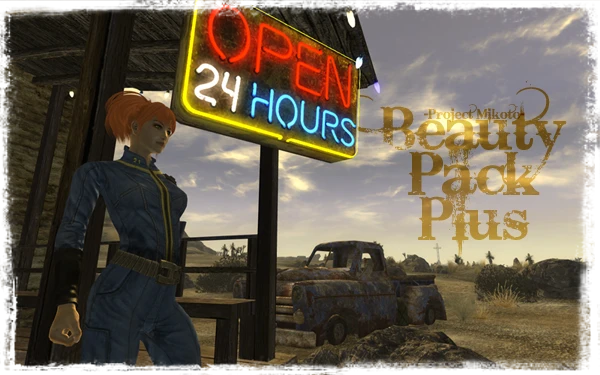
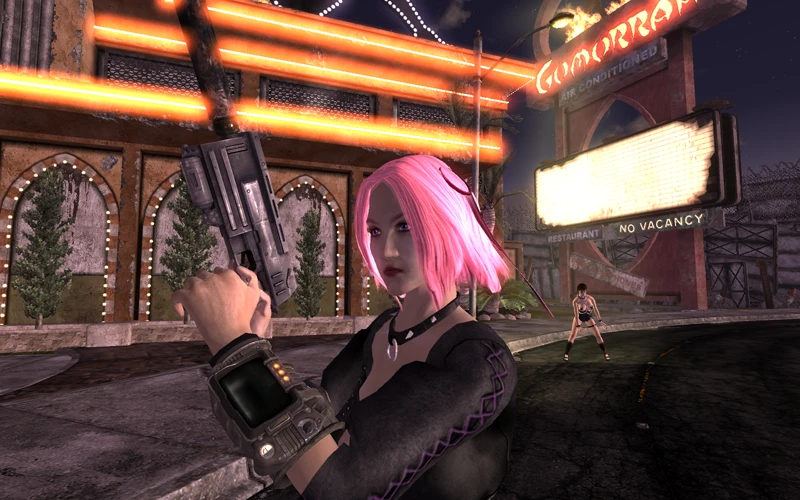
_-_-_-Beautifying the Wastes!-_-_-_-_ Adds: 151 Female Hairstyles, 70 Male Hairstyles, 25 Glowing Eyes, and 131 Eye Textures
Mikoto's Beauty Pack is bringing some glamour back to the wasteland.
If you like this mod, please endorse it. If you encounter bugs, please submit a bug report in the discussions.
Now Available in Spanish!
http://newvegasnexus.com/downloads/file.php?id=43337
What You Get
Mikoto's Beauty Pack includes one of the largest hair selections in Fallout, along with functional eyelashes and a variety of new, improved eye textures to choose from.
TOTALS
151 Female Hairstyles
70 Male Hairstyles
131 Eyes
25 Glowing Eyes (Custom Races)
Author's Note
I couldn't secure funding for my walk, so it's on hold until I can finance it myself.
Optional Add-ons
Complementing the Beauty Pack are several side projects aimed at further enhancing your wasteland experience.
Mikoto's BP Waster Overhaul
http://www.newvegasnexus.com/downloads/file.php?id=36327
The Waster's Overhaul adds hair and eyes from Mikoto's Beauty Pack to wasteland residents.
Mikoto's Armorer
http://www.newvegasnexus.com/downloads/file.php?id=36618
The armorer is a new shop in Fallout: New Vegas, featuring a collection of various armor packs from Fallout 3.
Mikoto's Wood Elf Race
http://www.newvegasnexus.com/downloads/file.php?id=37155
Adds playable Wood Elf race.
Mikoto's Unequippable Companions
http://www.newvegasnexus.com/downloads/file.php?id=36220
De-Equipable companions let you remove base companion gear, opening up a wide range of new fashion options.
Mikoto's BP Companions
http://www.newvegasnexus.com/downloads/file.php?id=36217
Companion's Companion is a compilation of companion visual overhauls.
Mikoto's BP CC Boone
http://www.newvegasnexus.com/downloads/file.php?id=36216
Mikoto's BP CC Rose of Cassidy
http://www.newvegasnexus.com/downloads/file.php?id=36222
Mikoto's BP CC Veronica
http://www.newvegasnexus.com/downloads/file.php?id=36226
Mikoto's BP CC Arcade
http://www.newvegasnexus.com/downloads/file.php?id=36224
Mikoto's BP CC individual packs let you choose to replace only certain companions with visual overhauls.
Installation
Please note that this mod is not compatible with any mod that alters races. This includes other beauty packs or similar files.
To install:
If you are having trouble, use WinRAR
-Download RAR from any one of the mirrors on the (Mirror) tab.
-Extract to your data directory
-Enable ESP and ESM
To uninstall, simply delete both the .esp and .bsa files.
Load Order
FalloutNV.esm
All Other.esm
Other -Project Mikoto-.esm
MikotoBeauty.esm
All Other.esp
Other -Project Mikoto-.esp
MikotoBeauty.esp
Troubleshooting
"I Can't See Any New Hair"
1) First check to see that both esm and esp are enabled.
2) Check your load order. The general load order should be: FalloutNV.esm -> Other ESM -> MikotoBeauty.esm -> Other ESP -> MikotoBeauty.esp
3) If you still don’t see any changes, try disabling all other mods to test for conflicts. The most likely reason the mod doesn’t show up when enabled is a conflict with another race-altering mod. This includes rationalization mods, though placing the Mikoto ESP after the regional ESP should resolve the issue.
"Hair Is Showing Bald Spots"
Every hairstyle in this pack will conform and move with the head shape when the sliders are adjusted. Most of the included hairstyles were not originally made for Fallout’s head meshes. If you notice small bald spots, please report them in the discussions or bug reports section, including the hairstyle name, gender, race, other active mods, and screenshots of the issue. However, if you see very large bald spots on multiple hairstyles, check the following. [NOTE: FOMM will unpack the BSA if used to install the mod. Only install manually. I will make v4.7+ FOMM compatible if possible.]
Check to make sure that the MikotoBeauty - Assets.bsa is in the data folder.
2) Check the Data/Meshes/Characters/Hair folder. This folder should NOT exist. If it does, delete it and re-test in game. (See "A Note on .BSA" below for more info.)
3) Report in the discussions/bug reports section, including the hairstyle name, gender, race, any other active mods, and screenshots of the issue.
"I'm Seeing Purple Hair / Eyes"
or "I'm Seeing Red Exclamation Marks"
Both errors are caused by missing resource files. Solid purple means a missing texture, while the red exclamation mark means a missing mesh.
I'm a professional game localization translator. Automatically identify the source language and translate the following text into **English**. Requirements: - Output must be **only in English**, with no mixing of other languages - Fit the game context (UI, dialogue, quests, system text, etc.) - Sound natural and match player expectations—avoid literal translations - Do not add explanations or notes Text: 1) If you are getting a lot of these errors, check to make sure that the MikotoBeauty - Assets.bsa is in the data folder, and that both the .esm and .esp files are enabled. If all three conditions are met, redownload the mod and replace the files—they are likely corrupted. If you are only getting a few errors or a single one Skip this step.
2) Report the issue on the Discussions/Bug Reports tab. These issues should not be caused by conflicts or unpacked / overlapping resources. They either mean the resources are missing or corrupted.
A Note on .BSA
There has been a major bug in Fallout NV that directly affects the use of custom hairstyles. In Fallout 3, you could keep all your meshes loose in the data directory, but this is not an option in Fallout NV. For some reason, .nif files won't interact properly with .esm files when running loose. This causes two separate issues: hairstyles not fitting correctly and failing to morph with heads, and the head becoming bald when a helmet is worn. So for those looking to unpack the .bsa files, it seems it can't be done properly with Fallout NV. That said, .bsa files do make installing and uninstalling mods much simpler.
Credits
Ashara's Hair Conversions
Thanks to SydneyB for use of converted fallout hairs.
**Soya Hair**
Thanks to Soya for use of Oblivion Hair Pack
Comprehensive Style Collection
Thanks to Room207 for hair usage (Comprehensive Style Collection)
Fallout 3 Hairpack
Thanks to Yoshikinakota for his Fallout 3 hair pack.
Thanks to Ren, idkrrr, Kozaburo (http://digitalbabes2.com), and other masters for the models and textures.
Thanks to Zacam1369 for all the English names of haircuts and fixes.
Thank developers NifTools, 3D Max, and Windows :)
Oblivion Corean Mod
Corean mod - made by idkrrr-
Thanks to Bethesda Softworks.
Thanks to My Hero 'Ren'
(This mod originated from Mystic Elf, with many of its files based on it.)
I learned a lot from her blog. And if it weren't for the Mystic Elf, there would be no Corean either.
Thanks to Corean mod tester 'chris(sscss2)'
Thanks to My Family (Elder Scrolls Naver Cafe: http://cafe.naver.com/elderscrolls7.cafe)
Oblivion Saram
Thanks to idkrrr for models and textures
Oblivion Sulwah
Thanks to idkrrr for models and textures
2ch Hair Explosion
Thanks to Bethesda Softworks.
Thanks to Capucine for the help with making colorable hair.
Thanks to Daeger and Ranma-chan for fixing the texture paths of meshes.
All of the meshes and textures are made by Ren.
HS-Hair2.0
Models & Textures: HISSSA
Better Hair Alpha
Author: BlueMax
RAN's Hair
Author: RAN46
Ren for hair textures
HISSSSA for hair textures
Yukisuke Tennoji’s Guide to Crafting
Kafei's Short Hairstyle Improved
Author:
Thanks to:
- KafeiDotour
- The NifTools developers
- The Blender team
- Bethesda Studios
**Timeslip (for OMM)**
- Scanti (for Conformulator)
- The entire Oblivion modding community!
Head and Hair Resources
Models & Textures: Robert2
FFVII Cloud's Haircut
Meshes & Textures: Renzeekin
Blindfold Bangs
Meshes & Textures: Montbello Knight
**Braided Redguard Hair for Fallout 3**
Thanks to Bethesda for creating Fallout 3.
Thanks to Kafeid for Braided Redguard Hair.
Thanks to Ghogiel for his great help.
Thanks to InsanitySorrow for the ReadMe Generator this readme is based on.
Braided Rearguard Hair
Models & Textures: Kafeid
tkHairPack
Models & Textures: throttlekitty
VB Hair
Ren
Vanilla Beans
Babe Hair
Models & Textures: Babe
Tribute to Final Fantasy
Models & Textures: MeguRyel
Lop-eared Elf
Working Eyelashes Author(s): Throttlekitty, Jclyde6108
(http://www.tesnexus.com/downloads/file.php?id=17323)
mmouthargonian.egm/nif/tri/DDS Author: Scanti
RenHair Author: Ren
x1.17 Race Author: uzk
x1.17 Race Added - Hair by Ringo
Eyelash New Vegas
Models and FaceGen by throttlekitty, based on jclyde6108's original model.
Special thanks to Scanti and NifTools, who created the tools I use.
Texture by Luchaire.
Ashara's Character Presets
Thanks to Bethesda for creating Fallout 3.
Thanks to Dimon for the Type 3 body.
Thanks to LHammonds for the Readme Generator this file was based on: http://lhammonds.game-host.org/obmm/tools_readme_generator1.asp.
Thanks to Fallout3Nexus.com for being a one-stop resource for authors and players.
Thanks to all the modding community for their tutorials, tools, and support. Special thanks to the Clan Dlan and TesEyeCandy communities.
GlowingEyes Resource
Models: Kikaimegami
Sparkling Eyes
Textures: AntoniusMaximus
Cernasite Oracle Eyes
Textures: Cernasite
Cernasite Dragon Eyes
Textures: Cernasite
Ethereal: Eyes Universal Edition
Textures: DagothBalls
Beauty Pack PLUS Original Eyes
All other eye textures done by Matteius.
All ESP work by Matteius.
If you like this mod, please endorse it. If you encounter bugs, please submit a bug report in the discussions.
Now Available in Spanish!
http://newvegasnexus.com/downloads/file.php?id=43337
What You Get
Mikoto's Beauty Pack includes one of the largest hair selections in Fallout, along with functional eyelashes and a variety of new, improved eye textures to choose from.
TOTALS
151 Female Hairstyles
70 Male Hairstyles
131 Eyes
25 Glowing Eyes (Custom Races)
Author's Note
I couldn't secure funding for my walk, so it's on hold until I can finance it myself.
Optional Add-ons
Complementing the Beauty Pack are several side projects aimed at further enhancing your wasteland experience.
Mikoto's BP Waster Overhaul
http://www.newvegasnexus.com/downloads/file.php?id=36327
The Waster's Overhaul adds hair and eyes from Mikoto's Beauty Pack to wasteland residents.
Mikoto's Armorer
http://www.newvegasnexus.com/downloads/file.php?id=36618
The armorer is a new shop in Fallout: New Vegas, featuring a collection of various armor packs from Fallout 3.
Mikoto's Wood Elf Race
http://www.newvegasnexus.com/downloads/file.php?id=37155
Adds playable Wood Elf race.
Mikoto's Unequippable Companions
http://www.newvegasnexus.com/downloads/file.php?id=36220
De-Equipable companions let you remove base companion gear, opening up a wide range of new fashion options.
Mikoto's BP Companions
http://www.newvegasnexus.com/downloads/file.php?id=36217
Companion's Companion is a compilation of companion visual overhauls.
Mikoto's BP CC Boone
http://www.newvegasnexus.com/downloads/file.php?id=36216
Mikoto's BP CC Rose of Cassidy
http://www.newvegasnexus.com/downloads/file.php?id=36222
Mikoto's BP CC Veronica
http://www.newvegasnexus.com/downloads/file.php?id=36226
Mikoto's BP CC Arcade
http://www.newvegasnexus.com/downloads/file.php?id=36224
Mikoto's BP CC individual packs let you choose to replace only certain companions with visual overhauls.
Installation
Please note that this mod is not compatible with any mod that alters races. This includes other beauty packs or similar files.
To install:
If you are having trouble, use WinRAR
-Download RAR from any one of the mirrors on the (Mirror) tab.
-Extract to your data directory
-Enable ESP and ESM
To uninstall, simply delete both the .esp and .bsa files.
Load Order
FalloutNV.esm
All Other.esm
Other -Project Mikoto-.esm
MikotoBeauty.esm
All Other.esp
Other -Project Mikoto-.esp
MikotoBeauty.esp
Troubleshooting
"I Can't See Any New Hair"
1) First check to see that both esm and esp are enabled.
2) Check your load order. The general load order should be: FalloutNV.esm -> Other ESM -> MikotoBeauty.esm -> Other ESP -> MikotoBeauty.esp
3) If you still don’t see any changes, try disabling all other mods to test for conflicts. The most likely reason the mod doesn’t show up when enabled is a conflict with another race-altering mod. This includes rationalization mods, though placing the Mikoto ESP after the regional ESP should resolve the issue.
"Hair Is Showing Bald Spots"
Every hairstyle in this pack will conform and move with the head shape when the sliders are adjusted. Most of the included hairstyles were not originally made for Fallout’s head meshes. If you notice small bald spots, please report them in the discussions or bug reports section, including the hairstyle name, gender, race, other active mods, and screenshots of the issue. However, if you see very large bald spots on multiple hairstyles, check the following. [NOTE: FOMM will unpack the BSA if used to install the mod. Only install manually. I will make v4.7+ FOMM compatible if possible.]
Check to make sure that the MikotoBeauty - Assets.bsa is in the data folder.
2) Check the Data/Meshes/Characters/Hair folder. This folder should NOT exist. If it does, delete it and re-test in game. (See "A Note on .BSA" below for more info.)
3) Report in the discussions/bug reports section, including the hairstyle name, gender, race, any other active mods, and screenshots of the issue.
"I'm Seeing Purple Hair / Eyes"
or "I'm Seeing Red Exclamation Marks"
Both errors are caused by missing resource files. Solid purple means a missing texture, while the red exclamation mark means a missing mesh.
I'm a professional game localization translator. Automatically identify the source language and translate the following text into **English**. Requirements: - Output must be **only in English**, with no mixing of other languages - Fit the game context (UI, dialogue, quests, system text, etc.) - Sound natural and match player expectations—avoid literal translations - Do not add explanations or notes Text: 1) If you are getting a lot of these errors, check to make sure that the MikotoBeauty - Assets.bsa is in the data folder, and that both the .esm and .esp files are enabled. If all three conditions are met, redownload the mod and replace the files—they are likely corrupted. If you are only getting a few errors or a single one Skip this step.
2) Report the issue on the Discussions/Bug Reports tab. These issues should not be caused by conflicts or unpacked / overlapping resources. They either mean the resources are missing or corrupted.
A Note on .BSA
There has been a major bug in Fallout NV that directly affects the use of custom hairstyles. In Fallout 3, you could keep all your meshes loose in the data directory, but this is not an option in Fallout NV. For some reason, .nif files won't interact properly with .esm files when running loose. This causes two separate issues: hairstyles not fitting correctly and failing to morph with heads, and the head becoming bald when a helmet is worn. So for those looking to unpack the .bsa files, it seems it can't be done properly with Fallout NV. That said, .bsa files do make installing and uninstalling mods much simpler.
Credits
Ashara's Hair Conversions
Thanks to SydneyB for use of converted fallout hairs.
**Soya Hair**
Thanks to Soya for use of Oblivion Hair Pack
Comprehensive Style Collection
Thanks to Room207 for hair usage (Comprehensive Style Collection)
Fallout 3 Hairpack
Thanks to Yoshikinakota for his Fallout 3 hair pack.
Thanks to Ren, idkrrr, Kozaburo (http://digitalbabes2.com), and other masters for the models and textures.
Thanks to Zacam1369 for all the English names of haircuts and fixes.
Thank developers NifTools, 3D Max, and Windows :)
Oblivion Corean Mod
Corean mod - made by idkrrr-
Thanks to Bethesda Softworks.
Thanks to My Hero 'Ren'
(This mod originated from Mystic Elf, with many of its files based on it.)
I learned a lot from her blog. And if it weren't for the Mystic Elf, there would be no Corean either.
Thanks to Corean mod tester 'chris(sscss2)'
Thanks to My Family (Elder Scrolls Naver Cafe: http://cafe.naver.com/elderscrolls7.cafe)
Oblivion Saram
Thanks to idkrrr for models and textures
Oblivion Sulwah
Thanks to idkrrr for models and textures
2ch Hair Explosion
Thanks to Bethesda Softworks.
Thanks to Capucine for the help with making colorable hair.
Thanks to Daeger and Ranma-chan for fixing the texture paths of meshes.
All of the meshes and textures are made by Ren.
HS-Hair2.0
Models & Textures: HISSSA
Better Hair Alpha
Author: BlueMax
RAN's Hair
Author: RAN46
Ren for hair textures
HISSSSA for hair textures
Yukisuke Tennoji’s Guide to Crafting
Kafei's Short Hairstyle Improved
Author:
Thanks to:
- KafeiDotour
- The NifTools developers
- The Blender team
- Bethesda Studios
**Timeslip (for OMM)**
- Scanti (for Conformulator)
- The entire Oblivion modding community!
Head and Hair Resources
Models & Textures: Robert2
FFVII Cloud's Haircut
Meshes & Textures: Renzeekin
Blindfold Bangs
Meshes & Textures: Montbello Knight
**Braided Redguard Hair for Fallout 3**
Thanks to Bethesda for creating Fallout 3.
Thanks to Kafeid for Braided Redguard Hair.
Thanks to Ghogiel for his great help.
Thanks to InsanitySorrow for the ReadMe Generator this readme is based on.
Braided Rearguard Hair
Models & Textures: Kafeid
tkHairPack
Models & Textures: throttlekitty
VB Hair
Ren
Vanilla Beans
Babe Hair
Models & Textures: Babe
Tribute to Final Fantasy
Models & Textures: MeguRyel
Lop-eared Elf
Working Eyelashes Author(s): Throttlekitty, Jclyde6108
(http://www.tesnexus.com/downloads/file.php?id=17323)
mmouthargonian.egm/nif/tri/DDS Author: Scanti
RenHair Author: Ren
x1.17 Race Author: uzk
x1.17 Race Added - Hair by Ringo
Eyelash New Vegas
Models and FaceGen by throttlekitty, based on jclyde6108's original model.
Special thanks to Scanti and NifTools, who created the tools I use.
Texture by Luchaire.
Ashara's Character Presets
Thanks to Bethesda for creating Fallout 3.
Thanks to Dimon for the Type 3 body.
Thanks to LHammonds for the Readme Generator this file was based on: http://lhammonds.game-host.org/obmm/tools_readme_generator1.asp.
Thanks to Fallout3Nexus.com for being a one-stop resource for authors and players.
Thanks to all the modding community for their tutorials, tools, and support. Special thanks to the Clan Dlan and TesEyeCandy communities.
GlowingEyes Resource
Models: Kikaimegami
Sparkling Eyes
Textures: AntoniusMaximus
Cernasite Oracle Eyes
Textures: Cernasite
Cernasite Dragon Eyes
Textures: Cernasite
Ethereal: Eyes Universal Edition
Textures: DagothBalls
Beauty Pack PLUS Original Eyes
All other eye textures done by Matteius.
All ESP work by Matteius.
This tool is provided by the third party [bufftool]

Download Mods For Free
Install LagoFast, start Fallout: New Vegas and play with the mods you love.
We use cookies to make interactions with our websites andservices easy and meaningful. For more information aboutthe cookies we use or to find out how you can disable cookies, click here.