lStewieAl's Tweaks and Engine Fixes
Autor:lStewieAlLast updated:04/07/2026 10:46:584.4M5.6MB

Pre-dependencies

Mod Introduction
Engine bug fixes, optional tweaks, and new features with no performance impact. Fully customizable via in-game menu and INIs. Adds support for inventory searching, cookable grenades, manual reload, smooth aiming, WASD menu navigation, and more.

An engine-level collection of Quality-of-Life improvements in one file with INI settings to enable tweaks.
Fully compatible with and recommended for Tale of Two Wastelands and The Frontier.
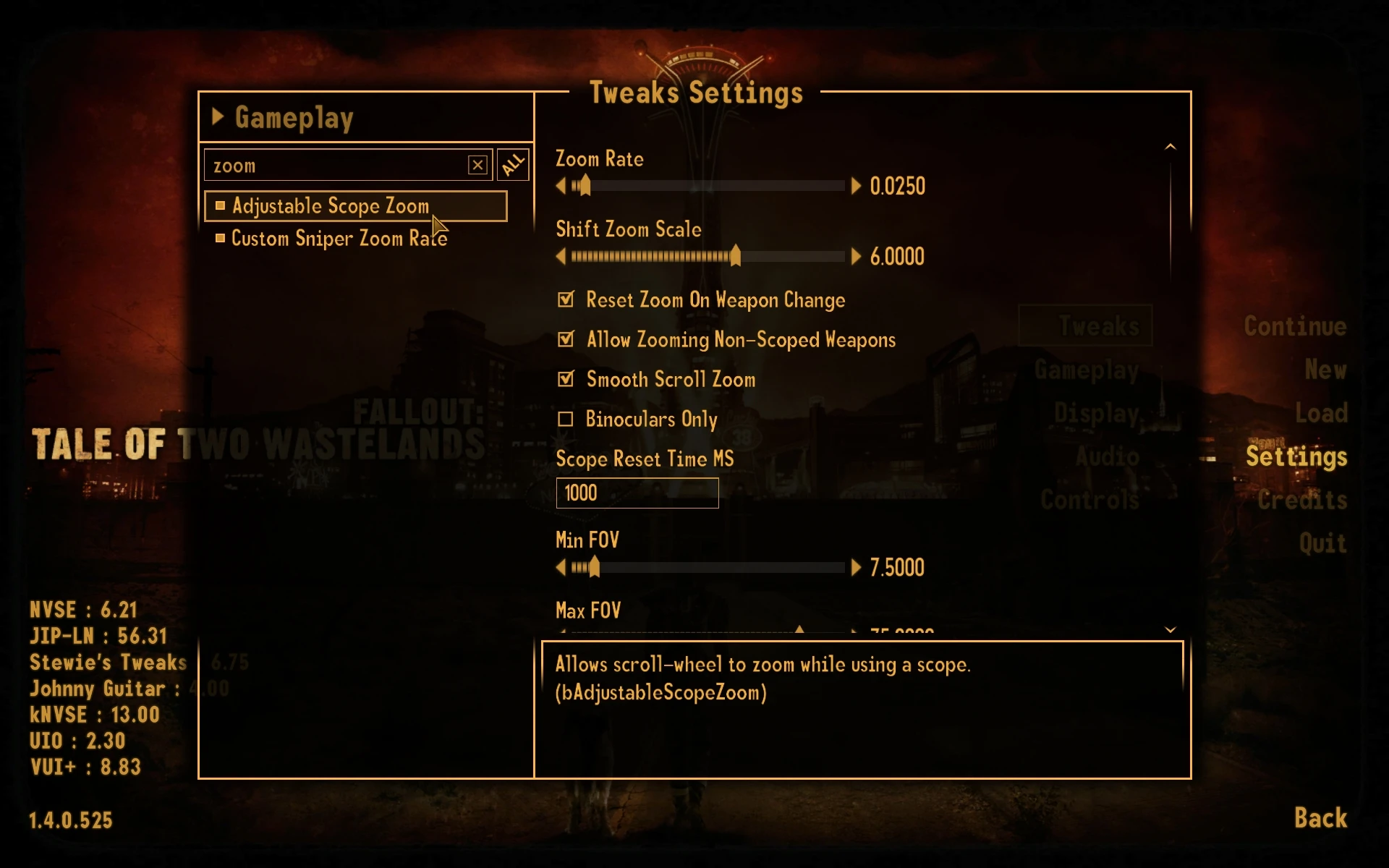
All features are optional and disabled by default. and can be configured via Pause > Settings > Tweaks (changes take effect after restarting the game). Launching the game generates the nvse_stewie_tweaks.ini file (available in the optional downloads section). As an alternative to the in-game menu, tweaks can be enabled by changing the relevant line under the [Tweaks] section from ‘= 0’ to ‘= 1’. For hotkey options, set the value under [Hotkeys] to the desired key .
It is safe to install, configure, update, or uninstall mid-playthrough (a new save is **not** required).
When updating, the mod's INI will automatically populate with any new settings after launching the game — no need to reconfigure your settings.
**New in 9.50+**
For a full changelog, see here .
Quality of Life
2 Hotkey Restored - Replaces the 'Ammo Swap' icon with a functional weapon slot '2' (rebinding the Ammo Swap key may be required).
Activating While Seated Doesn't Stand Up - Prevents standing up when pressing 'Activate' without a reference selected while seated.
Aiming Unholsters Weapons - Aim to take out your weapon
Allow Activate While Animation Plays - Allow activating objects while firing, reloading, jumping, etc.
Allow Sleep Wait With Reduced Max Health - Allow sleeping while maximum health is temporarily reduced
Allow Weapon Hotkeys While Equipping - Use weapon hotkeys while switching weapons
Better AutoWalk - Moving left/right does not cancel auto-walk and adds backward movement support.
Better Pickup Prompt - Show the value and weight for a full stack of items while looting, and highlight the weight in red if it would overencumber you.
Billy Goat Mode (Climb Steeper Angles) - Allow adjusting of maximum walking/jumping/autowalk climbing angle.
Clicking Shows Remaining Terminal Note Page - Make clicking in terminals only skip to the next page if the current page is fully displayed.
Compass Rotates in Vanity Camera - Also rotate the compass while holding the POV button to look around.
Console Background - Add a background to the console
Console Output Text Shadow - Darken and add a faint shadow to console output text.
Decrease Dialogue And Start Menu Click Delay - Half the delay between clicking on menu items (500ms → 250ms)
Delay Post Combat Level Up - Add a 3-second delay after combat before the Level Up menu appears.
Delay Post-Combat Reputation Message Box - Add a 3-second delay after combat before the reputation change message appears.
Don't Save Duplicate Commands to Console History - Prevent duplicate consecutive commands from being saved in sent history.
Entering VATS does not unholster weapon - Allow entering VATS without unholstering your weapon
Extra Selected Console Ref Details - Include the name of the last mod that modified the selected console reference.
**Faster Save Menu Close** - Remove a hard-coded 3-second delay when saving via the save menu.
Faster Terminal Hacking Transition - Reduce the delay after a successful hack from 3 seconds to 0.5 seconds.
Faster Quest and Note Menu - Only redraw the menus when gaining new notes/quests
Godmode Prevents Landing Pain Sound - Prevent hit shader and landing sound when falling In God Mode
Hide Grenade Indicator If Explosion Deals No Damage - Hide the HUD grenade indicator for projectiles whose explosions deal no damage.
Improved Character Edit Menu - Right-click/Y to enable panning in character creation.
Improved Flycam Controls - add AutoMove. Use Jump and Crouch to fly up and down, press Z and C to rotate, and scroll the mouse wheel to change flight speed. Pressing Reload enables smooth camera movement.
Improved Hacking - Options to: prevent single character attempts (e.g., clicking "/" won't count as an attempt); prevent duplicate guesses; remove a dud instead of replenishing allowance if allowance is already full; suppress display of clicked characters in "Dud removed" and "Allowance replenished" messages; make dud removal ignore guessed words; print guesses on a single line instead (e.g., HORIZON (1/7)).
Include Plugin Name in Console Prints - [Modname.esp] added to script debug output
Keep Quest Text Visible While Aiming - Don't hide quest/location text when aiming
Keep Roulette Bet Amount - Don't reset the bet amount to 1 after playing roulette
Less Restrictive VATS Menu Exiting - Allow dequeuing actions or exiting VATS while zooming in/out
Level Up Menu Scrollwheel Support - Allow using the scrollwheel to increase or decrease skills in the Level Up Menu.
Lockpick Click To Rotate - Add left click to rotate during lockpicking
Lockpick Keyboard Controls - Add (Control/Shift) left+right to move the bobby pin, and tap to spin the screwdriver.
Lower Ambient Music Volume During Dialogue - Adjust the volume of background music during dialogue
Lower Radio Song Volume During Dialogue - Lower radio music volume when speaking to an NPC.
Marker Added - Include the cell name in the "Map marker added" popup.
Menu Numpad Support - Allow numpad for menus and console
More Responsive Controller Aiming - Improves controller look responsiveness.
Multithreaded Hacking Menu - Improve hacking menu speed by preloading words in the background when opening the menu.
**No Interior Black Post-Loading Screen** - Remove the hardcoded 1-second black screen after entering all interiors.
No Minimum Companion Map Distance - Remove the minimum distance for displaying a companion on the world map.
No PipBoy on Alt Tab - Stop the Pip-Boy from opening/closing when you Alt-Tab.
No Place Marker Popup - Don't show the "Place/Remove marker" popup when placing markers on the map.
No Poison Confirm - Remove the confirmation prompt when applying poison to a weapon.
No Screenshot Popup - Print "Screenshot Created" message to console instead of showing a popup.
Non-Selectable Player In Console - Prevent the player from being selected when clicking in the console (common with Enhanced Camera)
Pause Holotapes - Add ability to pause/reset a holotape
Persistent Console History - Store/restore sent console commands to a text file between sessions.
Prevent Gib Sound When Entering Cells - Prevent body part explosion sounds when entering cells
Queue Holster Weapons While Animations Play - Pressing the holster weapon key during animations will holster the weapon once they finish.
Radio Keeps Song Position When Loading Saves - Don't restart the current song when loading a save if the same song is playing.
Rebind 1/3-9 Hotkeys - Allow rebinding weapon hotkeys 1/3 and 4–9 in the settings menu.
Reloading With No Ammo Swaps Types - Swap ammo types on reload if current type has no rounds left
Remember Selected Console Ref - Remember the selected reference when closing the console
Save Pip-Boy Scroll Positions - Store the scroll height of each inventory page in the co-save.
Scope Visibility Delay - Delay visibility of scope overlay when zooming in, and optionally stop aiming while reloading.
Select Unavailable Radios - Allow selecting unavailable radios to use when back in range
Semi-Auto Queue - Queue the next shot for semi-automatic weapons if the trigger is pulled before the current shot is completed.
Show Currency in Misc Containers and Caps in Pip-Boy - Unhide faction currency in the Misc tab of containers, and Caps in the Pip-Boy.
Show Quest and Non DR/DT Items in Vendor Repair Menu - Unhide quest items and armors without DR/DT in the vendor repair menu
Show Unconscious Companions on Map - Show unconscious companions on local/world maps (in red)
Skip Continue Game Prompt - Skip the "Continue from your last saved game?" prompt when clicking Continue Game in the main menu.
Skip Deathcam Hotkey - Add hotkey 'left-alt' to instantly end the player deathcam
Skip Main Menu Loading Video - Automatically skip loading video when entering main menu.
Skip To Perk Screen If No Skill Points To Assign - Skip the skill point screen if all skills are already maxed out.
Slot Machine Continual Spin Hotkey - Add a hotkey 'W' to keep spinning the slot machine.
Sort Usable Ammo to Top - Sort equipable ammo to the top of the inventory
Unassign Hotkey - Allow removal of a hotkey from an item by selecting it again
Use Hip Fire Anims While Scoped - Use hip fire animations and recoil patterns while scoped to prevent weapons from lingering in your face when unscoping.
VATS Ignores Teammates - Stop VATS targeting companions
VATS Stop Following Dead Targets - Stop rotating to follow targets once they are dead
VATS Default Head Targeting - Target the head instead of the torso when entering VATS.
**Menu/HUD**
12 Hour PipBoy Clock - Show the time in 12-hour format on the Pip-Boy Map Menu.
24 Hour Sleep/Wait Clock - Show the time in 24-hour format in the Sleep/Wait menu.
Added To Inventory Message Uses Item Icon - Use item icon instead of 'present' icon when gaining items
Ammo Label Uses Long Name - Use longer ammo name on HUD
Armor Condition Label - Add an armor condition label to the HUD
AP and HP Visible While Using Scope - Show the AP and HP bars while using a scope.
Barter Quantity Menu Shows Value - Show value in the barter quantity menu.
Barter Show Caps Change - Show final caps after a transaction next to player/merchant caps.
Barter Show Total When Over Sell Limit - Show total barter value even if it exceeds the merchant's caps.
Better Map Zooming - Zoom in at cursor position on map menu
Blackjack Total Display - Show your hand values in Blackjack
CAPITALIZE RECIPE MENU CATEGORIES - SHOW RECIPE MENU CATEGORIES IN FULL CAPS
Changing Cells Shows Quest Reminders - Show quest objectives when changing zones
Scrolls to Top When Changing Container Category - Scroll to top when switching container or barter categories
Clicking the current Pip-Boy tab sorts/filters inventory. - Clicking the current Pip-Boy tab sorts/filters the inventory.
Color New Map Markers - Color newly added map markers in red (until save is reloaded)
Color Weapon Low Condition Label - Allow coloring the weapon low condition label
Colored HUD Bars - Color the HP and AP bars red when they are low.
Companions Use Location Font on Map - Make companions use the same font as locations on the map.
Compare Armor Stats - Add - or + next to armor DT and DR in inventories compared to currently equipped armor.
Weapon Stats Comparison - Compare weapon damage and DPS in inventory with a + or - next to values.
Compass Always Points to Nearest New Location - Always show nearest undiscovered location on compass or map
Compass Left Side Fade - fade icons for NPCs, doors, etc. on the left side of the compass (works best with a centered compass)
Container Encumbrance Indicator - Show container weight in red if the item stack would overencumber the player.
Container Quantity Menu Shows Weight - Show transfer weight in the quantity menu
Containers Show Equipped Ammo - Show an equipped square next to equipped ammo in containers/barter.
Critical Hit Messages Include Limb Name - Include the limb name in critical hit messages.
Custom Add To Inventory Message Timer - Customize how long the "Added to inventory" message is displayed.
Custom Companion HUD Color - Customize companion colors on the compass
Custom Max HUD NPC Compass Ticks - Allows a custom max number of compass ticks above the vanilla maximum of 10.
Custom Popup Icons - Add configurable icons to popup messages
MM.DD.YY Date Format - Use a custom date format in Sleep/Wait and Pip-Boy menus.
Dialog Number Hotkeys - Add hotkeys to press dialog options (pairs well with VUI+'s numbered topics setting)
Disable Compass Edge Alpha - Remove the hardcoded fade from NPCs, locations, and player-placed markers on the right side of the compass
Disable Grenade Indicator - Hide the nearby grenade indicator
Disable HUD Hotkey Wheel - Prevent the hotkey wheel from showing while holding a hotkey
Disable Hard-Coded Tutorial Messages - disable hard-coded One-time tutorial menu messages
Disable Hardcore/RADS Needs Messages - Prevent the "... increased" and "You are now sick with ..." messages. Toggle each individually.
Display Item Effect Totals - Show item effect totals in the Pip-Boy, e.g., HP +26 (3s) → HP +78 (26×3s)
Distance Based Compass Alpha - Scale the alpha of compass locations and NPCs based on distance from the player.
Distance Based Quest Marker Visibility - Hide the quest marker if it is farther than a certain distance from the player (separate value for interiors/exteriors).
Disable Quest Location Display - Disable "Show Location" button in the quests tab.
Don't Multiply Item Stats by Stack Size - Show the stats of a single item instead of the entire stack in inventories.
Drop Item Hotkey - Add a key 'Q' to drop items in the Pip-Boy.
Bold Tagged Skills in Stats Menu - **Show tagged skills in bold in the Stats menu**
Enemy Healthbar Shows Buffed HP - Show health modifiers on enemy health bars (e.g., Buffout)
Exploding Destructible Indicator - Show exploding cars on the HUD grenade indicator
Grey Read Terminal Notes - Gray out terminal entries after reading them
HUD Color Sliders - Add color sliders for the main HUD in the settings menu - Note DUI doesn't support the extra options
HUD Show Region Names - Show interior cell names or the nearest marker name in the HUD area text (the bottom-left 'Mojave Wasteland' text).
Hide Ammo Label - Hide ammo label from main HUD, optionally show total ammo.
Hide Cap Added Messages - Hide item added messages for caps
Hide Completed Quests - Hide Completed Quests in Pip-Boy
Hide Crosshair in First Person - Hide the crosshair while in first person
Hide Crosshair In Third Person - Hide crosshair in third person
Hide Crosshair In Killcams - Hides the crosshair during cinematic/player view killcams
Hide Crosshair While Reloading - Hide the vanilla crosshair while reloading
Hide Cursor in Dialog - Hide cursor during dialogue
Hide Cursor in Message Menu - Hide cursor in message popup windows
Hide Equipped Items in Trade/Containers - Do not show player-equipped items in the barter menu and containers.
Hide Exterior Load Screen Backgrounds - Remove the background image and tip text when switching cells (excluding loading a save).
Hide Food Worn Off Message - Prevent the "X has worn off" message for food items
Hide Healthbar In Killcams - Hide the health bar during killcams
Hide Hotkeyed Items in Barter/Containers - Hide items assigned to hotkey slots 1–8 when in barter/container menus.
Hide Hotkeyed Items in Repair Menu - Prevent repairing with hotkeyed items
Hide HUD Crippled Limb Indicator - Prevent the Vault Boy from appearing when you injure a limb.
Hide Loading Screen Tips - Hide loading screen tips
Hide Location Popup - Stop the "Location Discovered" text
Hide Main Menu Downloads Button - Remove the downloads button from the main menu.
Hide Map Marker Added Popup - Remove the "Map Marker Added" popup
Hide Map Marker Faction Reputation - Hide faction reputation on locations in the world map
Hide Misc Quest Items - Hide quest items in the Misc tab of the Pip-Boy
Hide No Fast Travel Undiscovered Message - Prevent the "sNoFastTravelUndiscovered" message when clicking an undiscovered map marker.
Hide Pip Boy Quest Item Weight and Value - Hide the weight and value of quest items and keys in the Pip-Boy.
Hide Quest Failed Popup - Hide quest failed text (optional, only if quest was started)
Hide Quest Objective Text - Hide the quest added text when objectives are added, or when a save is loaded - optionally hide completed objectives.
Hide Ranks in Trait Description - Hide the 'Ranks' from trait descriptions in the Trait menu.
Hide Read Notes - Filter out read notes in the Pip-Boy
Hide Red Crosshair on Distant Invisible NPCs - Prevent red crosshair from appearing when mousing over distant invisible enemies
Hide Reputation Messages - Disable reputation gain/loss messages and popups (optionally hide them only if already at min/max reputation)
Hide Reputation Tab If Empty - Hide the reputation tab in the stats menu if no factions have been encountered.
Hide Skill Tags - Hide [Speech] tags in dialogue, and [FAILED] and [SUCCESS] in responses.
Hide Unavailable Radios - Don't show unavailable radio stations in the Pip-Boy radio tab
Hide Unconscious Message - Remove the "... is now unconscious" message when an actor is knocked out.
Hide Unmarked Compass Locations - Show unvisited locations on the compass only if marked on the map.
Hide Unspoken NPC Names - Hide NPC names from HUD if they haven't spoken to the player.
Hostiles Use Neutral Color On Compass - Make hostiles the same color as friendlies on the compass.
HUD Marker Name Indicator - Show the name of the nearest location marker you are facing on the compass.
HUD Weapon Name Label - Briefly show the current weapon name when a weapon is equipped
Invert PipBoy Repair Condition Sorting - Sort low condition items to the top of the Pip-Boy repairs list.
Item Repair List Preview - Holding ALT while opening the repair menu now shows which weapons/armors can repair the hovered item.
Keep Crosshair When Aiming - Keep the crosshair visible when aiming with non-scoped weapons
**Living Anatomy Shows DR** - Show the target's damage resistance. Remove unnecessary decimal places for DT, and hide DR/DT if the target has none.
Local Map Separate Interior/Exterior Door Icon - Use a separate icon for local map doors that lead outside.
Location Discovered - Show the location discovered text as a corner message
Lockpick/Hacking Requirement Message Shows Current Skill Level - Show current skill level in skill requirement messages
Main Menu Continue Save Icon - Show the save image when hovering over 'Continue' on the main menu.
Map Marker Reputation Displays Faction Name - Show (Faction name - reputation) when hovering over a location (e.g., NCR - Neutral).
Map Markers Show Distance - Show the distance to the hovered location marker on the map.
Map Recenter Hotkey - Y Button or R Key centers on Player; Enter centers on Menu Search location.
Map Remembers Position - Remember the last viewed position in the Map Menu
Menu Alternate Ammo Type Indicator - Show a + next to inventory ammo count if you have alternate ammo.
Menu Hide Weightless/Sort By Weight Button - Add a UI element to the Pip-Boy, Inventory, and Barter menus to toggle the visibility of weightless items or sort by weight.
Menu Key Repeat Acceleration - Hold key briefly to scroll faster
More Detailed Stats Menu - Show value modifier amount as (+) and (-) for skills/SPECIAL, and display them above the min/max values.
More Precise Rad Meter - Show decimal places on the radiation meter
Move Ammo Type Label - Move the ammo type label below the ammo count.
No Capitalized Container Categories - Don't capitalize the container category titles (Aid, Weapons, Armor, etc.)
No Cripple/Critical Messages - Disable messages when crippling or critically hitting an NPC
No Karma Messages - Disable good/bad karma messages and sounds, or stop bad karma sounds from repeating within a set interval.
No Red Crosshair on Enemies - Stop the crosshair from turning red when aiming at an enemy.
No XP Popup - Hide the XP bar and sound
Pip-Boy Challenge Icons - 使用挑战图标在PipBoy挑战菜单中
PipBoy Displays Weapon Poison Effects - Show melee weapon poison effects when viewing weapons in the Pip-Boy.
Player Placed Marker Height Indicator - Show whether the player's placed map marker is above or below them.
Power Armor Blocks Screen Blood - Prevent screen blood effects when hit while in power armor.
Quantity Menu Respects Companion Carry Limit - Limit the maximum quantity when transferring items that would overburden a companion.
Quest Compass Height Indicator - Indicate whether a quest marker is above or below the player on the compass.
Quest Text Visible in Menus - Make quest update text visible in the Pip-Boy and Hacking menus.
Recurring Challenge Indicator - Show (Recurring) beside the progress indicator for recurring challenges.
Remove Sneak Label - Remove the [HIDDEN] label, etc.
Remove Queued Cripple/Critical Messages For Dead NPCs - Remove 'Critical Hit'/'Crippled Limb' corner messages when the target dies.
Repair All Confirmation - Add a confirmation when repairing all items
Replace Pause Menu Help Button With Console - Replace the 'Help' button in the pause menu with a console button.
Reputation Shows Fame/Infamy - Show fame and infamy in the reputation menu
Right Click Switches to Previous Container Category - Make right-clicking the title cycle to the previous category in containers/barter/recipe
Right-click marks notes as unread - Right-click to mark a note as unread
Save Character Selector - Add a character name selector to the Save/Load menu for switching between playthroughs.
Show Active Quest Notes — Shows All Started Quests - Show notes for all started, non-completed quests instead of just the current quest.
Show Book Effects - Show "Permanent {{Skill}} +n" in the Effects tab for books in the inventory.
Show Caravan Cards in Misc Tabs - Show caravan cards in the Misc tab for containers and barter.
Show Mod Name In Perk Descriptions - Show the source mod of perks in the perk menu.
Show Note Menu in PipBoy - Show the Scroll menu when opening notes from the Pip-Boy.
Show Sneak Label While Standing - Show the [HIDDEN] etc. label while standing.
Show [Use Password] On Terminals With Password Note - Show [Use Password] if the password has been collected.
Show Weapon Ammo Use In Menus - Show ammo per shot when viewing a weapon in the inventory
Skip Load Game Confirmation Prompt - Skip load confirmation
Sleep Wait Slider Shows Wake Time - Show the wake time on the sleep/wait slider
Sort Level Up Perks - Sort the level-up perk menu alphabetically
Sort Misc Stats - Sort the misc stats page of the Stats Menu alphabetically.
Sort Pip-Boy Notes - Sort the PipBoy Notes tab alphabetically or move unread notes to the top.
Sort Pip-Boy Quests - Sort the Pip-Boy Quests tab alphabetically or by completion.
Sort Pip-Boy Repair Menu - sort the PipBoy repair menu
Sort Recipe Menu - Sort uncraftable recipes by whether you have the required skill.
Sort Repair Services Menu Alphabetically - Sort the RepairServicesMenu by Worn / Alphabetically / Condition
Start Menu Back Key - Press TAB to go back in the start/pause menu.
Stats Effects Menu Show Time Remaining - Show the time remaining beside temporary effects in the Stats Menu
Stats Menu Percentage XP - Show XP bar as percentage in Stats Menu
Subtitles Show Actor Names - Show actor name above their subtitles
Switch Controller/Mouse By Clicking/Pressing A - Press A / Click to switch between controller and keyboard input
Synchronize Container Categories - Make switching categories in containers/barter change both inventories
Terminal Exit Key - Pressing TAB exits the current terminal
Terminal Instant Display Hotkeys - Add hotkeys Shift + Right Mouse Button to instantly display the current terminal text.
Terminal Number Hotkeys - Add number hotkeys to select terminal entries
Timescale Affects Minigames - Make the SGTM command affect minigames
Unvisited Cell Indicator - Show a * in the door activation prompt for unvisited interior cells.
VATS AP Display Includes Reload Cost - Include the reload AP cost when queuing a VATS attack that will trigger a reload.
Water Sources Show H₂O - Show water source healing amount
Gameplay / Balance Features
Agility affects Movement Speed - Movement speed is affected by the Agility stat (applies to the player and all NPCs).
Auto-Unequip Broken Armor - Automatically unequip armor when broken (affects player and all NPCs)
Cap Skills by SPECIAL - Cap the max value for skills in the Levelup Menu based on SPECIAL stats
Charged Attacks Cost AP - Unarmed/Melee Power Attacks require Action Points
Contact Mines - Mines detonate instantly when stepped on
Custom Hacking Answer Length - Customize hacking word length, min/max, difficulty multiplier, and 'Computer Whiz' perk bonus.
Detected by Whom - Show the names of all actors detecting the player (excluding teammates)
Disarm Requires Weapon Skill - Add a chance for mines to not disarm or to instantly explode based on Explosion skill.
Drop Equipped Weapon Hotkey - Adds a hotkey to drop the equipped weapon.
Entering VATS costs AP - Require Action Points to enter VATS. Optionally, only allow VATS if you have enough AP to fire the weapon.
Fallout 76 Encumbrance - Allow running and jumping while over-encumbered, using action points.
Fast Travel Requires Nuka Cola - Make fast travel consume an Ice Cold Nuka or Nuka Quantum/Quartz/Victory.
Hold and Release Throwables - Allows clicking and holding throwable weapons before throwing them.
Instant End VATS Hotkey - Add hotkey for MenuMode (PipBoy key) to instantly exit a VATS killcam.
Jumping costs Action Points - Add an Action Points cost when jumping
Jump Swims Upward - Add jump/crouch to swim up/down
Kills Reward AP - Earn Action Points when killing outside of VATS
Combat XP Based on Level Difference - Make XP based on level difference between player and defeated enemy.
Map Selectable Companions - Click on the map to summon hired companions.
Mark Nearby Locations on Map - Permanently reveal locations on the Pip-Boy map when passing nearby
Move During VATS Playback - Allow movement during VATS killcams
No Healing Items During Combat - Prevent use of healing items during combat
NPCs Drop Live Grenades - Makes NPCs drop a live grenade if crippled or killed mid-throw.
NPCs Collect Ammo Casings - Allow NPCs to earn ammo casings
Partial Reloads - Use reload animations ending in _partial.kf when the player reloads with a non-empty magazine.
Pickpocket Overhaul - Modify the pickpocket formula to account for item weight, target perception, and detection. Optionally display success chance.
Power Armor Reduces Fall Damage - Add a multiplier to falling damage when a Power Armor torso is equipped (applies to all NPCs).
Prevent Reloading Without Empty Clip - Only allow reloading when the magazine is empty
Quick Use - Hold Shift and use the Crosshair item to equip it (Aid, Armors, and Weapons), or open the Book Menu when using notes (required). Book Menu Restored). Show item stats while shift is held (DAM/DPS for weapons, DT/DR for armors)
Remember Bobby Pin Health - Keep bobby pin damage between lockpick attempts
Repairs Reward XP - Repair items to earn XP
Revive Unconscious Companions - Use stimpaks to revive unconscious companions.
Robotic Companions Heal with Scrap Metal - Heal companions using scrap metal + Repair skill instead of Stimpaks + Medicine skill
Slower Movement in Water - Scale movement speed when wading through water depending on depth in water (thanks JazzIsParis)
Run While Aiming - Remove movement penalty while aiming.
Running Costs Action Points - Add an AP cost for running
Hold Breath (Scoped) - Decrease scope wobble in exchange for Action Points while Shift or Activate is held.
Show Doors on Compass - Show nearby teleport doors on the compass.
Slow Breath Regen - Slowly regenerate breath when not underwater (vanilla is instant)
Supported Power Armor - Make Power Armor weightless when worn
Unequip Weapon Mods - Allow unequipping weapon mods, hide duplicates from the mod menu, and return weapon mods when repairing with a modded weapon.
Use Weapon Repair Kits in the Repair Menu - Show repair kits in the weapon repair menu
Vendors Obey Their Buy/Sell Flags - Make vendors respect their Buy/Sell flags by hiding items they don’t accept.
Weapon Requirements Matter - Disallow equipping items without required Strength and weapon skill levels.
Misc Features
Adjustable Scope Zoom - Add scroll-wheel to zoom while aiming
Alternate Sighting Node Hotkey - Add a hotkey to switch to using ##SightingNode2 if the weapon has one.
Anim Debug Prints - Show which animations are active for the player in the console.
Anim Variants Support - Add support for reload/aim/equip/unequip animation variants
Auto-Read Notes - Automatically open the note menu when obtaining notes.
Change Radio Station Hotkeys - Add Next/Previous Radio Station Keys
Clear Nearby Player Marker - Remove player-placed marker when nearby
Combined Combat XP - Delay XP popups until the end of combat
Container Respawns Message - If the container is set to respawn, show a warning in the bottom bar.
Continue Game Hotkey - Add hotkey 'R' to load the last save from the Start Menu (for devs only)
Controller Cycles Weapon Hotkeys - Use left/right on the D-pad to cycle through weapon hotkeys.
Convert Screenshot Format - Automatically convert screenshots to JPG, TIFF, or PNG (Thanks) iranrmrf)
Dialog Menu Debugging - Show topic editor ID next to topics in the Dialog Menu.
Don't Open Doors After Lockpicking - Prevent doors from automatically opening after lockpicking
Double Tapping Reload Changes Ammo Type - Double tapping reload switches ammo types
Equip Last Weapon - Add a hotkey to equip the last weapon used.
Exit Game Hotkey - Add a hotkey to exit the game
Exit to Main Menu Hotkey - Add a hotkey to return to the main menu
Fire While Aiming In/Out - Allow firing weapons while aiming in/out
Fire While Landing - Allow firing weapons while lower body animations play
Heartbeat Sounds Fade - Fade heartbeat sounds shortly after taking damage
Hide HUD Key - Add a key to hide the compass, HP, ammo, and AP.
Hold to Activate - Hold the activation key to use crafting stations, containers, furniture, terminals, water sources, or steal items.
Holster Weapon Key - Replace 'hold reload to holster' with a hotkey - not compatible with controllers
HUD Fatigue Indicator - Add a fatigue indicator similar to the H20, FOD, and SLP indicators from hardcore mode.
Interior Fog Remover - Remove non-static fog from interiors
Local Map Respawned Cell Indicator - Show respawned cells in red and visited cells in white on the local map.
Mousewheel Scrolls Weapon Hotkeys - Cycle through hotkeyed weapons using the mousewheel
No Lockpick Activate - Prevent container menu from appearing after unlocking with lockpick or key.
Numbered Dialog Topics - Add the index to the beginning of dialogue choices in conversations.
Pause on Load Game - Automatically pause the game when a save is loaded.
Per Bullet Looping Reload - Require pressing reload N times to load N rounds for looping reload weapons.
Unlock doors and hack terminals using keys or passwords - Holding Shift lets you pick locks or hack terminals even if you already have the key or password.
PipBoy Local Map Hotkey - Add a hotkey to open the local map
Pip-Boy Map Hotkey - Add a hotkey to open the Pip-Boy Map
Pip-Boy Quest Hotkey - Add a hotkey to open the Pip-Boy quests tab.
Pip-Boy Radio Hotkey - Add a hotkey to open the Pip-Boy radio tab
Place Map Marker at Player Position Hotkey - Adds a hotkey to place a map marker at your current position.
Print Vanilla Errors To Console - Leave debug logging enabled in the game
Radiation Causes Radio Static - Add static to the Pip-Boy radio when in an irradiated area.
Radio Volume Up/Down Keys - Add hotkeys to adjust Pip-Boy radio volume outside of menus.
Randomize Killcam Mode - Randomly alternate between player view and cinematic killcams
Recently Dead Unlooted NPC Indicator - Shows recently killed NPCs on the compass until moused over.
Reloading with Full Clip Changes Ammo Type - Switch ammo types when reloading with a full magazine
Save Hotkeys - Add hotkeys for full save, quick save, and reload current save.
Separate Horizontal Sensitivity - Add a slider for horizontal sensitivity in the controls menu.
Shift Screenshot Hides Menus - Taking a screenshot while holding Shift hides the menus.
Skip Radio Track/Topic Key - Add a key to skip the current radio track
Smooth Camera Hotkey - Adds a hotkey to toggle cinematic/smooth camera.
Spam Activate Key - Add a hotkey to repeatedly press the use key
Stealing Sends No Alarm - Don't alert NPCs when stealing their items (excludes pickpocketing)
Talk While Sneaking If Shift Held - Allow talking while sneaking (hold Shift)
Toggle First Person When Drawing Weapon - Toggle first-person view when aiming a weapon, and third-person view when holstered.
Toggle Collision Key - Add a key to disable collision while held
Toggle Crosshair Key - Add a hotkey to toggle crosshair visibility.
Toggle Menus Hotkey - Assign a hotkey to the ToggleMenus command.
Toggle Pip-Boy Light Key - Add a configurable key to toggle the Pip-Boy light.
Toggle Sneak Indicator Hotkey - Add a hotkey to hide the stealth indicator
Toggle True Iron Sights Hotkey - Add a hotkey to toggle True Iron Sights
Toggle-able Scope Night Vision - Pressing the Toggle Pip-Boy Light key while aiming with a night vision weapon turns off the night vision effect.
Slower Turn While Aiming - Add a configurable scale to aim sensitivity.
Use Keyboard/Mouse in Game Mode While Controller Is Connected - Allow keyboard and mouse while controller is connected (excludes menus)
Using Keys Rewards XP - Gain XP when using keys on doors
Wear Power Armor Without Training - Allow wearing power armor without the Power Armor Training perk
Gameplay / Balance Adjustments
Agility Affects Jump Height - Jump higher based on Agility
Allow Entering VATS While Animations Play - Allow entering VATS while reloading, landing, firing, etc.
Allow Exploding Unplayable Explosives - Allow fragging NPC equipped weapons marked as unplayable, such as Dead Money's Gas Bombs.
Allow Opening PipBoy While Camera Shakes - Allow opening the PipBoy while the screen is shaking
Allow Pickpocket If Already Caught - Allow pickpocketing even if the NPC has already caught you
Allow Unsafe Fast Travel - Remove restrictions on fast traveling from interiors (you will need to be careful not to break scripted encounters)
An engine-level collection of Quality-of-Life improvements in one file with INI settings to enable tweaks.
Fully compatible with and recommended for Tale of Two Wastelands and The Frontier.
All features are optional and disabled by default. and can be configured via Pause > Settings > Tweaks (changes take effect after restarting the game). Launching the game generates the nvse_stewie_tweaks.ini file (available in the optional downloads section). As an alternative to the in-game menu, tweaks can be enabled by changing the relevant line under the [Tweaks] section from ‘= 0’ to ‘= 1’. For hotkey options, set the value under [Hotkeys] to the desired key .
It is safe to install, configure, update, or uninstall mid-playthrough (a new save is **not** required).
When updating, the mod's INI will automatically populate with any new settings after launching the game — no need to reconfigure your settings.
**New in 9.50+**
**Spoiler:**
Show
New in 9.75
Radiation Causes Radio Static - Add static to the Pip-Boy radio when in an irradiated area.
Characters Accumulate Rads - Allow radiation to affect Characters, not just Creatures and Player.
Dialog Menu Debugging - Show topic editor ID next to topics in the dialog menu.
Show Mod Name in Perk Descriptions – add Pip-Boy support
Sort Perk Menu - Add Mod Index Sorting
Auto-Pause After Loading - prevent auto-pause in first few minutes of a new game
Barter Buy Sell Flags - Removed Misc requirement for caravan cards
Remember Weapon Ammo – improved compatibility with scripted ammo equips
Running Costs AP - fix sneak AP settings being inverted
**Vanilla Bug Fixes:**
- Fixed death animations not playing in certain cases (thanks WallSoGB)
- Restore/fix stairs flag for Havok materials (thanks WallSoGB)
- Fix crash when AI Process is null in GetOffersServicesNow (thanks WallSoGB)
- Fixed doors auto-unlocking for the player when trespassing (thanks WallSoGB)
- Fixed player's ragdoll controller not updating in first person (thanks WallSoGB)
- Fixed teleport doors leading to the same cell not functioning (thanks WallSoGB)
- Fix for missing exterior door setting in new games
- Make ToggleDetection affect mines
- Show name in GetCurrentAIProcedure and GetCurrentAIPackage
- Prevent a use-after-free crash when the Pip-Boy repair menu is open while inventory is refreshed
New in 9.70
Restore Locked Door Sound - Restore the unused 'DRSLocked' sound when activating doors you cannot open
Repair Items Preview - fix button text being incorrect when using 'Show Weapon Repair Kits in Repair Menu'.
Use Weapon Repair Kits in Repair Menu - fixed repair item not displaying, fixed non-repair items appearing when "Prevent Repair when not at workbench" is active.
WASD Menus - Use scroll wheel to navigate in LoveTesterMenu/SPECIALBookMenu review screens, and support scroll wheel input when hovering over numbers.
Jumping Costs AP – Check if the player is in danger instead of in combat to align with Running Costs AP.
Custom Num SPECIAL Points - Fix points being set to 0 when iNumSpecial is below 12.
AddItem Uses Message Icon - use glow icon.
Auto Read Notes - only show if player can use PipBoy.
Remove setting for AddItem refreshing the inventory when called on the player, enable it by default, and add support for AddItemHealthPercent.
Fix Lock command not allowing 0 (Very Easy) as a value, and show the textual lock level.
Fix a vanilla bug where fCombatItemBuffTimer (45s) was used instead of fCombatItemRestoreTimer (3s) when checking NPC inventories for health items (thanks, Wall).
**New in 9.65**
Don't Open Doors After Lockpicking - Prevent doors from auto-opening after lockpicking
No Skip Dialog - Prevent click to skip dialogue
Barter Obeys Buy/Sell Flags - make stimpaks ignore chem buy/sell flag.
Hold Breath - make Activate key hold breath optional.
LevelUp Scrollwheel Support - support reallocating SPECIAL points.
LevelUp Scrollwheel Support - Fix level-up scroll not working unless hovering the + and - icons (regression in 5.45).
Use Weapon Repair Kits in the Repair Menu
- Allow using repair kits even if repairs require weapon skill
- Show the repair target
- Fix menu not closing
- Prevent clicking weapons that do not affect weapon durability
If bImprovedAutosave is disabled, SaveManager disables reload, create, and incremental hotkeys.
Hide Read Notes - fix incompatibility with Cache Quest and Note Menu
Fixed a bug where using arrow keys to modify a hovered stat in the CharGenMenu would incorrectly select a different tile.
Fix player healing from HealRate occurring twice as fast while waiting.
Fixed a crash occurring when actors attempt to path to teleport doors that no longer exist after mods are uninstalled.
New in 9.60
Hostiles Prioritize Player - Make hostiles prefer targeting the player instead of companions
xNVSE 6.3.0 is now required
Running Costs AP - Add Sneak Values.
Movement Penalties - increase automatic weapon fire rate.
Quick Use - make controller aiming quick use optional.
HUD Weapon Label - fix label showing on holster.
Power Attack If Blocking - fix double attacks when using 'Only If Blocking' with non-unarmed.
Show Mod Name In Perk Descriptions - doubles max description length and fixes crash when limit is reached.
Zoomable Scopes - fixed DPAD ammo swap.
Use Repair Kits in Repair Menu
- Fix menu not closing when weapon is fully repaired.
- Fixed menu closing when using a repair kit (regression in 9.55).
- Fix repair kits not restoring sufficient durability if a weapon was used for repair first.
Fix default ammo type not equipping for hotkeyed weapons if they previously had an alternate ammo type.
Workaround crash related to backpacks (regression in 9.40).
Add Command StewieGetValue (alias StewVal) for querying Tweaks' values.
e.g. string_var sGrenadeSound = StewVal "sSoundName:Cookable Grenades"
if eval StewieGetValue "bJumpWhileAiming:Tweaks" etc.
Fix vanilla crash if perk descriptions are too long - truncate them instead.
Fix vanilla IsUsingAutomaticWeapon not resetting if attack is held.
Fix throwable weapons spinning weirdly.
New in 9.55
Hide Crosshair While Reloading - Hide the vanilla crosshair while reloading
Replace Pause Menu Help Button with Console - Replace the pause menu 'Help' button with a button to open the console.
Auto-Read Notes - Auto-open the note menu upon obtaining notes
HUD Weapon Label - Allows customizing fade in/out/display durations, and optionally instantly shows name changes.
Luck Doesn't Affect Gambling – Make Luck Skill Configurable.
Adjustable Scope Zoom - Add Controller Support
Power Attack If Blocking - add option to prevent power attacks if not blocking.
Tweaks Menu - Added Shift/Alt + Enter to cycle filter mode.
Disable Fast Travel - Fix Incompatibility with Selectable Companions
Barter Affects Repair Costs - Allows repairing items with zero value.
Subtitles Show Actor Names - Hide Whitespace-Only Subtitles.
Notes Show In Separate Menu - Fix selected icon not showing on Holotapes.
Use Repair Kits In Repair Menu – prevent repairing with weapons when the button is disabled.
Hide Cursor In Dialog - show cursor if another menu is visible.
Hide 'No Recurring Challenges' as it causes unexpected behavior when gaining perks and was a niche request.
Fixed skill not capped at 100 for explosive damage.
Fix weapon ##NifRound not culling in first person when player has no ammo (e.g. the FatMan) - thanks WallSoGB.
Suppress console logs for IsImageSpaceActive and PlayerSpellBook unless triggered from the console.
Prevent Auto-Vanity mode if first-person special idles are playing.
Prevent controller from moving caravan menu while console is open.
Make RB click in console instead of the Activate bind.
Add DPAD Up/Down to scroll console input history, Right Stick to scroll console output, A to submit a command, and B to close the console.
New in 9.50
VATS Stop Following Dead Targets - Stop rotating to follow targets once they are dead
VATS Throwables Use Target Visibility - Scale thrown (non-grenade) hit percentages based on body part visibility
Armor Condition Label - add option to copy Weapon label X position.
Hacking Improved - Add option to retain matching characters when removing guesses.
Fix crash when picking up a thrown weapon with Retrievable Throwable Reborn (regression in 9.41).
Fix rare vanilla crash when using aid items from the companion wheel, and when some refs have no cell.
Since 8.70
Significant internal changes and improvements, and separated configuration for various features.
Manual Reload + Remember Weapon Ammo
Smooth True Iron Sights
Faster Start Menu
Jump While Aiming
Compass Height Indicator
Save Manager
**Faster Sleep Wait** → **Fast Forward / Skip Wait**
Double Jump
WASD Menus
Menu Search
Cookable Grenades
Inline Functions
Radiation Causes Radio Static - Add static to the Pip-Boy radio when in an irradiated area.
Characters Accumulate Rads - Allow radiation to affect Characters, not just Creatures and Player.
Dialog Menu Debugging - Show topic editor ID next to topics in the dialog menu.
Show Mod Name in Perk Descriptions – add Pip-Boy support
Sort Perk Menu - Add Mod Index Sorting
Auto-Pause After Loading - prevent auto-pause in first few minutes of a new game
Barter Buy Sell Flags - Removed Misc requirement for caravan cards
Remember Weapon Ammo – improved compatibility with scripted ammo equips
Running Costs AP - fix sneak AP settings being inverted
**Vanilla Bug Fixes:**
- Fixed death animations not playing in certain cases (thanks WallSoGB)
- Restore/fix stairs flag for Havok materials (thanks WallSoGB)
- Fix crash when AI Process is null in GetOffersServicesNow (thanks WallSoGB)
- Fixed doors auto-unlocking for the player when trespassing (thanks WallSoGB)
- Fixed player's ragdoll controller not updating in first person (thanks WallSoGB)
- Fixed teleport doors leading to the same cell not functioning (thanks WallSoGB)
- Fix for missing exterior door setting in new games
- Make ToggleDetection affect mines
- Show name in GetCurrentAIProcedure and GetCurrentAIPackage
- Prevent a use-after-free crash when the Pip-Boy repair menu is open while inventory is refreshed
New in 9.70
Restore Locked Door Sound - Restore the unused 'DRSLocked' sound when activating doors you cannot open
Repair Items Preview - fix button text being incorrect when using 'Show Weapon Repair Kits in Repair Menu'.
Use Weapon Repair Kits in Repair Menu - fixed repair item not displaying, fixed non-repair items appearing when "Prevent Repair when not at workbench" is active.
WASD Menus - Use scroll wheel to navigate in LoveTesterMenu/SPECIALBookMenu review screens, and support scroll wheel input when hovering over numbers.
Jumping Costs AP – Check if the player is in danger instead of in combat to align with Running Costs AP.
Custom Num SPECIAL Points - Fix points being set to 0 when iNumSpecial is below 12.
AddItem Uses Message Icon - use glow icon.
Auto Read Notes - only show if player can use PipBoy.
Remove setting for AddItem refreshing the inventory when called on the player, enable it by default, and add support for AddItemHealthPercent.
Fix Lock command not allowing 0 (Very Easy) as a value, and show the textual lock level.
Fix a vanilla bug where fCombatItemBuffTimer (45s) was used instead of fCombatItemRestoreTimer (3s) when checking NPC inventories for health items (thanks, Wall).
**New in 9.65**
Don't Open Doors After Lockpicking - Prevent doors from auto-opening after lockpicking
No Skip Dialog - Prevent click to skip dialogue
Barter Obeys Buy/Sell Flags - make stimpaks ignore chem buy/sell flag.
Hold Breath - make Activate key hold breath optional.
LevelUp Scrollwheel Support - support reallocating SPECIAL points.
LevelUp Scrollwheel Support - Fix level-up scroll not working unless hovering the + and - icons (regression in 5.45).
Use Weapon Repair Kits in the Repair Menu
- Allow using repair kits even if repairs require weapon skill
- Show the repair target
- Fix menu not closing
- Prevent clicking weapons that do not affect weapon durability
If bImprovedAutosave is disabled, SaveManager disables reload, create, and incremental hotkeys.
Hide Read Notes - fix incompatibility with Cache Quest and Note Menu
Fixed a bug where using arrow keys to modify a hovered stat in the CharGenMenu would incorrectly select a different tile.
Fix player healing from HealRate occurring twice as fast while waiting.
Fixed a crash occurring when actors attempt to path to teleport doors that no longer exist after mods are uninstalled.
New in 9.60
Hostiles Prioritize Player - Make hostiles prefer targeting the player instead of companions
xNVSE 6.3.0 is now required
Running Costs AP - Add Sneak Values.
Movement Penalties - increase automatic weapon fire rate.
Quick Use - make controller aiming quick use optional.
HUD Weapon Label - fix label showing on holster.
Power Attack If Blocking - fix double attacks when using 'Only If Blocking' with non-unarmed.
Show Mod Name In Perk Descriptions - doubles max description length and fixes crash when limit is reached.
Zoomable Scopes - fixed DPAD ammo swap.
Use Repair Kits in Repair Menu
- Fix menu not closing when weapon is fully repaired.
- Fixed menu closing when using a repair kit (regression in 9.55).
- Fix repair kits not restoring sufficient durability if a weapon was used for repair first.
Fix default ammo type not equipping for hotkeyed weapons if they previously had an alternate ammo type.
Workaround crash related to backpacks (regression in 9.40).
Add Command StewieGetValue (alias StewVal) for querying Tweaks' values.
e.g. string_var sGrenadeSound = StewVal "sSoundName:Cookable Grenades"
if eval StewieGetValue "bJumpWhileAiming:Tweaks" etc.
Fix vanilla crash if perk descriptions are too long - truncate them instead.
Fix vanilla IsUsingAutomaticWeapon not resetting if attack is held.
Fix throwable weapons spinning weirdly.
New in 9.55
Hide Crosshair While Reloading - Hide the vanilla crosshair while reloading
Replace Pause Menu Help Button with Console - Replace the pause menu 'Help' button with a button to open the console.
Auto-Read Notes - Auto-open the note menu upon obtaining notes
HUD Weapon Label - Allows customizing fade in/out/display durations, and optionally instantly shows name changes.
Luck Doesn't Affect Gambling – Make Luck Skill Configurable.
Adjustable Scope Zoom - Add Controller Support
Power Attack If Blocking - add option to prevent power attacks if not blocking.
Tweaks Menu - Added Shift/Alt + Enter to cycle filter mode.
Disable Fast Travel - Fix Incompatibility with Selectable Companions
Barter Affects Repair Costs - Allows repairing items with zero value.
Subtitles Show Actor Names - Hide Whitespace-Only Subtitles.
Notes Show In Separate Menu - Fix selected icon not showing on Holotapes.
Use Repair Kits In Repair Menu – prevent repairing with weapons when the button is disabled.
Hide Cursor In Dialog - show cursor if another menu is visible.
Hide 'No Recurring Challenges' as it causes unexpected behavior when gaining perks and was a niche request.
Fixed skill not capped at 100 for explosive damage.
Fix weapon ##NifRound not culling in first person when player has no ammo (e.g. the FatMan) - thanks WallSoGB.
Suppress console logs for IsImageSpaceActive and PlayerSpellBook unless triggered from the console.
Prevent Auto-Vanity mode if first-person special idles are playing.
Prevent controller from moving caravan menu while console is open.
Make RB click in console instead of the Activate bind.
Add DPAD Up/Down to scroll console input history, Right Stick to scroll console output, A to submit a command, and B to close the console.
New in 9.50
VATS Stop Following Dead Targets - Stop rotating to follow targets once they are dead
VATS Throwables Use Target Visibility - Scale thrown (non-grenade) hit percentages based on body part visibility
Armor Condition Label - add option to copy Weapon label X position.
Hacking Improved - Add option to retain matching characters when removing guesses.
Fix crash when picking up a thrown weapon with Retrievable Throwable Reborn (regression in 9.41).
Fix rare vanilla crash when using aid items from the companion wheel, and when some refs have no cell.
Since 8.70
Significant internal changes and improvements, and separated configuration for various features.
Manual Reload + Remember Weapon Ammo
Smooth True Iron Sights
Faster Start Menu
Jump While Aiming
Compass Height Indicator
Save Manager
**Faster Sleep Wait** → **Fast Forward / Skip Wait**
Double Jump
WASD Menus
Menu Search
Cookable Grenades
Inline Functions
For a full changelog, see here .
Quality of Life
2 Hotkey Restored - Replaces the 'Ammo Swap' icon with a functional weapon slot '2' (rebinding the Ammo Swap key may be required).
Activating While Seated Doesn't Stand Up - Prevents standing up when pressing 'Activate' without a reference selected while seated.
Aiming Unholsters Weapons - Aim to take out your weapon
Allow Activate While Animation Plays - Allow activating objects while firing, reloading, jumping, etc.
Allow Sleep Wait With Reduced Max Health - Allow sleeping while maximum health is temporarily reduced
Allow Weapon Hotkeys While Equipping - Use weapon hotkeys while switching weapons
Better AutoWalk - Moving left/right does not cancel auto-walk and adds backward movement support.
Better Pickup Prompt - Show the value and weight for a full stack of items while looting, and highlight the weight in red if it would overencumber you.
Billy Goat Mode (Climb Steeper Angles) - Allow adjusting of maximum walking/jumping/autowalk climbing angle.
Clicking Shows Remaining Terminal Note Page - Make clicking in terminals only skip to the next page if the current page is fully displayed.
Compass Rotates in Vanity Camera - Also rotate the compass while holding the POV button to look around.
Console Background - Add a background to the console
Console Output Text Shadow - Darken and add a faint shadow to console output text.
Decrease Dialogue And Start Menu Click Delay - Half the delay between clicking on menu items (500ms → 250ms)
Delay Post Combat Level Up - Add a 3-second delay after combat before the Level Up menu appears.
Delay Post-Combat Reputation Message Box - Add a 3-second delay after combat before the reputation change message appears.
Don't Save Duplicate Commands to Console History - Prevent duplicate consecutive commands from being saved in sent history.
Entering VATS does not unholster weapon - Allow entering VATS without unholstering your weapon
Extra Selected Console Ref Details - Include the name of the last mod that modified the selected console reference.
**Faster Save Menu Close** - Remove a hard-coded 3-second delay when saving via the save menu.
Faster Terminal Hacking Transition - Reduce the delay after a successful hack from 3 seconds to 0.5 seconds.
Faster Quest and Note Menu - Only redraw the menus when gaining new notes/quests
Godmode Prevents Landing Pain Sound - Prevent hit shader and landing sound when falling In God Mode
Hide Grenade Indicator If Explosion Deals No Damage - Hide the HUD grenade indicator for projectiles whose explosions deal no damage.
Improved Character Edit Menu - Right-click/Y to enable panning in character creation.
Improved Flycam Controls - add AutoMove. Use Jump and Crouch to fly up and down, press Z and C to rotate, and scroll the mouse wheel to change flight speed. Pressing Reload enables smooth camera movement.
Improved Hacking - Options to: prevent single character attempts (e.g., clicking "/" won't count as an attempt); prevent duplicate guesses; remove a dud instead of replenishing allowance if allowance is already full; suppress display of clicked characters in "Dud removed" and "Allowance replenished" messages; make dud removal ignore guessed words; print guesses on a single line instead (e.g., HORIZON (1/7)).
Include Plugin Name in Console Prints - [Modname.esp] added to script debug output
Keep Quest Text Visible While Aiming - Don't hide quest/location text when aiming
Keep Roulette Bet Amount - Don't reset the bet amount to 1 after playing roulette
Less Restrictive VATS Menu Exiting - Allow dequeuing actions or exiting VATS while zooming in/out
Level Up Menu Scrollwheel Support - Allow using the scrollwheel to increase or decrease skills in the Level Up Menu.
Lockpick Click To Rotate - Add left click to rotate during lockpicking
Lockpick Keyboard Controls - Add (Control/Shift) left+right to move the bobby pin, and tap to spin the screwdriver.
Lower Ambient Music Volume During Dialogue - Adjust the volume of background music during dialogue
Lower Radio Song Volume During Dialogue - Lower radio music volume when speaking to an NPC.
Marker Added - Include the cell name in the "Map marker added" popup.
Menu Numpad Support - Allow numpad for menus and console
More Responsive Controller Aiming - Improves controller look responsiveness.
Multithreaded Hacking Menu - Improve hacking menu speed by preloading words in the background when opening the menu.
**No Interior Black Post-Loading Screen** - Remove the hardcoded 1-second black screen after entering all interiors.
No Minimum Companion Map Distance - Remove the minimum distance for displaying a companion on the world map.
No PipBoy on Alt Tab - Stop the Pip-Boy from opening/closing when you Alt-Tab.
No Place Marker Popup - Don't show the "Place/Remove marker" popup when placing markers on the map.
No Poison Confirm - Remove the confirmation prompt when applying poison to a weapon.
No Screenshot Popup - Print "Screenshot Created" message to console instead of showing a popup.
Non-Selectable Player In Console - Prevent the player from being selected when clicking in the console (common with Enhanced Camera)
Pause Holotapes - Add ability to pause/reset a holotape
Persistent Console History - Store/restore sent console commands to a text file between sessions.
Prevent Gib Sound When Entering Cells - Prevent body part explosion sounds when entering cells
Queue Holster Weapons While Animations Play - Pressing the holster weapon key during animations will holster the weapon once they finish.
Radio Keeps Song Position When Loading Saves - Don't restart the current song when loading a save if the same song is playing.
Rebind 1/3-9 Hotkeys - Allow rebinding weapon hotkeys 1/3 and 4–9 in the settings menu.
Reloading With No Ammo Swaps Types - Swap ammo types on reload if current type has no rounds left
Remember Selected Console Ref - Remember the selected reference when closing the console
Save Pip-Boy Scroll Positions - Store the scroll height of each inventory page in the co-save.
Scope Visibility Delay - Delay visibility of scope overlay when zooming in, and optionally stop aiming while reloading.
Select Unavailable Radios - Allow selecting unavailable radios to use when back in range
Semi-Auto Queue - Queue the next shot for semi-automatic weapons if the trigger is pulled before the current shot is completed.
Show Currency in Misc Containers and Caps in Pip-Boy - Unhide faction currency in the Misc tab of containers, and Caps in the Pip-Boy.
Show Quest and Non DR/DT Items in Vendor Repair Menu - Unhide quest items and armors without DR/DT in the vendor repair menu
Show Unconscious Companions on Map - Show unconscious companions on local/world maps (in red)
Skip Continue Game Prompt - Skip the "Continue from your last saved game?" prompt when clicking Continue Game in the main menu.
Skip Deathcam Hotkey - Add hotkey 'left-alt' to instantly end the player deathcam
Skip Main Menu Loading Video - Automatically skip loading video when entering main menu.
Skip To Perk Screen If No Skill Points To Assign - Skip the skill point screen if all skills are already maxed out.
Slot Machine Continual Spin Hotkey - Add a hotkey 'W' to keep spinning the slot machine.
Sort Usable Ammo to Top - Sort equipable ammo to the top of the inventory
Unassign Hotkey - Allow removal of a hotkey from an item by selecting it again
Use Hip Fire Anims While Scoped - Use hip fire animations and recoil patterns while scoped to prevent weapons from lingering in your face when unscoping.
VATS Ignores Teammates - Stop VATS targeting companions
VATS Stop Following Dead Targets - Stop rotating to follow targets once they are dead
VATS Default Head Targeting - Target the head instead of the torso when entering VATS.
**Menu/HUD**
12 Hour PipBoy Clock - Show the time in 12-hour format on the Pip-Boy Map Menu.
24 Hour Sleep/Wait Clock - Show the time in 24-hour format in the Sleep/Wait menu.
Added To Inventory Message Uses Item Icon - Use item icon instead of 'present' icon when gaining items
Ammo Label Uses Long Name - Use longer ammo name on HUD
Armor Condition Label - Add an armor condition label to the HUD
AP and HP Visible While Using Scope - Show the AP and HP bars while using a scope.
Barter Quantity Menu Shows Value - Show value in the barter quantity menu.
Barter Show Caps Change - Show final caps after a transaction next to player/merchant caps.
Barter Show Total When Over Sell Limit - Show total barter value even if it exceeds the merchant's caps.
Better Map Zooming - Zoom in at cursor position on map menu
Blackjack Total Display - Show your hand values in Blackjack
CAPITALIZE RECIPE MENU CATEGORIES - SHOW RECIPE MENU CATEGORIES IN FULL CAPS
Changing Cells Shows Quest Reminders - Show quest objectives when changing zones
Scrolls to Top When Changing Container Category - Scroll to top when switching container or barter categories
Clicking the current Pip-Boy tab sorts/filters inventory. - Clicking the current Pip-Boy tab sorts/filters the inventory.
Color New Map Markers - Color newly added map markers in red (until save is reloaded)
Color Weapon Low Condition Label - Allow coloring the weapon low condition label
Colored HUD Bars - Color the HP and AP bars red when they are low.
Companions Use Location Font on Map - Make companions use the same font as locations on the map.
Compare Armor Stats - Add - or + next to armor DT and DR in inventories compared to currently equipped armor.
Weapon Stats Comparison - Compare weapon damage and DPS in inventory with a + or - next to values.
Compass Always Points to Nearest New Location - Always show nearest undiscovered location on compass or map
Compass Left Side Fade - fade icons for NPCs, doors, etc. on the left side of the compass (works best with a centered compass)
Container Encumbrance Indicator - Show container weight in red if the item stack would overencumber the player.
Container Quantity Menu Shows Weight - Show transfer weight in the quantity menu
Containers Show Equipped Ammo - Show an equipped square next to equipped ammo in containers/barter.
Critical Hit Messages Include Limb Name - Include the limb name in critical hit messages.
Custom Add To Inventory Message Timer - Customize how long the "Added to inventory" message is displayed.
Custom Companion HUD Color - Customize companion colors on the compass
Custom Max HUD NPC Compass Ticks - Allows a custom max number of compass ticks above the vanilla maximum of 10.
Custom Popup Icons - Add configurable icons to popup messages
MM.DD.YY Date Format - Use a custom date format in Sleep/Wait and Pip-Boy menus.
Dialog Number Hotkeys - Add hotkeys to press dialog options (pairs well with VUI+'s numbered topics setting)
Disable Compass Edge Alpha - Remove the hardcoded fade from NPCs, locations, and player-placed markers on the right side of the compass
Disable Grenade Indicator - Hide the nearby grenade indicator
Disable HUD Hotkey Wheel - Prevent the hotkey wheel from showing while holding a hotkey
Disable Hard-Coded Tutorial Messages - disable hard-coded One-time tutorial menu messages
Disable Hardcore/RADS Needs Messages - Prevent the "... increased" and "You are now sick with ..." messages. Toggle each individually.
Display Item Effect Totals - Show item effect totals in the Pip-Boy, e.g., HP +26 (3s) → HP +78 (26×3s)
Distance Based Compass Alpha - Scale the alpha of compass locations and NPCs based on distance from the player.
Distance Based Quest Marker Visibility - Hide the quest marker if it is farther than a certain distance from the player (separate value for interiors/exteriors).
Disable Quest Location Display - Disable "Show Location" button in the quests tab.
Don't Multiply Item Stats by Stack Size - Show the stats of a single item instead of the entire stack in inventories.
Drop Item Hotkey - Add a key 'Q' to drop items in the Pip-Boy.
Bold Tagged Skills in Stats Menu - **Show tagged skills in bold in the Stats menu**
Enemy Healthbar Shows Buffed HP - Show health modifiers on enemy health bars (e.g., Buffout)
Exploding Destructible Indicator - Show exploding cars on the HUD grenade indicator
Grey Read Terminal Notes - Gray out terminal entries after reading them
HUD Color Sliders - Add color sliders for the main HUD in the settings menu - Note DUI doesn't support the extra options
HUD Show Region Names - Show interior cell names or the nearest marker name in the HUD area text (the bottom-left 'Mojave Wasteland' text).
Hide Ammo Label - Hide ammo label from main HUD, optionally show total ammo.
Hide Cap Added Messages - Hide item added messages for caps
Hide Completed Quests - Hide Completed Quests in Pip-Boy
Hide Crosshair in First Person - Hide the crosshair while in first person
Hide Crosshair In Third Person - Hide crosshair in third person
Hide Crosshair In Killcams - Hides the crosshair during cinematic/player view killcams
Hide Crosshair While Reloading - Hide the vanilla crosshair while reloading
Hide Cursor in Dialog - Hide cursor during dialogue
Hide Cursor in Message Menu - Hide cursor in message popup windows
Hide Equipped Items in Trade/Containers - Do not show player-equipped items in the barter menu and containers.
Hide Exterior Load Screen Backgrounds - Remove the background image and tip text when switching cells (excluding loading a save).
Hide Food Worn Off Message - Prevent the "X has worn off" message for food items
Hide Healthbar In Killcams - Hide the health bar during killcams
Hide Hotkeyed Items in Barter/Containers - Hide items assigned to hotkey slots 1–8 when in barter/container menus.
Hide Hotkeyed Items in Repair Menu - Prevent repairing with hotkeyed items
Hide HUD Crippled Limb Indicator - Prevent the Vault Boy from appearing when you injure a limb.
Hide Loading Screen Tips - Hide loading screen tips
Hide Location Popup - Stop the "Location Discovered" text
Hide Main Menu Downloads Button - Remove the downloads button from the main menu.
Hide Map Marker Added Popup - Remove the "Map Marker Added" popup
Hide Map Marker Faction Reputation - Hide faction reputation on locations in the world map
Hide Misc Quest Items - Hide quest items in the Misc tab of the Pip-Boy
Hide No Fast Travel Undiscovered Message - Prevent the "sNoFastTravelUndiscovered" message when clicking an undiscovered map marker.
Hide Pip Boy Quest Item Weight and Value - Hide the weight and value of quest items and keys in the Pip-Boy.
Hide Quest Failed Popup - Hide quest failed text (optional, only if quest was started)
Hide Quest Objective Text - Hide the quest added text when objectives are added, or when a save is loaded - optionally hide completed objectives.
Hide Ranks in Trait Description - Hide the 'Ranks' from trait descriptions in the Trait menu.
Hide Read Notes - Filter out read notes in the Pip-Boy
Hide Red Crosshair on Distant Invisible NPCs - Prevent red crosshair from appearing when mousing over distant invisible enemies
Hide Reputation Messages - Disable reputation gain/loss messages and popups (optionally hide them only if already at min/max reputation)
Hide Reputation Tab If Empty - Hide the reputation tab in the stats menu if no factions have been encountered.
Hide Skill Tags - Hide [Speech] tags in dialogue, and [FAILED] and [SUCCESS] in responses.
Hide Unavailable Radios - Don't show unavailable radio stations in the Pip-Boy radio tab
Hide Unconscious Message - Remove the "... is now unconscious" message when an actor is knocked out.
Hide Unmarked Compass Locations - Show unvisited locations on the compass only if marked on the map.
Hide Unspoken NPC Names - Hide NPC names from HUD if they haven't spoken to the player.
Hostiles Use Neutral Color On Compass - Make hostiles the same color as friendlies on the compass.
HUD Marker Name Indicator - Show the name of the nearest location marker you are facing on the compass.
HUD Weapon Name Label - Briefly show the current weapon name when a weapon is equipped
Invert PipBoy Repair Condition Sorting - Sort low condition items to the top of the Pip-Boy repairs list.
Item Repair List Preview - Holding ALT while opening the repair menu now shows which weapons/armors can repair the hovered item.
Keep Crosshair When Aiming - Keep the crosshair visible when aiming with non-scoped weapons
**Living Anatomy Shows DR** - Show the target's damage resistance. Remove unnecessary decimal places for DT, and hide DR/DT if the target has none.
Local Map Separate Interior/Exterior Door Icon - Use a separate icon for local map doors that lead outside.
Location Discovered - Show the location discovered text as a corner message
Lockpick/Hacking Requirement Message Shows Current Skill Level - Show current skill level in skill requirement messages
Main Menu Continue Save Icon - Show the save image when hovering over 'Continue' on the main menu.
Map Marker Reputation Displays Faction Name - Show (Faction name - reputation) when hovering over a location (e.g., NCR - Neutral).
Map Markers Show Distance - Show the distance to the hovered location marker on the map.
Map Recenter Hotkey - Y Button or R Key centers on Player; Enter centers on Menu Search location.
Map Remembers Position - Remember the last viewed position in the Map Menu
Menu Alternate Ammo Type Indicator - Show a + next to inventory ammo count if you have alternate ammo.
Menu Hide Weightless/Sort By Weight Button - Add a UI element to the Pip-Boy, Inventory, and Barter menus to toggle the visibility of weightless items or sort by weight.
Menu Key Repeat Acceleration - Hold key briefly to scroll faster
More Detailed Stats Menu - Show value modifier amount as (+) and (-) for skills/SPECIAL, and display them above the min/max values.
More Precise Rad Meter - Show decimal places on the radiation meter
Move Ammo Type Label - Move the ammo type label below the ammo count.
No Capitalized Container Categories - Don't capitalize the container category titles (Aid, Weapons, Armor, etc.)
No Cripple/Critical Messages - Disable messages when crippling or critically hitting an NPC
No Karma Messages - Disable good/bad karma messages and sounds, or stop bad karma sounds from repeating within a set interval.
No Red Crosshair on Enemies - Stop the crosshair from turning red when aiming at an enemy.
No XP Popup - Hide the XP bar and sound
Pip-Boy Challenge Icons - 使用挑战图标在PipBoy挑战菜单中
PipBoy Displays Weapon Poison Effects - Show melee weapon poison effects when viewing weapons in the Pip-Boy.
Player Placed Marker Height Indicator - Show whether the player's placed map marker is above or below them.
Power Armor Blocks Screen Blood - Prevent screen blood effects when hit while in power armor.
Quantity Menu Respects Companion Carry Limit - Limit the maximum quantity when transferring items that would overburden a companion.
Quest Compass Height Indicator - Indicate whether a quest marker is above or below the player on the compass.
Quest Text Visible in Menus - Make quest update text visible in the Pip-Boy and Hacking menus.
Recurring Challenge Indicator - Show (Recurring) beside the progress indicator for recurring challenges.
Remove Sneak Label - Remove the [HIDDEN] label, etc.
Remove Queued Cripple/Critical Messages For Dead NPCs - Remove 'Critical Hit'/'Crippled Limb' corner messages when the target dies.
Repair All Confirmation - Add a confirmation when repairing all items
Replace Pause Menu Help Button With Console - Replace the 'Help' button in the pause menu with a console button.
Reputation Shows Fame/Infamy - Show fame and infamy in the reputation menu
Right Click Switches to Previous Container Category - Make right-clicking the title cycle to the previous category in containers/barter/recipe
Right-click marks notes as unread - Right-click to mark a note as unread
Save Character Selector - Add a character name selector to the Save/Load menu for switching between playthroughs.
Show Active Quest Notes — Shows All Started Quests - Show notes for all started, non-completed quests instead of just the current quest.
Show Book Effects - Show "Permanent {{Skill}} +n" in the Effects tab for books in the inventory.
Show Caravan Cards in Misc Tabs - Show caravan cards in the Misc tab for containers and barter.
Show Mod Name In Perk Descriptions - Show the source mod of perks in the perk menu.
Show Note Menu in PipBoy - Show the Scroll menu when opening notes from the Pip-Boy.
Show Sneak Label While Standing - Show the [HIDDEN] etc. label while standing.
Show [Use Password] On Terminals With Password Note - Show [Use Password] if the password has been collected.
Show Weapon Ammo Use In Menus - Show ammo per shot when viewing a weapon in the inventory
Skip Load Game Confirmation Prompt - Skip load confirmation
Sleep Wait Slider Shows Wake Time - Show the wake time on the sleep/wait slider
Sort Level Up Perks - Sort the level-up perk menu alphabetically
Sort Misc Stats - Sort the misc stats page of the Stats Menu alphabetically.
Sort Pip-Boy Notes - Sort the PipBoy Notes tab alphabetically or move unread notes to the top.
Sort Pip-Boy Quests - Sort the Pip-Boy Quests tab alphabetically or by completion.
Sort Pip-Boy Repair Menu - sort the PipBoy repair menu
Sort Recipe Menu - Sort uncraftable recipes by whether you have the required skill.
Sort Repair Services Menu Alphabetically - Sort the RepairServicesMenu by Worn / Alphabetically / Condition
Start Menu Back Key - Press TAB to go back in the start/pause menu.
Stats Effects Menu Show Time Remaining - Show the time remaining beside temporary effects in the Stats Menu
Stats Menu Percentage XP - Show XP bar as percentage in Stats Menu
Subtitles Show Actor Names - Show actor name above their subtitles
Switch Controller/Mouse By Clicking/Pressing A - Press A / Click to switch between controller and keyboard input
Synchronize Container Categories - Make switching categories in containers/barter change both inventories
Terminal Exit Key - Pressing TAB exits the current terminal
Terminal Instant Display Hotkeys - Add hotkeys Shift + Right Mouse Button to instantly display the current terminal text.
Terminal Number Hotkeys - Add number hotkeys to select terminal entries
Timescale Affects Minigames - Make the SGTM command affect minigames
Unvisited Cell Indicator - Show a * in the door activation prompt for unvisited interior cells.
VATS AP Display Includes Reload Cost - Include the reload AP cost when queuing a VATS attack that will trigger a reload.
Water Sources Show H₂O - Show water source healing amount
Gameplay / Balance Features
Agility affects Movement Speed - Movement speed is affected by the Agility stat (applies to the player and all NPCs).
Auto-Unequip Broken Armor - Automatically unequip armor when broken (affects player and all NPCs)
Cap Skills by SPECIAL - Cap the max value for skills in the Levelup Menu based on SPECIAL stats
Charged Attacks Cost AP - Unarmed/Melee Power Attacks require Action Points
Contact Mines - Mines detonate instantly when stepped on
Custom Hacking Answer Length - Customize hacking word length, min/max, difficulty multiplier, and 'Computer Whiz' perk bonus.
Detected by Whom - Show the names of all actors detecting the player (excluding teammates)
Disarm Requires Weapon Skill - Add a chance for mines to not disarm or to instantly explode based on Explosion skill.
Drop Equipped Weapon Hotkey - Adds a hotkey to drop the equipped weapon.
Entering VATS costs AP - Require Action Points to enter VATS. Optionally, only allow VATS if you have enough AP to fire the weapon.
Fallout 76 Encumbrance - Allow running and jumping while over-encumbered, using action points.
Fast Travel Requires Nuka Cola - Make fast travel consume an Ice Cold Nuka or Nuka Quantum/Quartz/Victory.
Hold and Release Throwables - Allows clicking and holding throwable weapons before throwing them.
Instant End VATS Hotkey - Add hotkey for MenuMode (PipBoy key) to instantly exit a VATS killcam.
Jumping costs Action Points - Add an Action Points cost when jumping
Jump Swims Upward - Add jump/crouch to swim up/down
Kills Reward AP - Earn Action Points when killing outside of VATS
Combat XP Based on Level Difference - Make XP based on level difference between player and defeated enemy.
Map Selectable Companions - Click on the map to summon hired companions.
Mark Nearby Locations on Map - Permanently reveal locations on the Pip-Boy map when passing nearby
Move During VATS Playback - Allow movement during VATS killcams
No Healing Items During Combat - Prevent use of healing items during combat
NPCs Drop Live Grenades - Makes NPCs drop a live grenade if crippled or killed mid-throw.
NPCs Collect Ammo Casings - Allow NPCs to earn ammo casings
Partial Reloads - Use reload animations ending in _partial.kf when the player reloads with a non-empty magazine.
Pickpocket Overhaul - Modify the pickpocket formula to account for item weight, target perception, and detection. Optionally display success chance.
Power Armor Reduces Fall Damage - Add a multiplier to falling damage when a Power Armor torso is equipped (applies to all NPCs).
Prevent Reloading Without Empty Clip - Only allow reloading when the magazine is empty
Quick Use - Hold Shift and use the Crosshair item to equip it (Aid, Armors, and Weapons), or open the Book Menu when using notes (required). Book Menu Restored). Show item stats while shift is held (DAM/DPS for weapons, DT/DR for armors)
Remember Bobby Pin Health - Keep bobby pin damage between lockpick attempts
Repairs Reward XP - Repair items to earn XP
Revive Unconscious Companions - Use stimpaks to revive unconscious companions.
Robotic Companions Heal with Scrap Metal - Heal companions using scrap metal + Repair skill instead of Stimpaks + Medicine skill
Slower Movement in Water - Scale movement speed when wading through water depending on depth in water (thanks JazzIsParis)
Run While Aiming - Remove movement penalty while aiming.
Running Costs Action Points - Add an AP cost for running
Hold Breath (Scoped) - Decrease scope wobble in exchange for Action Points while Shift or Activate is held.
Show Doors on Compass - Show nearby teleport doors on the compass.
Slow Breath Regen - Slowly regenerate breath when not underwater (vanilla is instant)
Supported Power Armor - Make Power Armor weightless when worn
Unequip Weapon Mods - Allow unequipping weapon mods, hide duplicates from the mod menu, and return weapon mods when repairing with a modded weapon.
Use Weapon Repair Kits in the Repair Menu - Show repair kits in the weapon repair menu
Vendors Obey Their Buy/Sell Flags - Make vendors respect their Buy/Sell flags by hiding items they don’t accept.
Weapon Requirements Matter - Disallow equipping items without required Strength and weapon skill levels.
Misc Features
Adjustable Scope Zoom - Add scroll-wheel to zoom while aiming
Alternate Sighting Node Hotkey - Add a hotkey to switch to using ##SightingNode2 if the weapon has one.
Anim Debug Prints - Show which animations are active for the player in the console.
Anim Variants Support - Add support for reload/aim/equip/unequip animation variants
Auto-Read Notes - Automatically open the note menu when obtaining notes.
Change Radio Station Hotkeys - Add Next/Previous Radio Station Keys
Clear Nearby Player Marker - Remove player-placed marker when nearby
Combined Combat XP - Delay XP popups until the end of combat
Container Respawns Message - If the container is set to respawn, show a warning in the bottom bar.
Continue Game Hotkey - Add hotkey 'R' to load the last save from the Start Menu (for devs only)
Controller Cycles Weapon Hotkeys - Use left/right on the D-pad to cycle through weapon hotkeys.
Convert Screenshot Format - Automatically convert screenshots to JPG, TIFF, or PNG (Thanks) iranrmrf)
Dialog Menu Debugging - Show topic editor ID next to topics in the Dialog Menu.
Don't Open Doors After Lockpicking - Prevent doors from automatically opening after lockpicking
Double Tapping Reload Changes Ammo Type - Double tapping reload switches ammo types
Equip Last Weapon - Add a hotkey to equip the last weapon used.
Exit Game Hotkey - Add a hotkey to exit the game
Exit to Main Menu Hotkey - Add a hotkey to return to the main menu
Fire While Aiming In/Out - Allow firing weapons while aiming in/out
Fire While Landing - Allow firing weapons while lower body animations play
Heartbeat Sounds Fade - Fade heartbeat sounds shortly after taking damage
Hide HUD Key - Add a key to hide the compass, HP, ammo, and AP.
Hold to Activate - Hold the activation key to use crafting stations, containers, furniture, terminals, water sources, or steal items.
Holster Weapon Key - Replace 'hold reload to holster' with a hotkey - not compatible with controllers
HUD Fatigue Indicator - Add a fatigue indicator similar to the H20, FOD, and SLP indicators from hardcore mode.
Interior Fog Remover - Remove non-static fog from interiors
Local Map Respawned Cell Indicator - Show respawned cells in red and visited cells in white on the local map.
Mousewheel Scrolls Weapon Hotkeys - Cycle through hotkeyed weapons using the mousewheel
No Lockpick Activate - Prevent container menu from appearing after unlocking with lockpick or key.
Numbered Dialog Topics - Add the index to the beginning of dialogue choices in conversations.
Pause on Load Game - Automatically pause the game when a save is loaded.
Per Bullet Looping Reload - Require pressing reload N times to load N rounds for looping reload weapons.
Unlock doors and hack terminals using keys or passwords - Holding Shift lets you pick locks or hack terminals even if you already have the key or password.
PipBoy Local Map Hotkey - Add a hotkey to open the local map
Pip-Boy Map Hotkey - Add a hotkey to open the Pip-Boy Map
Pip-Boy Quest Hotkey - Add a hotkey to open the Pip-Boy quests tab.
Pip-Boy Radio Hotkey - Add a hotkey to open the Pip-Boy radio tab
Place Map Marker at Player Position Hotkey - Adds a hotkey to place a map marker at your current position.
Print Vanilla Errors To Console - Leave debug logging enabled in the game
Radiation Causes Radio Static - Add static to the Pip-Boy radio when in an irradiated area.
Radio Volume Up/Down Keys - Add hotkeys to adjust Pip-Boy radio volume outside of menus.
Randomize Killcam Mode - Randomly alternate between player view and cinematic killcams
Recently Dead Unlooted NPC Indicator - Shows recently killed NPCs on the compass until moused over.
Reloading with Full Clip Changes Ammo Type - Switch ammo types when reloading with a full magazine
Save Hotkeys - Add hotkeys for full save, quick save, and reload current save.
Separate Horizontal Sensitivity - Add a slider for horizontal sensitivity in the controls menu.
Shift Screenshot Hides Menus - Taking a screenshot while holding Shift hides the menus.
Skip Radio Track/Topic Key - Add a key to skip the current radio track
Smooth Camera Hotkey - Adds a hotkey to toggle cinematic/smooth camera.
Spam Activate Key - Add a hotkey to repeatedly press the use key
Stealing Sends No Alarm - Don't alert NPCs when stealing their items (excludes pickpocketing)
Talk While Sneaking If Shift Held - Allow talking while sneaking (hold Shift)
Toggle First Person When Drawing Weapon - Toggle first-person view when aiming a weapon, and third-person view when holstered.
Toggle Collision Key - Add a key to disable collision while held
Toggle Crosshair Key - Add a hotkey to toggle crosshair visibility.
Toggle Menus Hotkey - Assign a hotkey to the ToggleMenus command.
Toggle Pip-Boy Light Key - Add a configurable key to toggle the Pip-Boy light.
Toggle Sneak Indicator Hotkey - Add a hotkey to hide the stealth indicator
Toggle True Iron Sights Hotkey - Add a hotkey to toggle True Iron Sights
Toggle-able Scope Night Vision - Pressing the Toggle Pip-Boy Light key while aiming with a night vision weapon turns off the night vision effect.
Slower Turn While Aiming - Add a configurable scale to aim sensitivity.
Use Keyboard/Mouse in Game Mode While Controller Is Connected - Allow keyboard and mouse while controller is connected (excludes menus)
Using Keys Rewards XP - Gain XP when using keys on doors
Wear Power Armor Without Training - Allow wearing power armor without the Power Armor Training perk
Gameplay / Balance Adjustments
Agility Affects Jump Height - Jump higher based on Agility
Allow Entering VATS While Animations Play - Allow entering VATS while reloading, landing, firing, etc.
Allow Exploding Unplayable Explosives - Allow fragging NPC equipped weapons marked as unplayable, such as Dead Money's Gas Bombs.
Allow Opening PipBoy While Camera Shakes - Allow opening the PipBoy while the screen is shaking
Allow Pickpocket If Already Caught - Allow pickpocketing even if the NPC has already caught you
Allow Unsafe Fast Travel - Remove restrictions on fast traveling from interiors (you will need to be careful not to break scripted encounters)
This tool is provided by the third party [bufftool]

Download Mods For Free
Install LagoFast, start Fallout: New Vegas and play with the mods you love.
We use cookies to make interactions with our websites andservices easy and meaningful. For more information aboutthe cookies we use or to find out how you can disable cookies, click here.