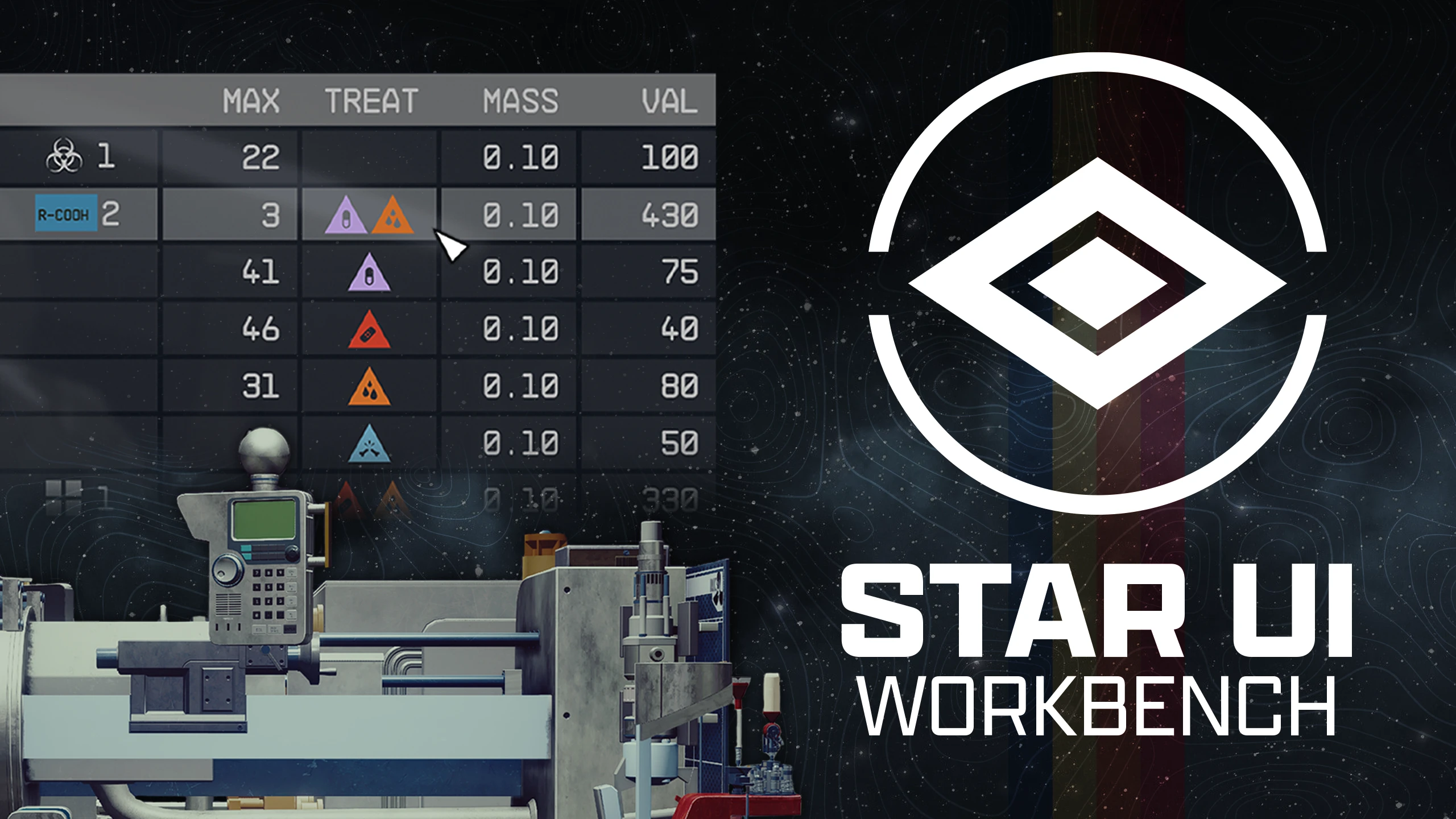
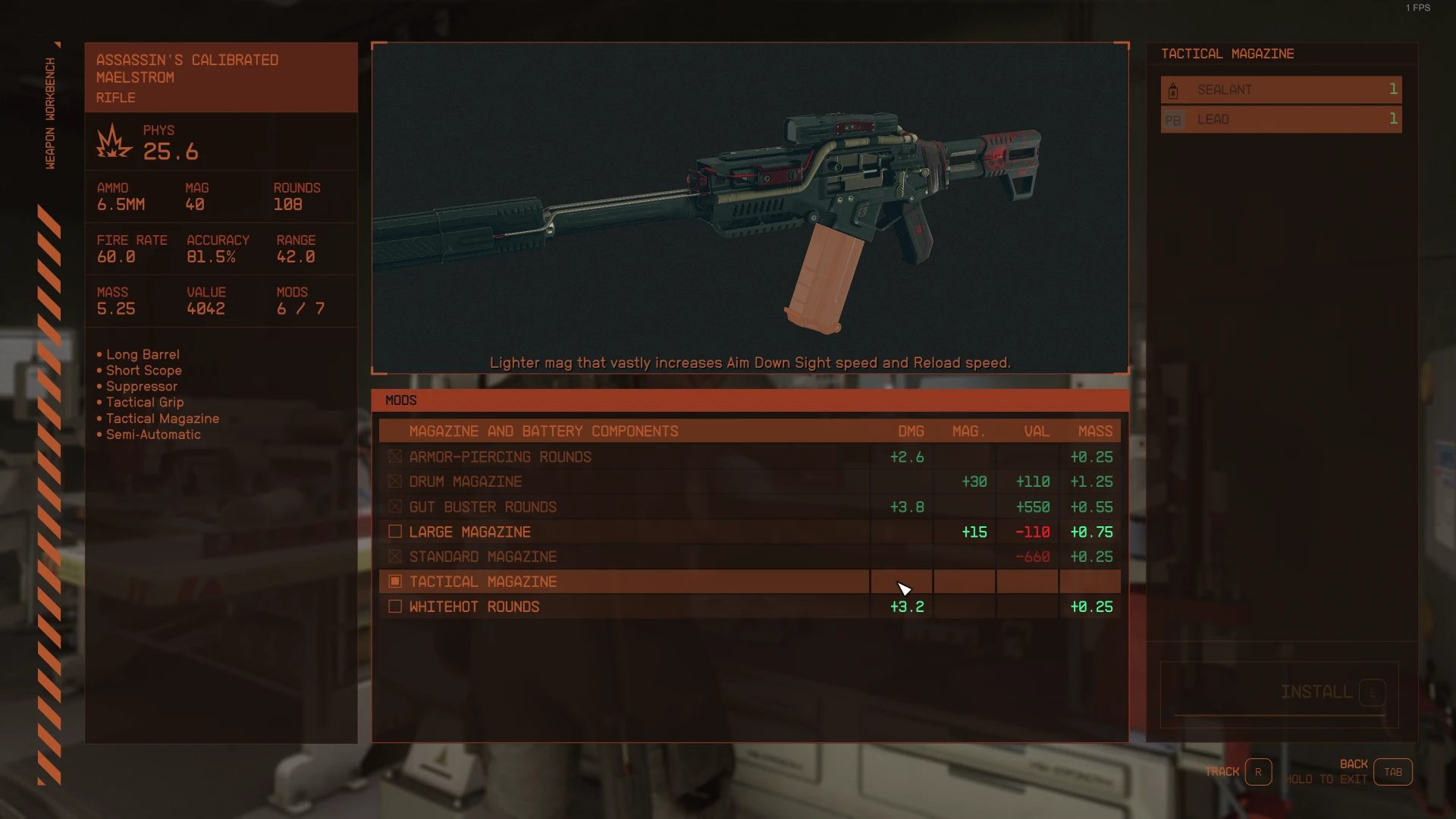
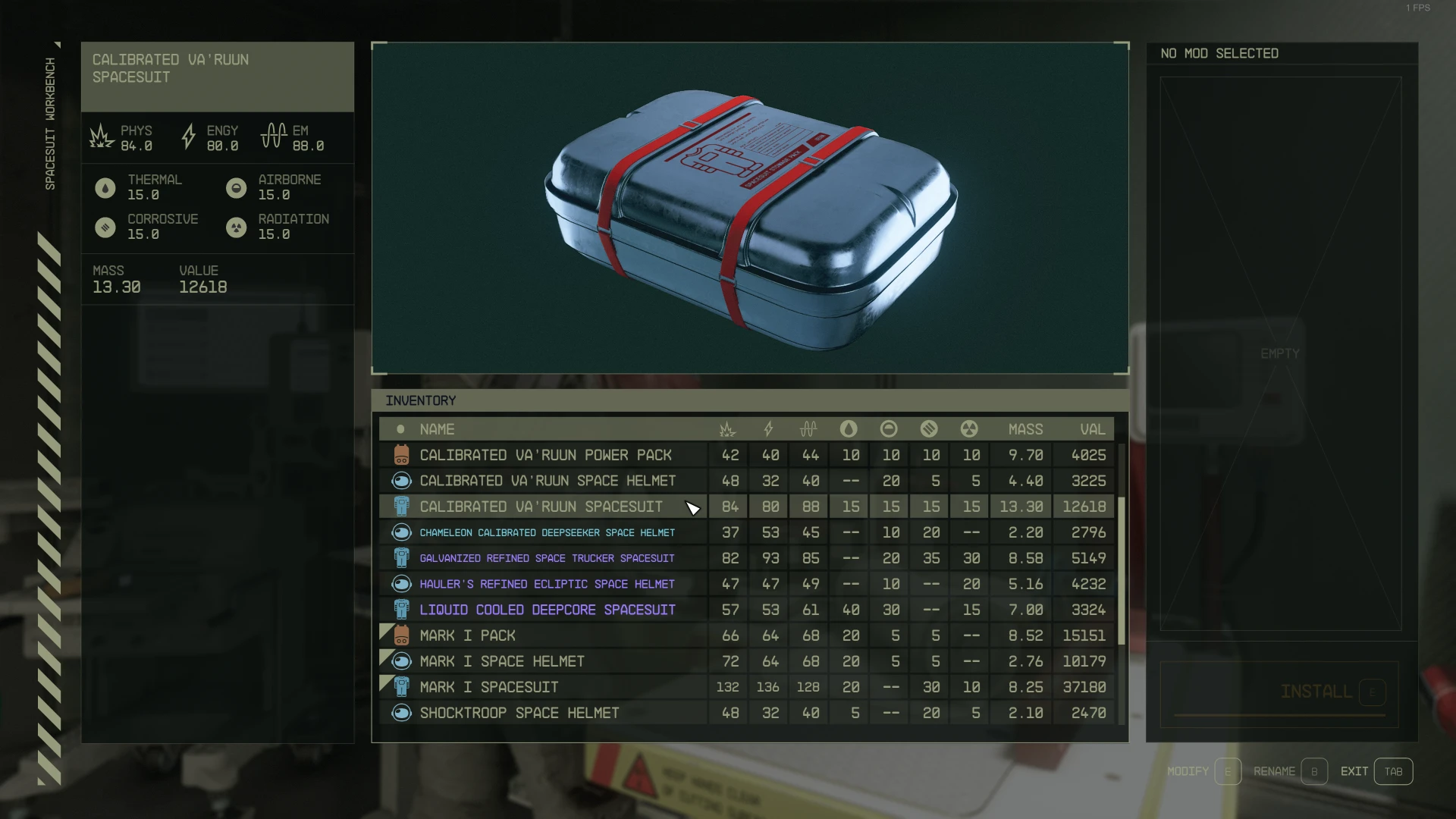
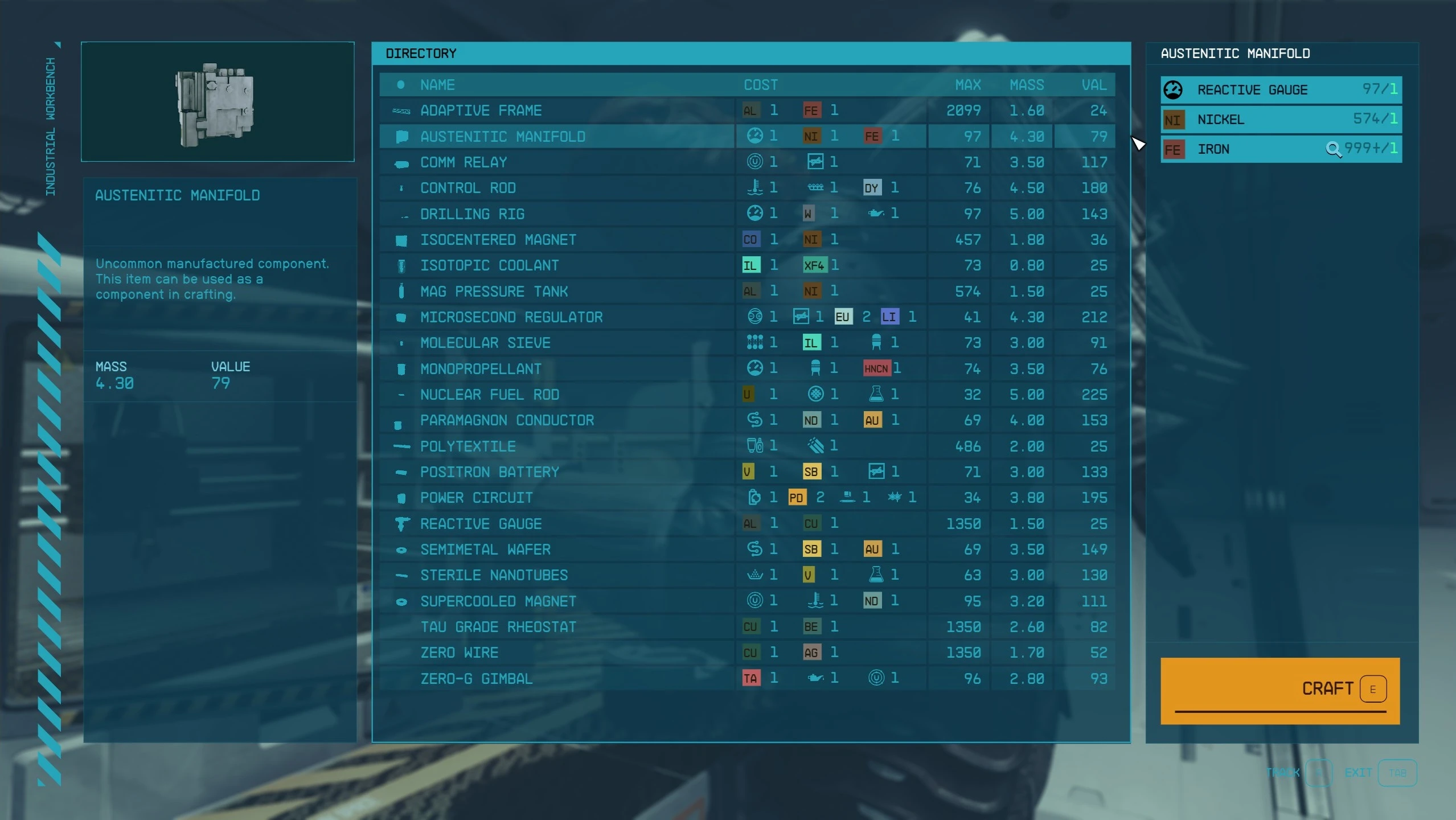
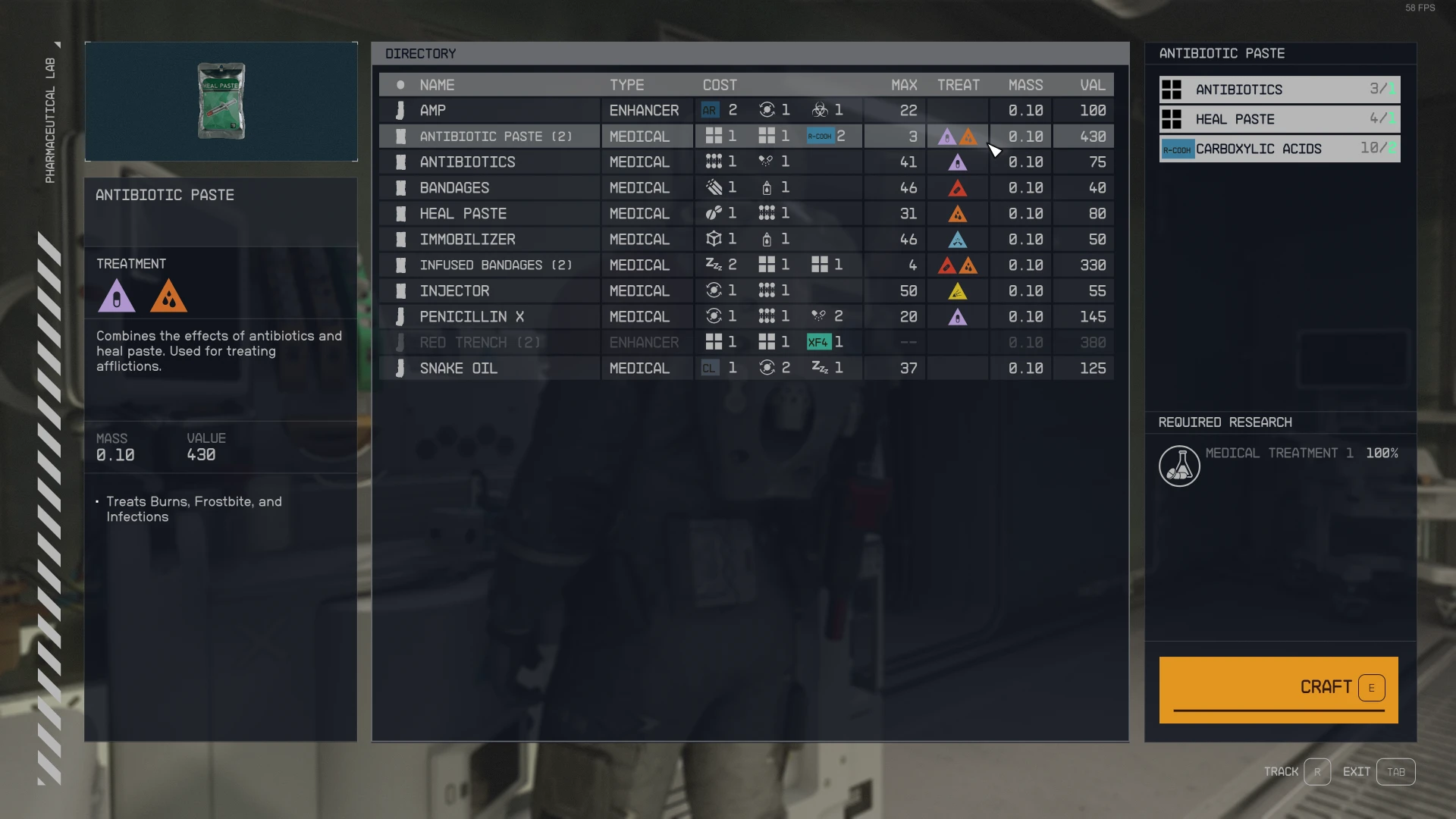
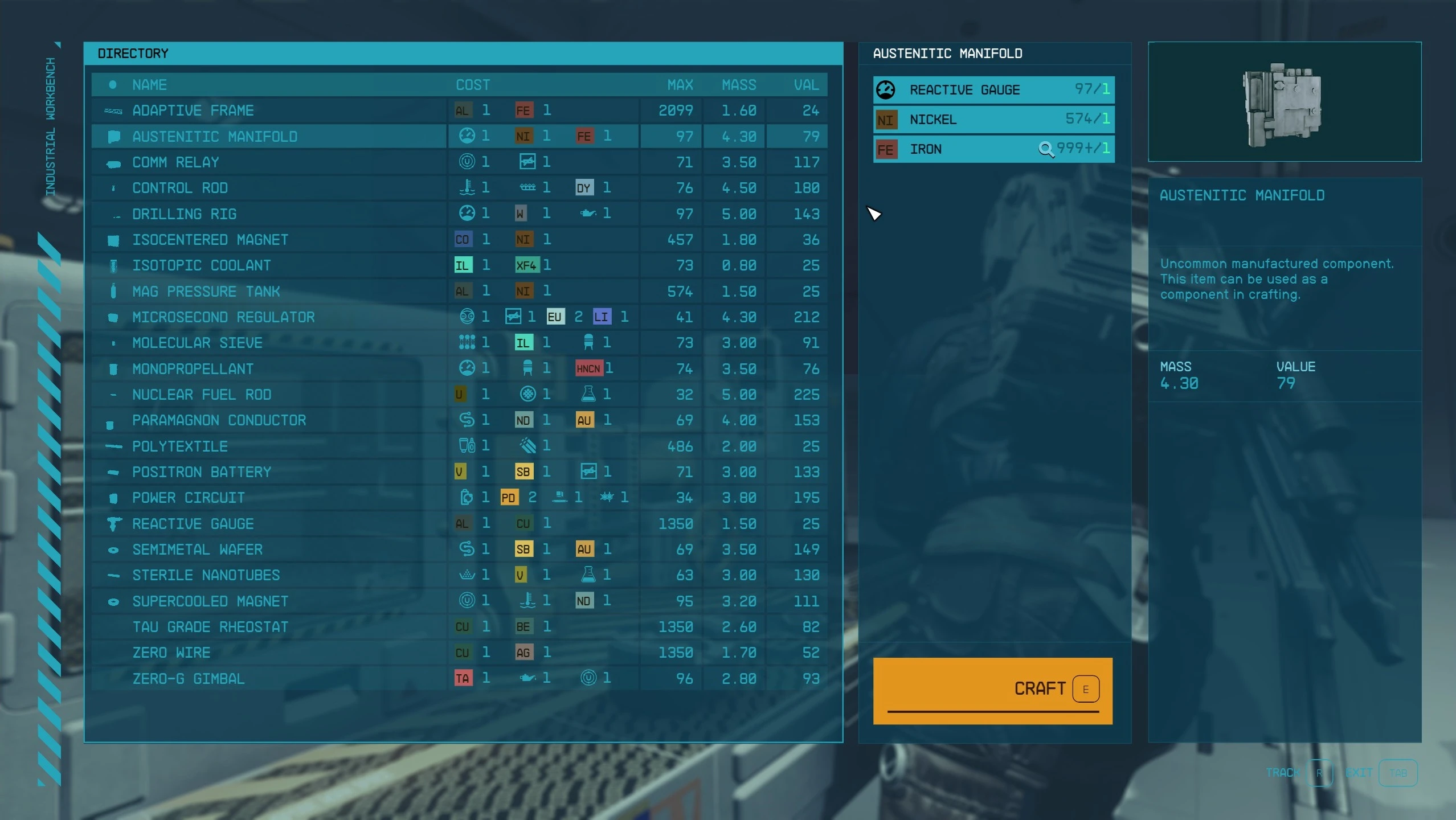
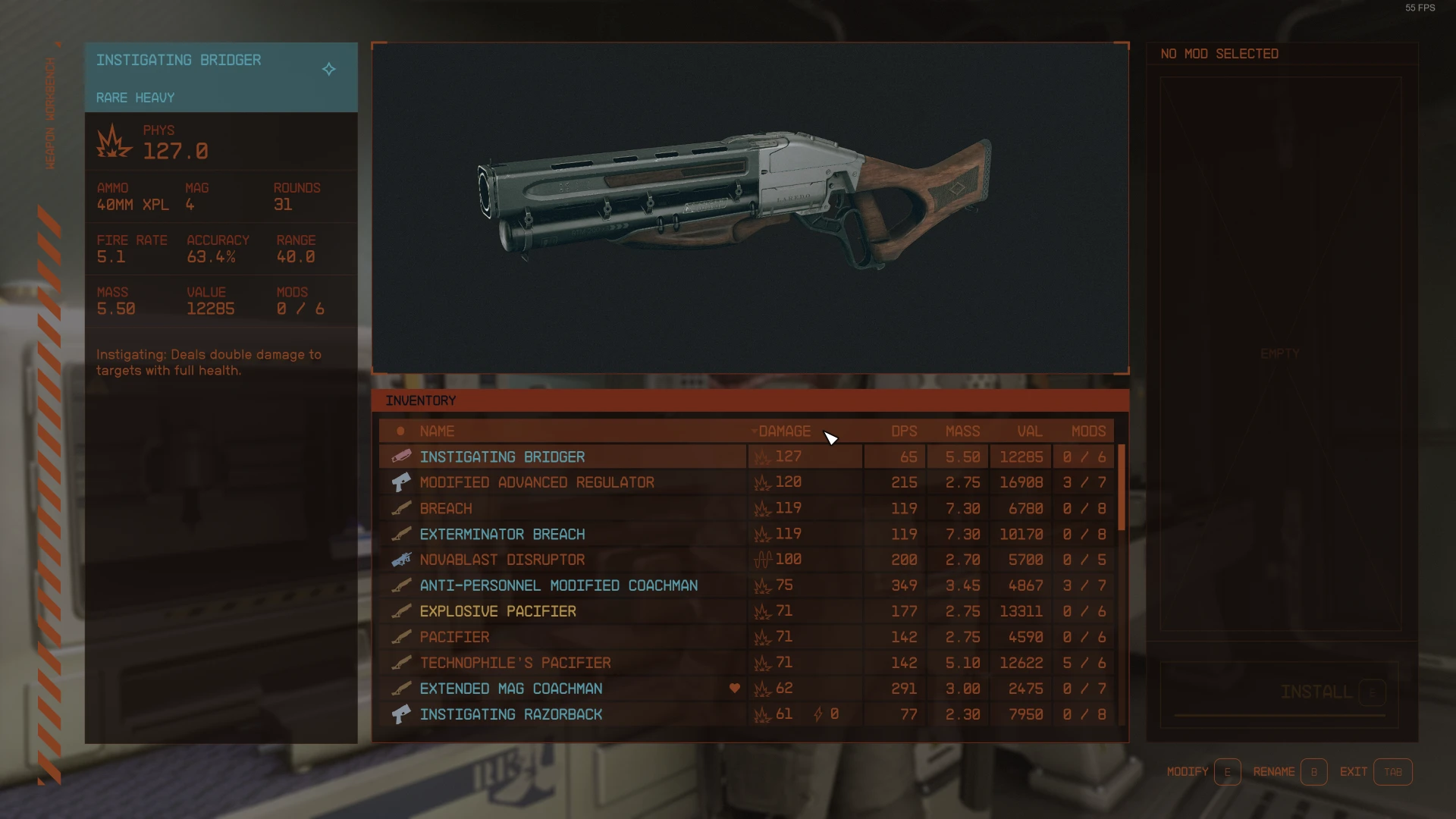
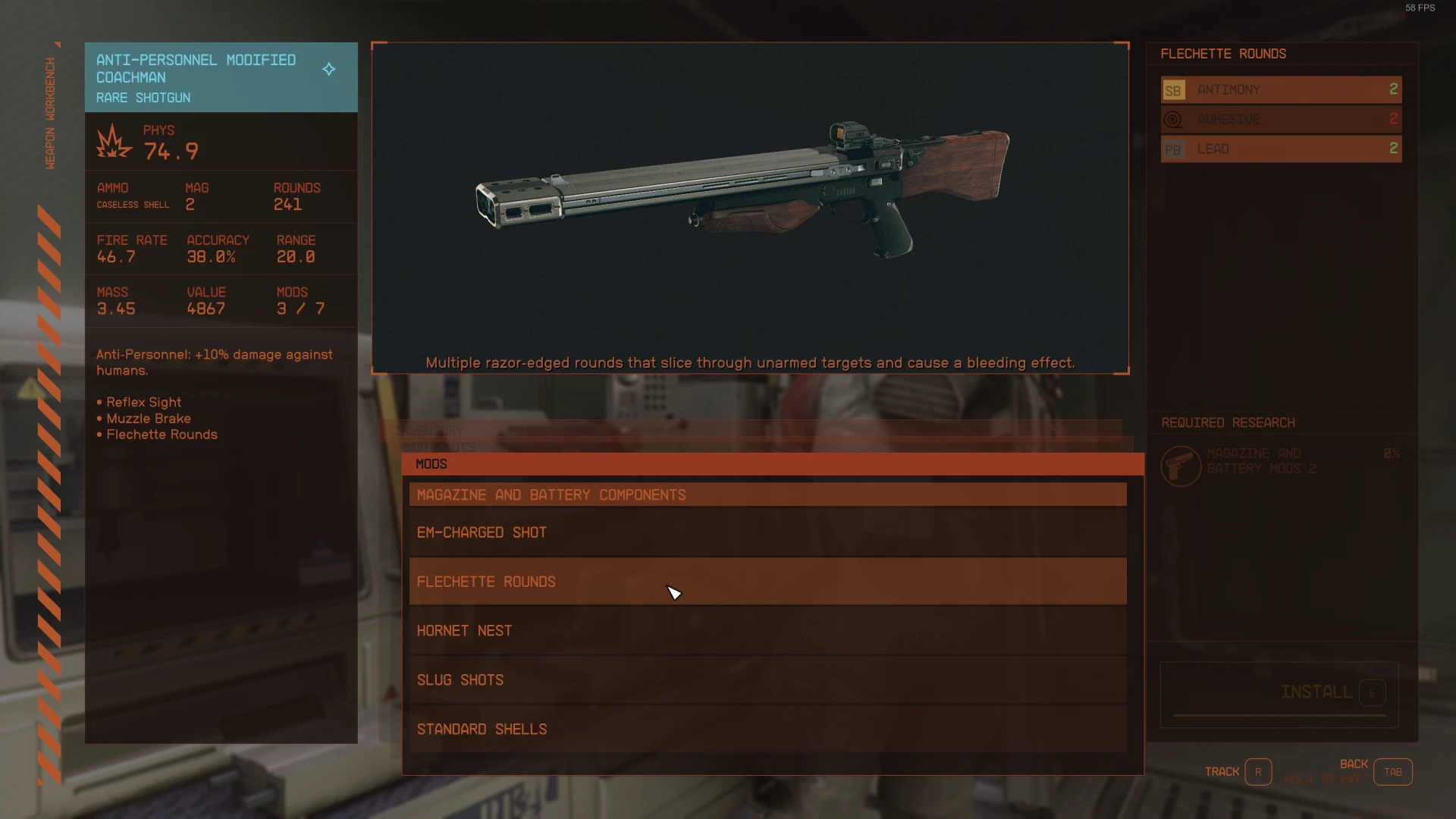
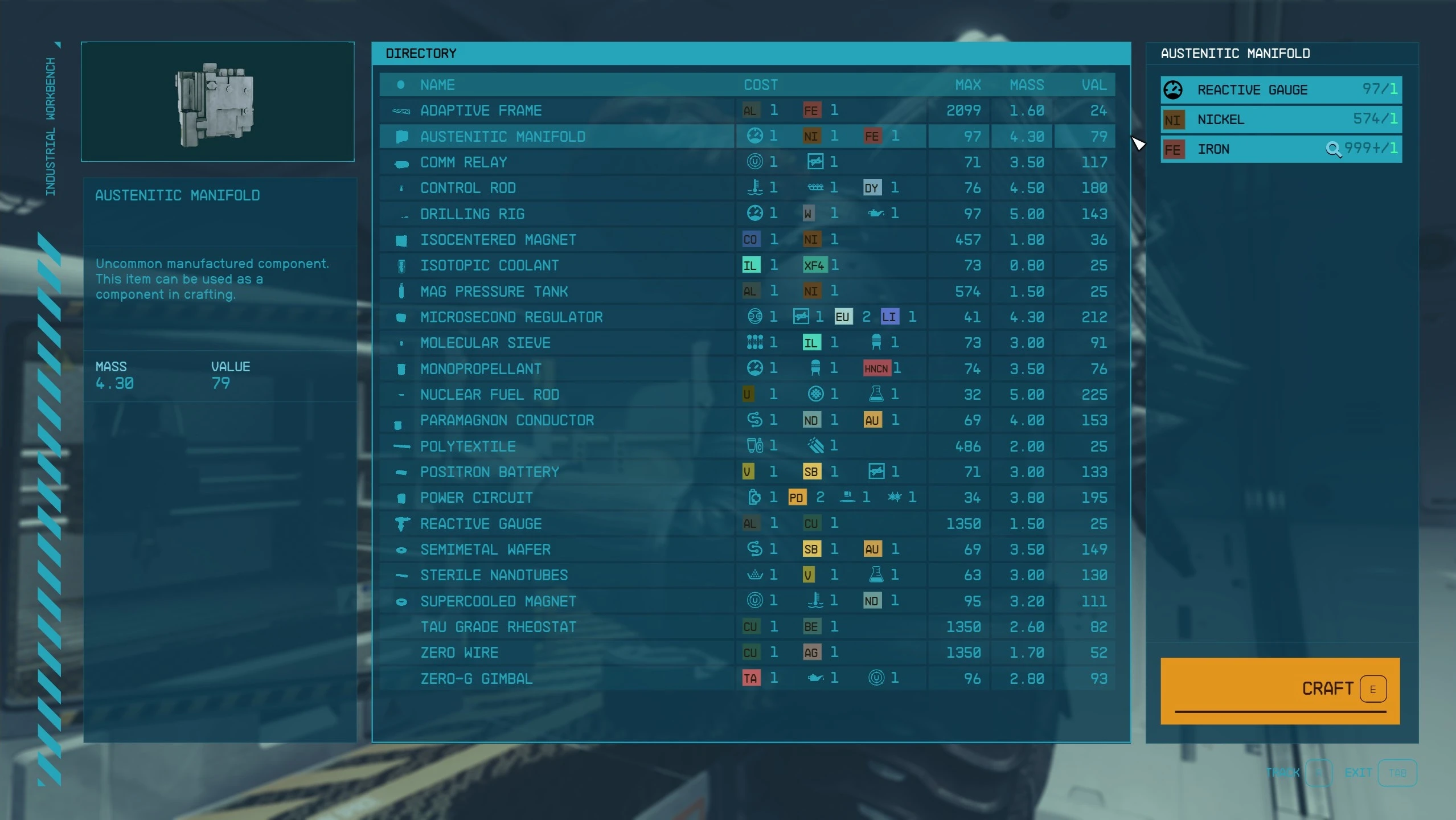
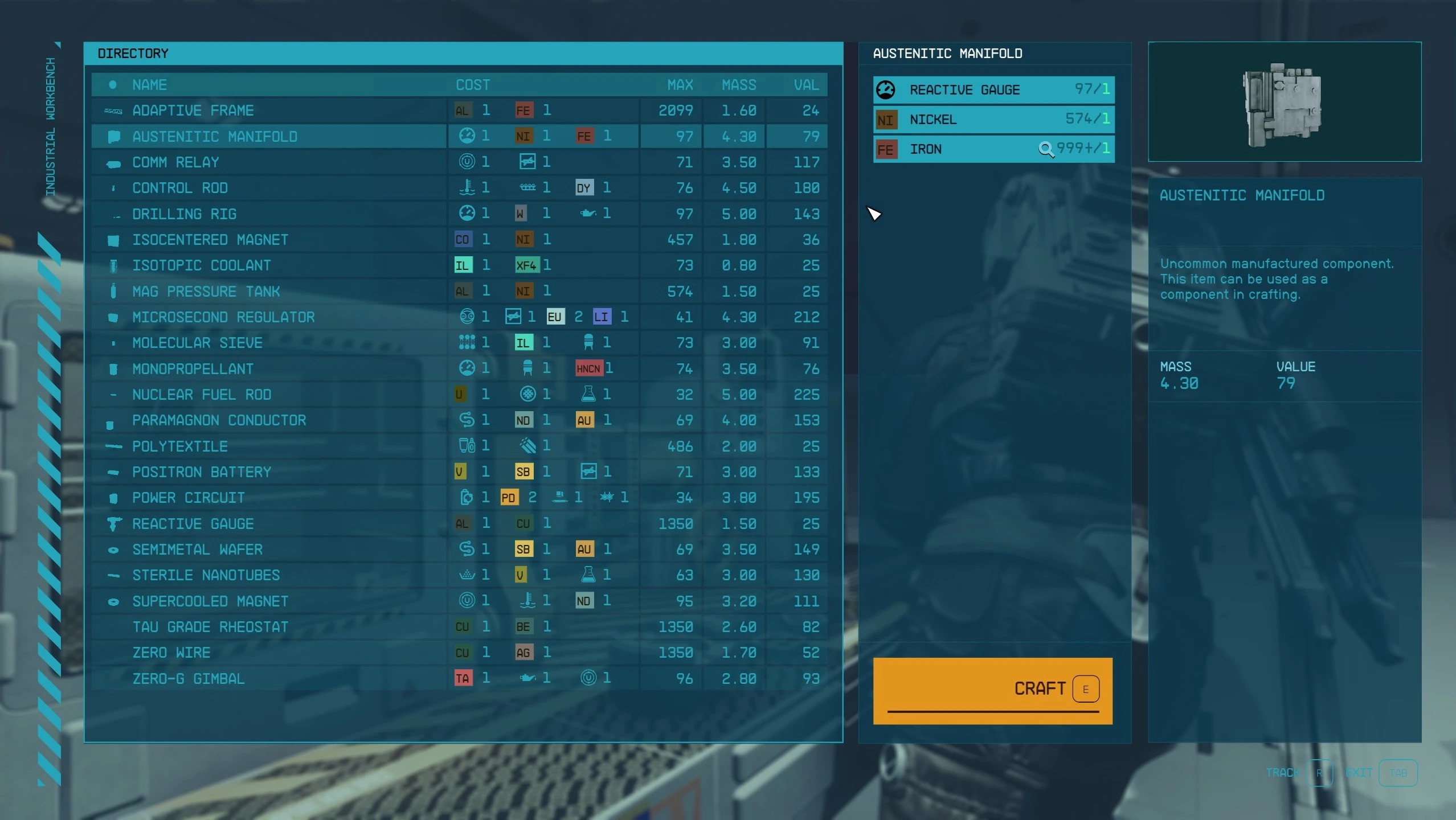
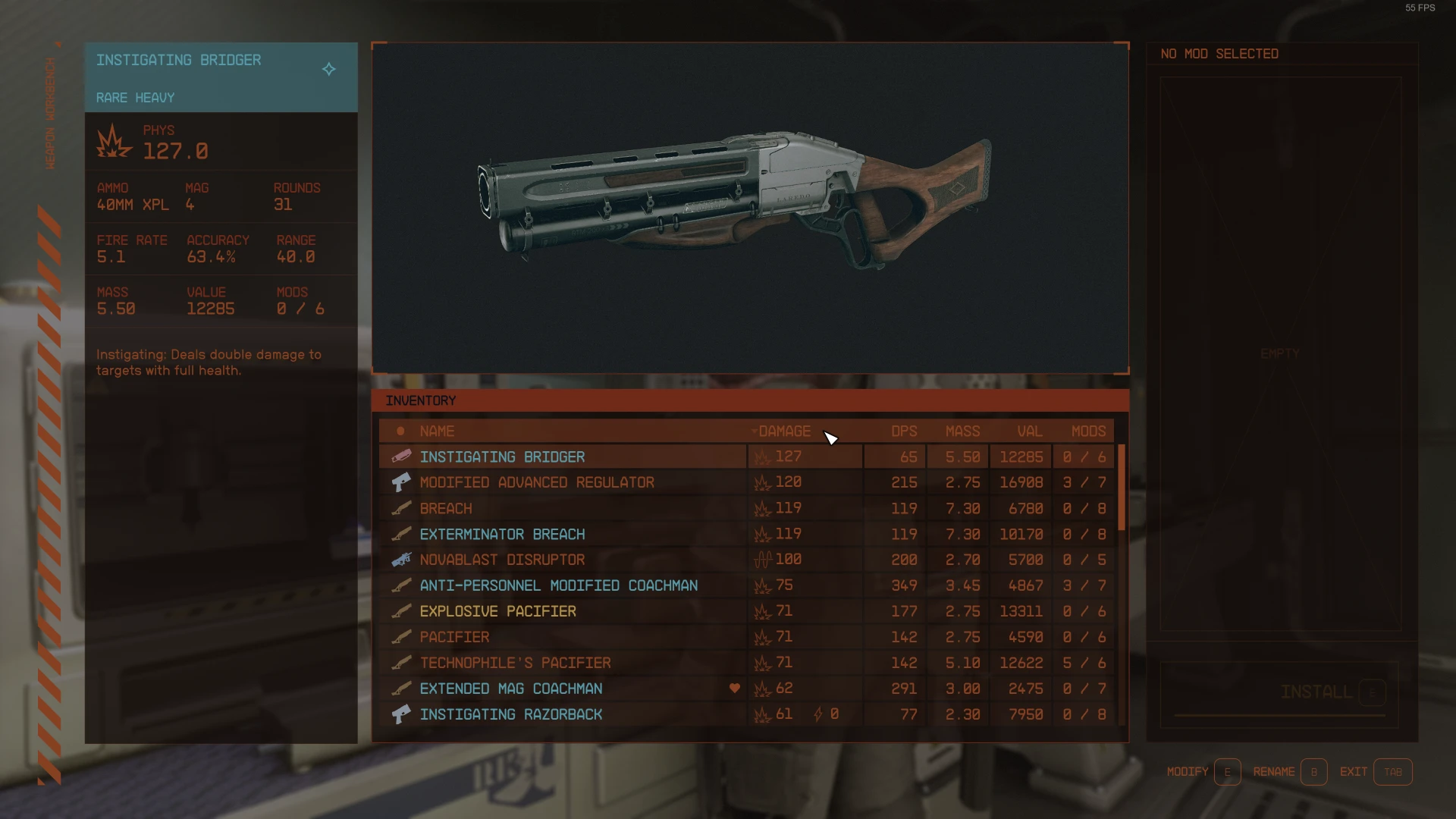
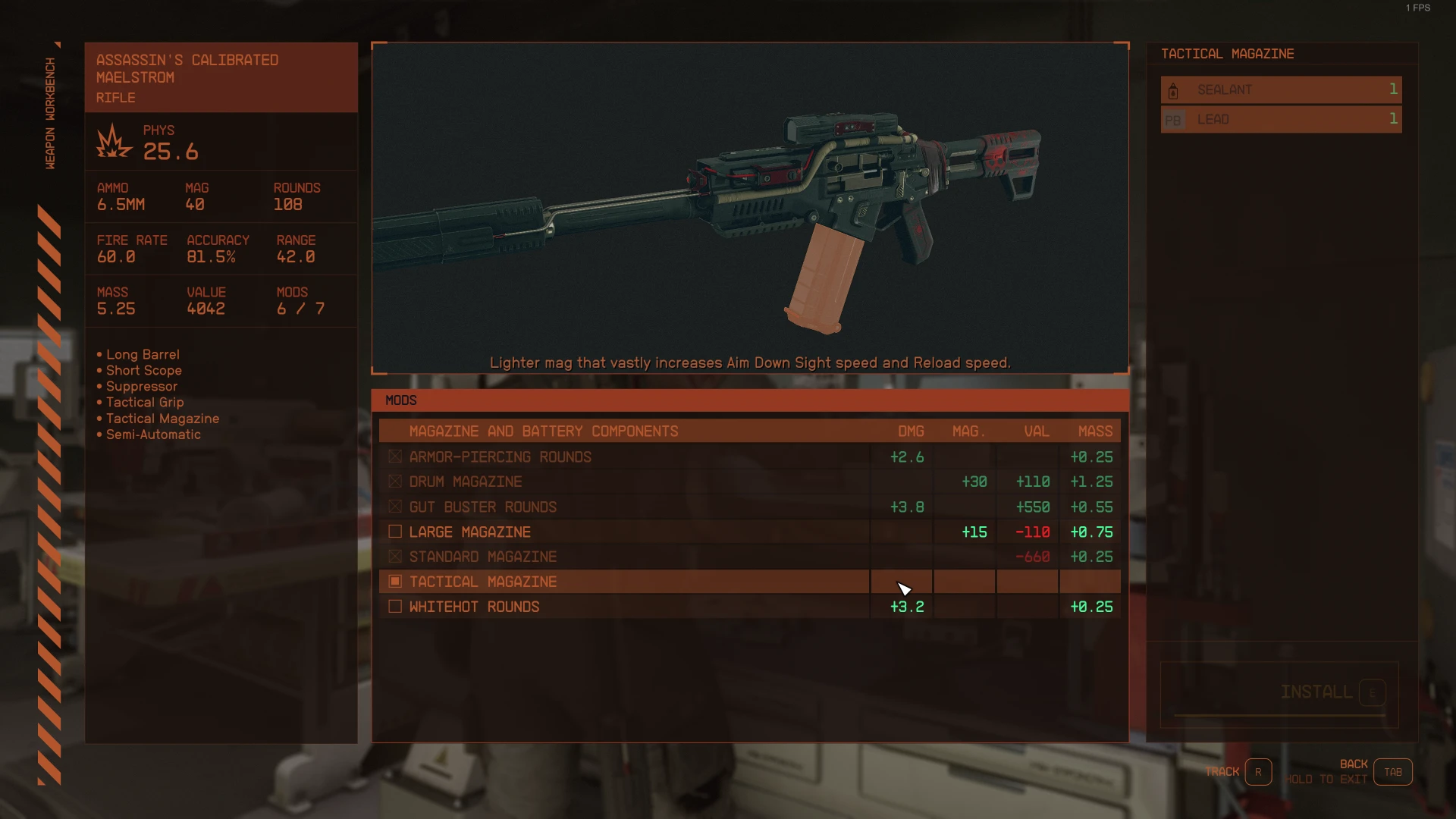
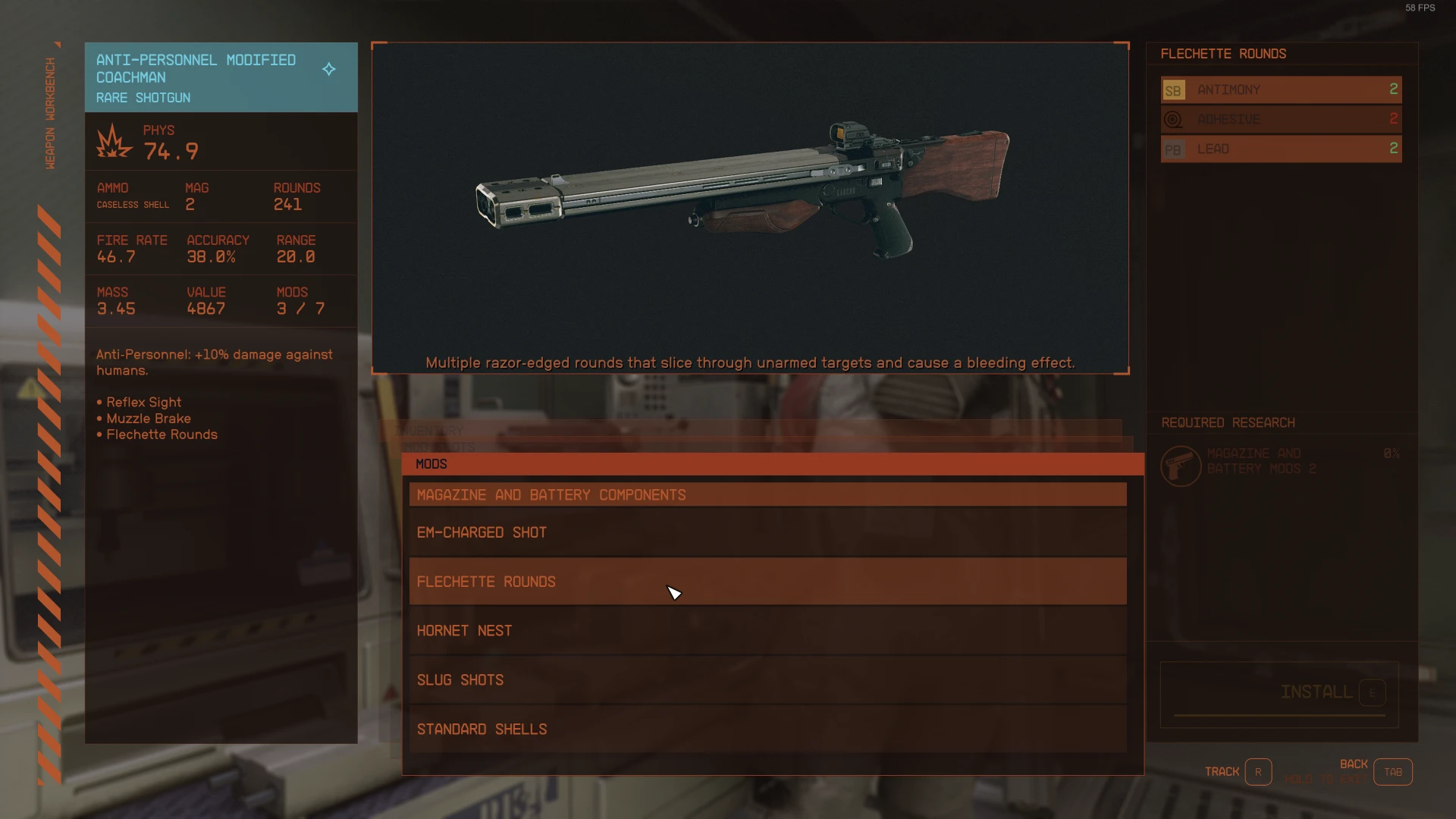
StarUI Workbench improves all workbenches with a more compact layout, more information, sortable columns, new data columns, custom layout, recolouring, dark mode, Quality-of-Life features and more!
StarUI Workbench improves all workbenches with a more compact layout, more information, sortable columns, new data columns, custom layout, recolouring, dark mode, Quality-of-Life features and more!
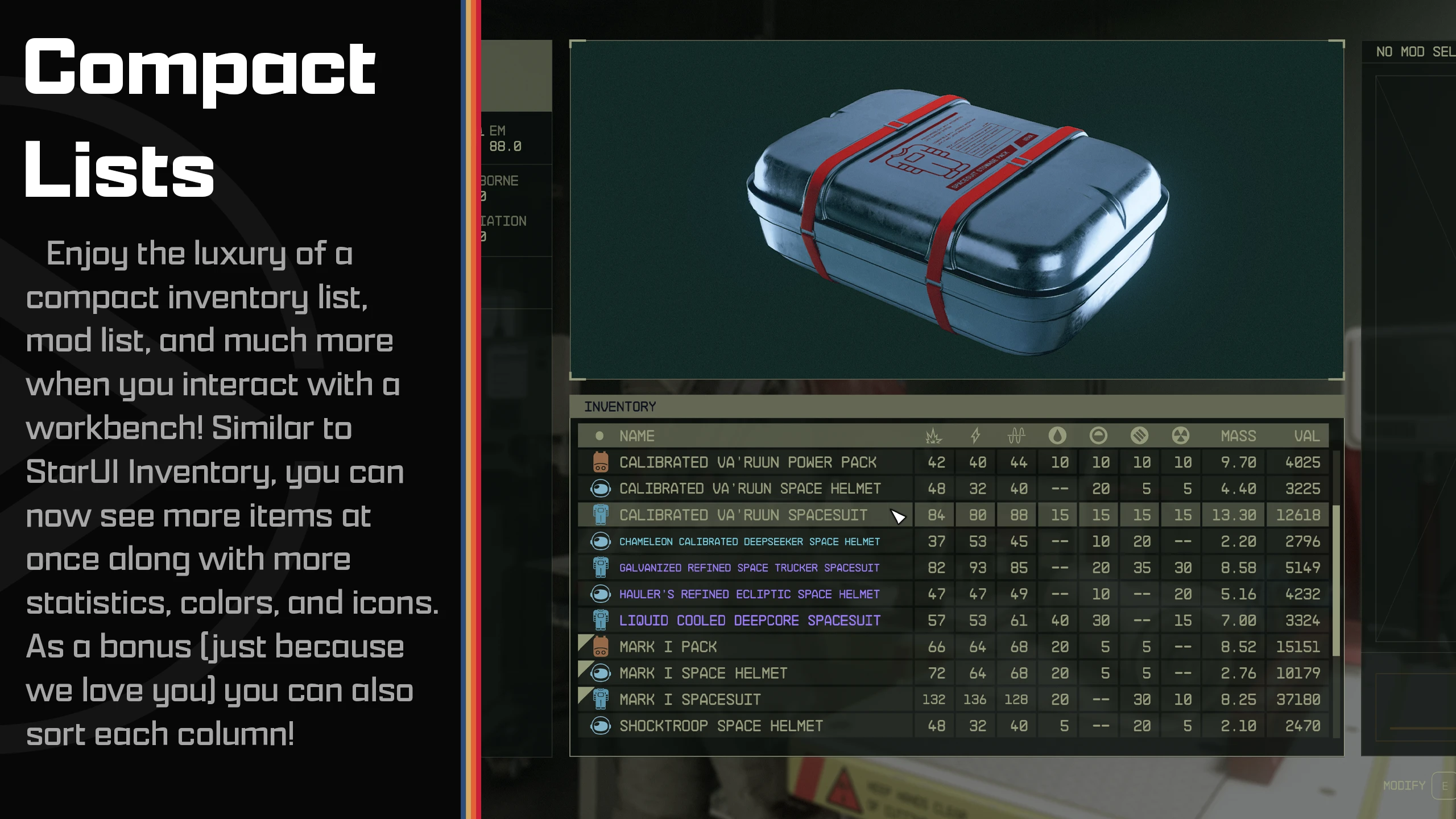
A much more compact design, optimized for PC use.
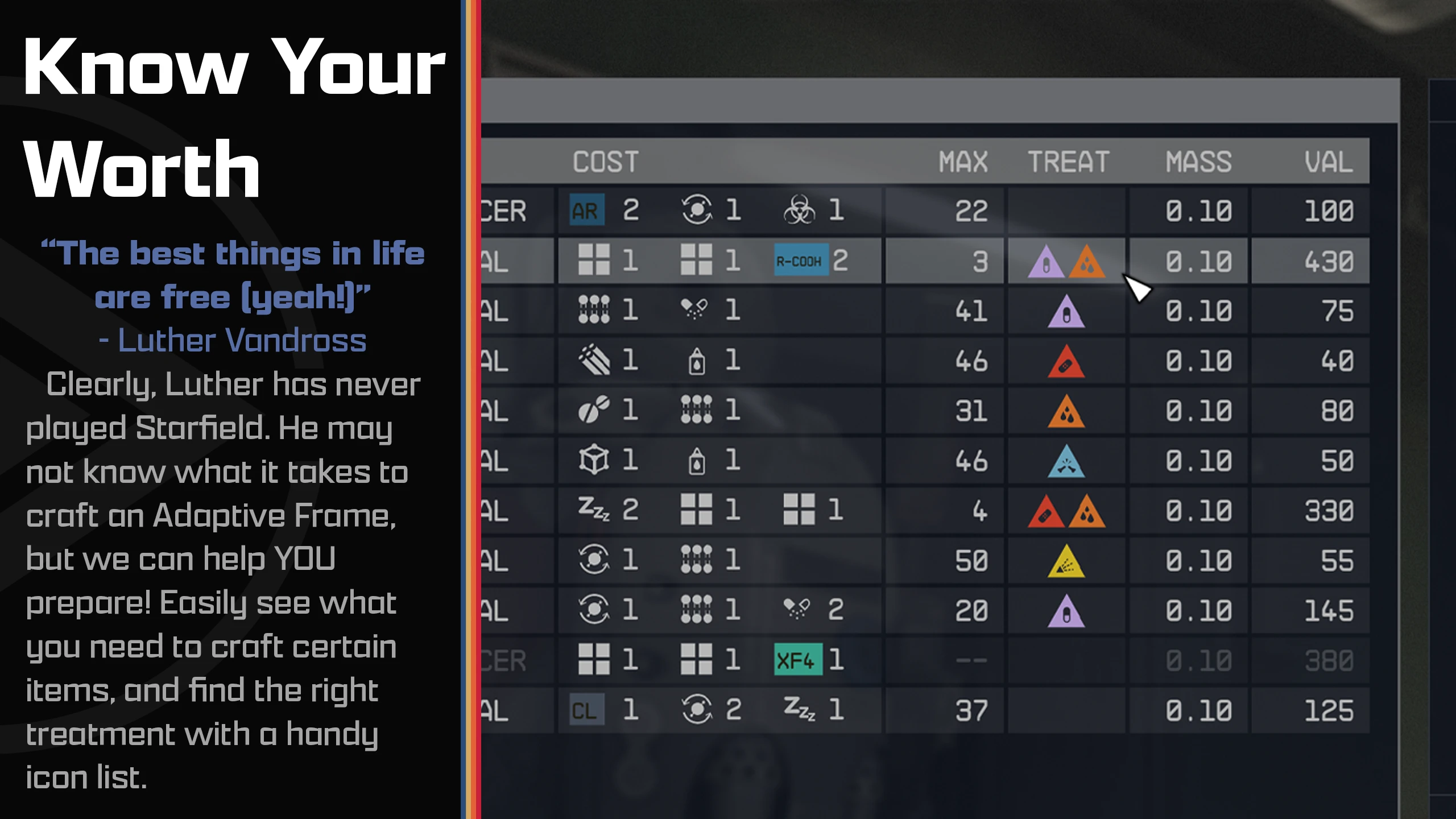
Additional information columns for all workbenches, including DPS for weapons, secondary resists for armor, cost and max craft-able amount for food/drugs/industrial items and a treatment column for aid items.
All columns are sortable - Just click on the column header
Adds a tracking item for recipes/mods you are tracking
Adds a favorite heart icon for your quickslot weapons
Includes item sorting tag support - use either StarUI tag icons for consistency or the vanilla workbench icons
Colorizes weapon and armor items by their rarity
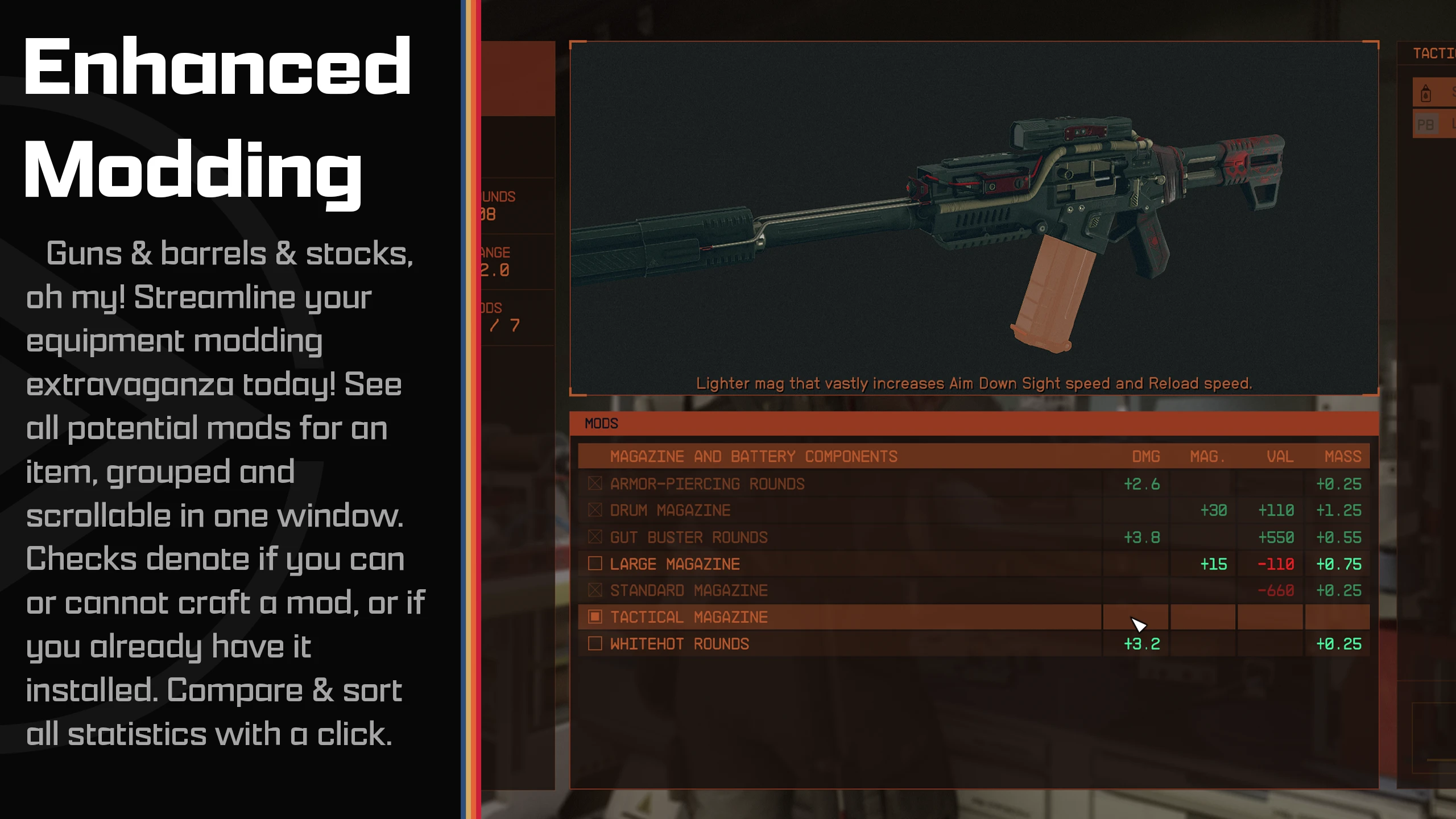
New Install Tag for weapon/armor mods - Easily see if a mod is installed, craftable, or if you're missing something!
Difference columns for mod installation - See how every mod changes your weapon/armor compared to your installed mod
Recolor your workbenches however you like. You can also recolor each interface part of each workbench individually.
Dark mode available (either use the preset or set iDarkMode in the INI)
All interface parts can be moved and resized. You can choose one of the four pre-defined workbench layouts or create your own layout!
The layout is configured in a separate file, so you can easily re-use a layout for another bench (or create more layouts if you like)
You can choose which layout to use for each workbench
Available layout presets: Vanilla, Vanilla Extended, Hoarder, Hoarder Alternate
Five pre-defined main configuration settings. Simply choose a preset that meets your taste in the installer. Or use it as base for your own individual workbench configuration!
Available main presets: Vanilla, Vanilla Extended, Hoarder, Hoarder Alternate, Hoarder Dark Mode
Instant open/close available (Interface animations removed)
Unlimited crafting - You can adjust the max amount in the INI
Doesn't affect the possibility to get Steam achievement
Completely customizable - See StarUI Workbench (default).ini
Simply install with Vortexor Mod Organizer 2 (For manual installation, open the spoiler below)
Enable Archive Invalidation in your INI
It's just one click in BethINI (enable "Load Loose Files" and save)
Copy the folders Interface\ and StarUI Configurator\ from the zip into your Starfield\Data\ folder (where the ba2 files are) - ignore folders fomod and Optional
For some people that folder won't work, copy the files to your Documents\My Games\Starfield\Data\ folder in that case (create Data\ If it doesn't exist)
Choose one of the presets from the sub-folder StarUI Workbench Presets\ and copy the INI file content into a new file StarUI Workbench.ini in Interface\.
(Optional) 30fps or 120fps version: After doing the above steps copy the files from the appropriate sub-folder in Optional\ and overwrite the existing ones.
Use the StarUI Configuratorto configure any setting in this mod with an easy to use graphical interface. You can also do it manually: See the well-documented INI file StarUI Workbench (default).ini and adapt it to your liking!
Main configuration presets The mod has five main presets: Vanilla, Vanilla Extended, Hoarder, Hoarder Alternate, Hoarder Dark Mode. Click for a preview:
Spoiler:
Show
(Click to enlarge image)
Collector
Hoarder Alternate
Hoarder Dark Mode
Vanilla Extended
Vanilla
Preview of the main configuration file (StarUI Workbench (default).ini or StarUI Workbench.ini)
Spoiler:
Show
[StarUI Workbench] ; ======================================= ; Configuration file for StarUI Workbench ; ======================================= ; ; Allows you to configure StarUI Workbench ; ; Some general notes and tips: ; ; Position ; ; The position is specified based on a 1920x1080 layer. If you have another resolution, it will ; automatically transformed into the position on your monitor. ; ; Color ; ----- ; The colors are specified as "red, green, blue(, alpha)" where alpha is optional. ; RGB values are from 0 to 255. Alpha is from 0 to 100 (percent). ; ; Examples: ;black is "0, 0, 0" ;white is "255, 255, 255" ;red is "255, 0, 0" ;blue is "0, 0, 255" ; Color tip: Use any common RGB color picker online to find your values! ; ; Tips ; ------------ ; * You can edit this file while the game is running. A simple quick-save/quick-load should ;Load the new configuration! ; * Copy this file and rename the copy to "StarUI Workbench.ini". Then change your settings in the ;new file. The new file won't be overwritten by mod updates!
;========= ; Generic ;=========
; This defines the main color for each workbench. The color set here will be used for all interface parts of the workbench. ; Note: You can specify separate colors for each interface part in the layout file. ; (Create new layout files for each workbench if you'd like to color the parts for each workbench type separately)
; Enable dark mode. You can adjust the strength in percentage. ; Default: 0. Recommended value for dark mode: 50 iDarkMode = 0
; Instant open/close animation (Note: This won't disable the character animation) Instant Open/Close Animation = 0
Instant open/close for confirmation popup (defaults to main instant open/close - remove ";" to define a different setting) ;bConfirmPopupInstantOpenCloseAnimation = 1
; Fonts ; Available fonts: ; 0 Default ("NB Architekt") ; 1 NB Architect Light ; 2 NB Architect ; 3 NB Grotesk R Semibold ; 4 NB Grotesk R Bold ; 5 Arial (Contains only ASCII characters for EN) ; 6 Consolas (Contains only ASCII characters for EN) iUseFont = 0
;============== ; Generic list ;==============
; List margin (outside) iListMargin = 10
; List entry height iListEntryHeight = 31 ; List entry font size iListEntryFontSize = 20 ; Left and right padding of list cells iListEntryPadding = 8
; Should the sub-lists be positioned a bit to the right-bottom? (disabled if your layout has specific positions for the sub-lists) bSubListsStackEffect = 0
; Show tracking icon (for trackable items, e.g. craftables or in weapons/armor mod list) Show Tracking Icon = 1
; Max craftable amount (Vanilla: 99) iMaxCraftableAmount = 999
; Default column width for additional columns iColWidthDefault = 80
;======================================================== ; Craftables list (food, drugs and industrial workbench) ;========================================================
; Additional list columns (limited columns, see below) ; Available columns: COSTS_TEXT, COSTS_ICONS, MAX_CRAFTABLE, MASS, VALUE, TYPE (only for drugs) ; Columns for the industrial workbench IndustrialBenchInvListColumns = COSTS_ICONS, MAX_CRAFTABLE, MASS, VALUE Columns for the food workbench FoodBenchInvListColumns = COSTS_ICONS, MAX_CRAFTABLE, MASS, VALUE ; Columns for the drugs workbench DrugsBenchInvListColumns = TYPE, COSTS_ICONS, MAX_CRAFTABLE, TREATMENT, MASS, VALUE
; Column widths - define individual column widths for any column you like - define more in the schema iColWidth[COLNAME]... (e.g. for DMG iColWidthDMG) COSTS_TEXT = 400 iColWidthCOSTS_ICONS = 220 iColWidthTYPE = 120 iColWidthMAX = 60
;============================================= ; Inventory list (weapon and armor workbench) ;=============================================
; Show tag icon for item (in items list) Show Item Tag Icon = 1
; Use the bench native item icons (instead of StarUI sorting tag icons) UseVanillaItemIcons = 0
; Use colored item icons (only for StarUI item sorting tags) ItemTagColored = 1
; Add a favorite item icon to weapons in quickslots Show Fav Icon = 1
; Color weapon and armor by their rarity ShowRarityColors = 1
; Additional inventory list columns (all inventory columns available - for a list of available columns see the end of this file) ; Columns for the weapon workbench WeaponBenchInvListColumns = DAMAGE, DPS, MASS, VALUE, WMODS ; Columns for the armor workbench ArmorBenchInvListColumns = PHYS, ENGY, EM, ATHERMAL, AAIRBORNE, ACORROSIVE, ARADIATION, MASS, VALUE
; Column widths - define individual column widths for any column you like - define more in the schema iColWidth[COLNAME]... (e.g. for DMG iColWidthDMG) iColWidthAMMO = 135 iColWidthRARITY = 110 iColWidthWMANUFACTURER = 200 iColWidthDAMAGES = 150 iColWidthPHYS = 50 iColWidthENGY = 50 iColWidthEM = 50 iColWidthRESISTANCES = 225 iColWidthATHERMAL = 50 iColWidthAAIRBORNE = 50 iColWidthACORROSIVE = 50 iColWidthARADIATION = 50
;======================================== ; Mods list (weapon and armor workbench) ;========================================
; Add install tag (Shows installed, craftable and components/skill/perk missing status) bModListAddInstallTag = 1 ; Add columns to show the difference to the installed mod Show difference columns = 1
; ================== ; Workbench layout ; ================== ; You can easily switch the layout for each workbench. ; This mod comes with three presets, but you can define as many as you like! ; The workbench layout file is located at Data\Interface\Workbench Layout\{Layout Name}.ini ; Pre-defined layouts: ;Vanilla - Just as you know it from the vanilla game. ;Vanilla Extended - Just as you know it from the vanilla game, but slightly improved. ;Hoarder - For the people who like lists more than 3D. A big list and a small item preview. Item card and 3D preview on the left and cost panel on the right. ;Hoarder Alternate - Like Hoarder layout, but with list on the left side and preview, item card and cost panel on the right. ; Note: The Hoarder layouts aren't suitable for weapon and armor bench (the item card can clip and the mod description is placed below the list) [Layout] Weapons Vanilla Extended Armor = Vanilla Extended Industrial Hoarder Food Hoarder Drugs Hoarder
; ======================== ; Doc: Available columns ; ======================= ; AMMO - Show used ammo type ; AMMO_ROUNDS - Show available rounds for ammo type ; DR - Damage Resistance ; DMG - Weapon damage ; DPS - Weapon damage per second (Burst DPS, so without reload-time) ; FAV - Shows your favorite assignment number ; MASS - Weight ; MASS_STACK - Weight per stack ; RARITY - Shows the rarity of the item (rare, epic, legendary for weapon/apparel and common, uncommon, rare,... for other items) ; VALUE - VALUE ; VALUE_STACK - Value per stack ; VPM - Value / Mass
; Weapon details columns ; WMANUFACTURER - Shows the manufacturer of the weapon ; WACC - Weapon accuracy ; WBASENAME - Shows the base name of the weapon (e.g. Eon, Grendel, Maelstrom,...) ; WMAG - Weapon ammo capacity ; WMODS - Weapon mod slots ( used / max ) ; WRANGE - Weapon range ; WROF - Weapon rate of fire (ranged) / Attack speed (melee) ; WTYPE - Weapon Type
; Detail columns for armor ; RESISTANCES - Combined column for all three primary resistances ; ATHERMAL - Armor thermal ; ACORROSIVE - Armor corrosive ; AIRBORNE - Armor airborne ; ARADIATION - Armor radiation
; Detail columns for Damage ; DAMAGES - Combined column for all three primary damage types ; PHYS - Weapon physical damage / Armor physical resistance ; ENGY - Weapon Energy Damage / Armor Energy Resistance ; EM - Weapon EM damage / Armor EM resistance ; ELEC - Weapon electrical damage / Armor electrical resistance [Currently unused in the game]
Preview of a workbench layout file (e.g. Interface\StarUI Workbench Layouts\Hoarder.ini)
Spoiler:
Show
; ================== ; Workbench layout ; ================== ; Note: Re-layouting and re-coloring separate parts can have side-effects and any animations probably won't look as intended. ; Please make sure your settings are working as expected before using it. ; If you like to re-position an interface part remove the ";" before position to set new values
[Background] ; Color of the background. Note: Add an alpha value to make the color more transparent (e.g.: 255, 255, 255, 25 for 25% alpha) sColor =
[MenuBanner] ; The item card which displays the item stats (normal position left) Enabled = 1 sColor = ; Re-position interface part - default position: 49.7, 55.2 ;fPositionX = 49.7 ;fPositionY = 55.2 Scale = 100 Rotation = 0
[ItemCard] ; The item card which displays the item stats (normal position left) Enabled = 1 Color = ; Re-position interface part - default position: 111.8, 55.95 ;fPositionX = 111.8 PositionY = 234 fScale = 100 Rotation = 0 ; Adjust the background height of the item card (Default: 926) ; WARNING: The content WON'T be adjusted. So only use this on benches where there isn't a long item card or you can live with clipping text. Crop Height 606
[InvList] ; The inventory list (normal position bottom center) Color = ; Re-position interface part - default position: 499.45, 552.9 fPositionX = 489.45 fPositionY = 56 fWidth = 1000 Height = 925 fScale = 100 Rotation = 0
[SlotsList] ; The slot list (normal position bottom center) ; If no color is assigned, the InvList color is used sColor = ; Re-position interface part - default position: 514.45, 574.9 ; If position is unassigned this list will assign it-self to the InvList ;fPositionX = 514.45 ;fPositionY = 574.9 ; If height/width is unassigned, it will use the InvList size ;fWidth = 980 ;fHeight = 427 fScale = 100 fRotation = 0
[ModsList] ; The mods list (normal position bottom center) ; If no color is assigned, the InvList color is used Color = ; Re-position interface part - default position: 529.45, 596.9 ; If position is unassigned this list will assign it-self to the InvList ;fPositionX = 529.45 ;fPositionY = 596.9 ; If height/width is unassigned, it will use the InvList size ;fWidth = 980 ;fHeight = 427 fScale = 100 fRotation = 0
[CostDisplay] ; The panel which displays the cost, required skills/research and the craft button (normal position right) Enabled = 1 sColor = ; Reposition interface part - default position: 1511, 55.4 ;fPositionX = 1511 PositionY = 54.5 fScale = 100 fRotation = 0
[ButtonBar] ; The button bar displays the keys/buttons for the current actions (normal position at the bottom right) Enabled = 1 Color = ; Re-position interface part - default position: 1865.85, 1017.9 ;fPositionX = 1865.85 ;fPositionY = 1017.9 fScale = 100 0 = 0
StarUI Inventory - Improves all inventory screens for use on a PC. Many Quality-of-Life features and completely customizable. StarUI HUD Customize your HUD. Relocate, resize and recolor widgets. Item tag icons, loot list item cards, Loot-O-Meter and many more features. StarUI Workbench - Improves all workbenches with columns, comparison, compact design, individual layout, Quality-of-Life features and more. StarUI Outpost - Improves the outpost interface with a new build menu, better key handling and many Quality-of-Life features. StarUI Ship Builder - Improves the ship builder interface with sort-able columns, category and variant list, as well as plenty Quality-of-Life features. StarUI Configurator Configure all StarUI mods in a well-aligned graphical interface with many helpful functions.
Bethesda for making another great RPG! Cala for making the awesome teaser images! Collective Modding discord - for morale support, testing, ideas and more! (Check it out!) The xEdit-Team for their great continued work The NexusMods community
And a big thanks to all the engaged beta testers in the #starui channel (alphabetical order, if i miss one please tell me): JohnnyLX91 maarlebw TheShoxter
This tool is provided by the third party [bufftool]
Download Mods For Free
Install LagoFast, start Starfield and play with the mods you love.
We use cookies to make interactions with our websites andservices easy and meaningful. For more information aboutthe cookies we use or to find out how you can disable cookies, click here.