
Mod Settings
Autor:mmarcussaLast updated:29/09/2026 20:44:2329.6K86KB

Mod Introduction
A shared settings menu for Dawnwalker mods, supporting all 15 vanilla game languages, requires UE4SS.
Dawnwalker Mod Menu
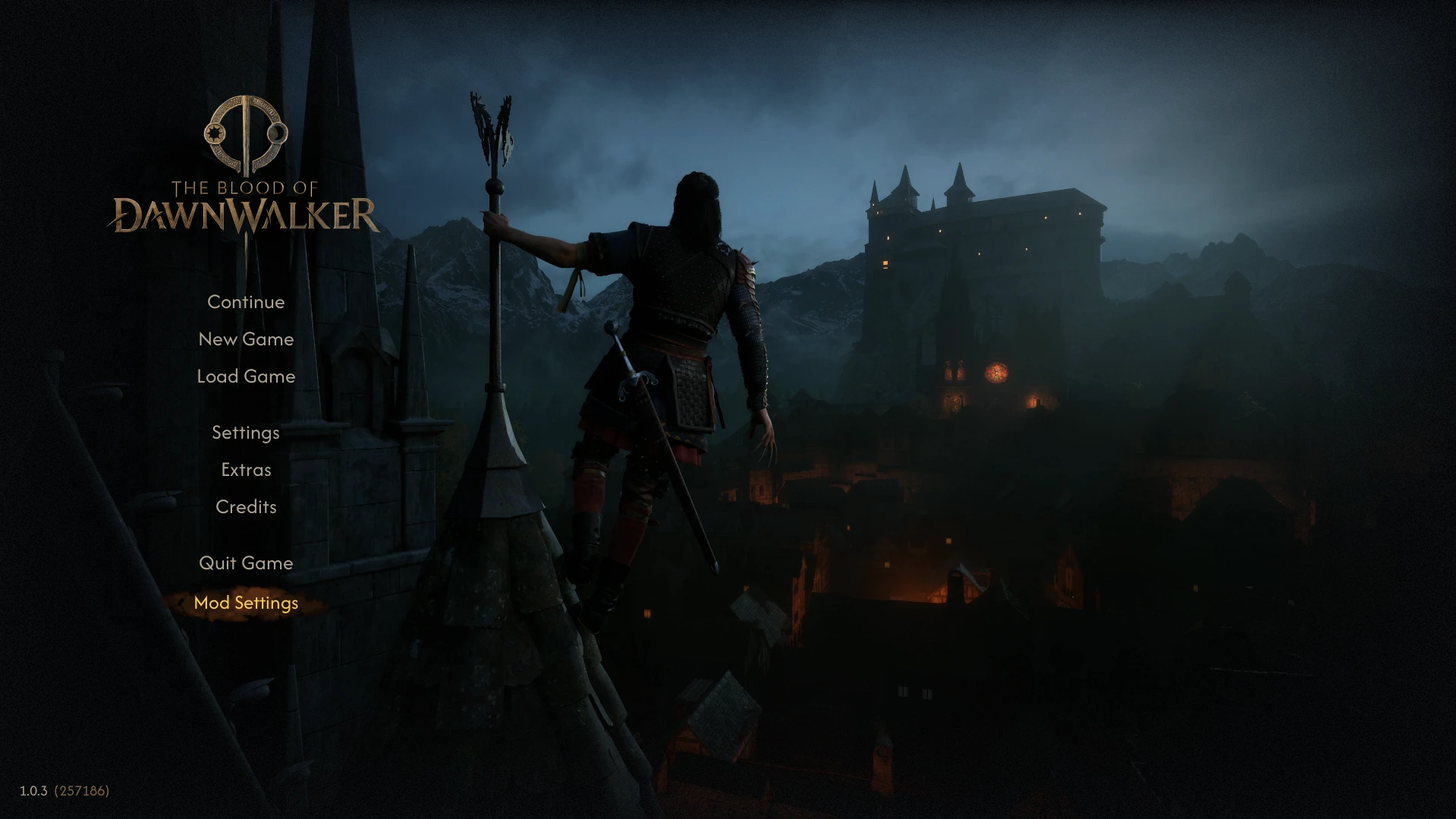
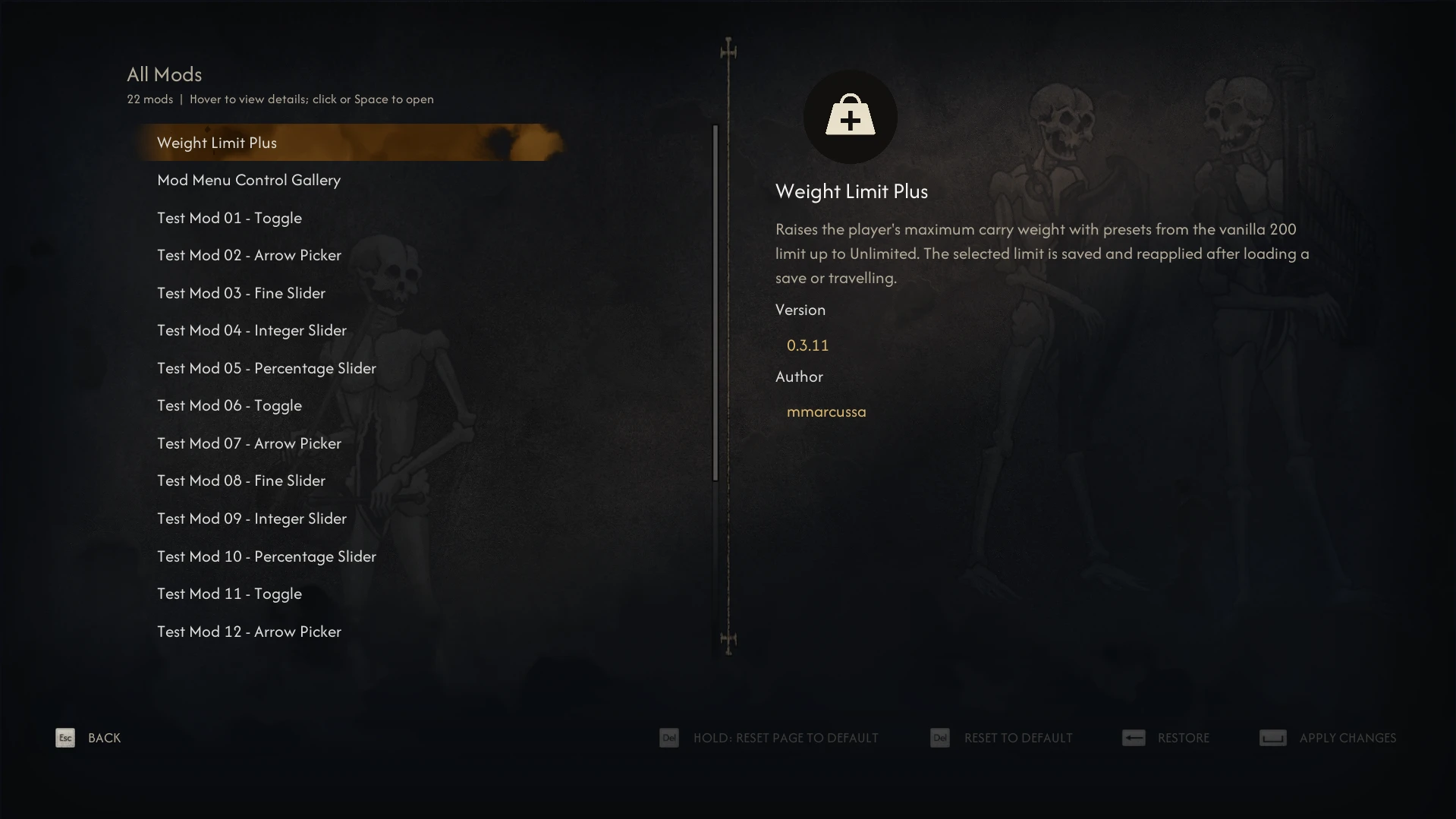
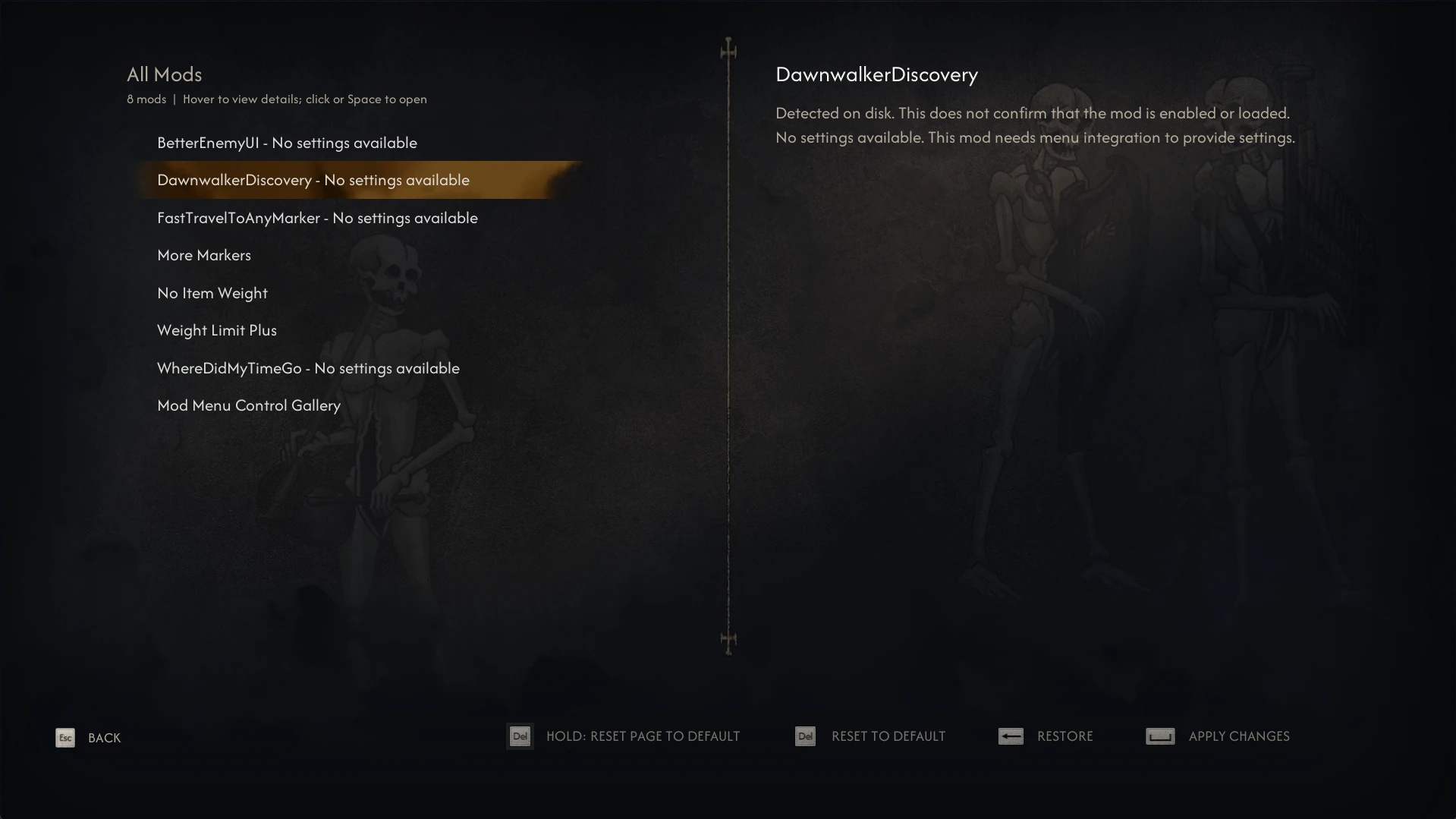
This adds Mod Settings to the main menu and pause menu. Open it, pick a mod in All Mods, and change its settings in one place.
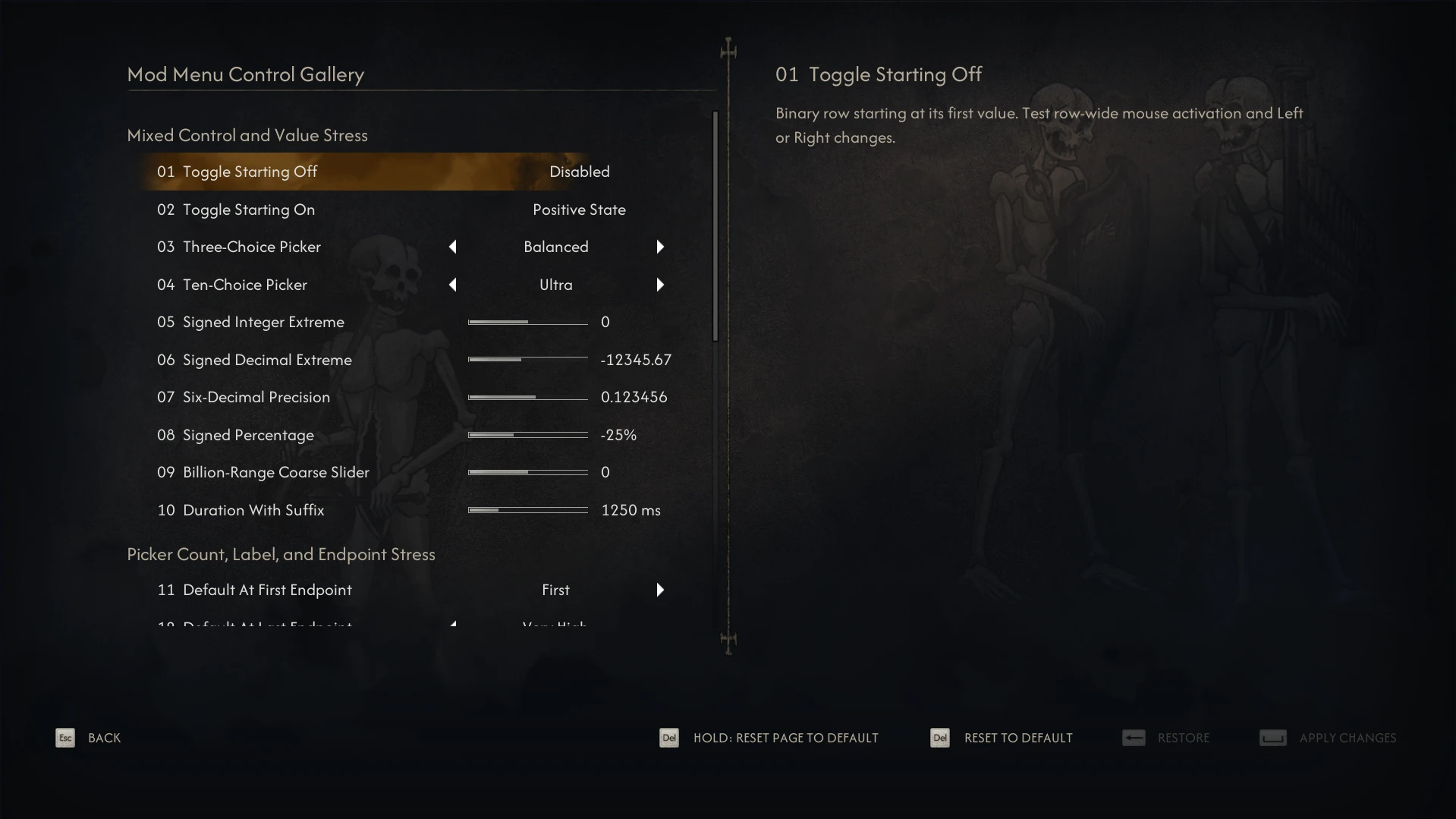
It supports toggles, choice lists and sliders, with mouse, keyboard and controller controls. Each setting can show a short description. Mod authors can also add a logo and links to their page. Other detected mods are listed with No settings available.
If the mod doesn't show, please replace the old UE4SS with UE4SS for BoD instead
Requirements
Installation
Close the game.
2. Extract the ZIP into the game installation folder. Merge the Dawnwalker folder with the one already there.
3. Check this file path:
Dawnwalker/Binaries/Win64/ue4ss/Mods/DawnwalkerModMenu/Scripts/main.lua
4. Keep enabled.txt Beside the Scripts folder. Enable only one version of Dawnwalker Mod Menu, then Fully restart the game.
If you use Vortex, check that it deploys the files to that same path.
Compatibility
The menu is available from the Main Menu and Pause MenuClosing it from Pause returns to the pause menu.
Mods need a compatible mod_settings.ini will appear. The list also detects UE4SS enabled through folders enabled.txt or mods.txtBundled UE4SS Utilities and inactive folders without integration are hidden. Detection does not confirm successful loading. Loose-file replacements and packages elsewhere are not listed. This menu does not enable, disable or uninstall mods.
Apply saves the mod's config. The mod decides when those changes take effect. Follow its instructions if it needs a restart.
Mods that replace the main menu may conflict. Game updates may affect the menu. Steam Input may show Xbox prompts for a PlayStation controller. Keyboard and mouse are available if controller input is unavailable.
If Apply fails, your edits stay in the menu. Check the error message. If the config changed outside the menu, cancel and reopen that mod's page.
Uninstall
Close the game and remove ue4ss/Mods/DawnwalkerModMenu, or disable it in your mod manager. Settings already saved in other mods stay as they are.
Language
The menu follows the game language and includes all 15 supported interface languages, with English fallback. The main-menu label updates after you apply a language change in vanilla settings. Reopen any already-open mod page after an external language change. Restart after editing the menu config or translation files. You can override Language in this mod's config.ini; the README Lists the language codes. Mod names and setting descriptions use translations supplied by their authors. Technical error details may remain in English.
All other description text stays the same. Use NEXUS-SUMMARY.txt for the updated short summary and NEXUS-CHANGELOG.txt for the 1.0.3 changelog.
My other mods (For This Game)
Weight Limit Plus


This adds Mod Settings to the main menu and pause menu. Open it, pick a mod in All Mods, and change its settings in one place.
It supports toggles, choice lists and sliders, with mouse, keyboard and controller controls. Each setting can show a short description. Mod authors can also add a logo and links to their page. Other detected mods are listed with No settings available.
If the mod doesn't show, please replace the old UE4SS with UE4SS for BoD instead
For mod authors - How to integrate
Spoiler:
Download Integration Guide 1.0.7.1 from Optional files on this page. It includes integration, linked preset, conditional visibility and translation and Apply callback instructions, a mod_settings.ini example, matching config.ini and the callback helper.
Add mod_settings.ini to your mod's folder under ue4ss/ModsGive your mod a Unique ID and a display Name.
2. Declare your settings as toggles, choice lists, or numeric sliders. You can add groups and a description for each setting.
Point each setting to an existing numeric config key using ConfigFile, ConfigKey and optional ConfigSectionAll settings for one mod must use the same config file. Toggle values are numbers, such as 0 and 1.
4. Make your mod read the config and use those values. Apply saves the config; your mod handles when the changes take effect. If it needs a restart, say so in the setting description.
5. Fully restart after adding or editing the integration. Open Mod Settings, change a value and press Apply. Check the saved config, reopen the page and confirm your mod uses the value.
IDs can use letters. They do not need to be numbers. The guide example uses Id = MyMod For the mod and Id = enabled As a setting. Letters, numbers, and underscores are a simple choice. The mod ID must be unique across installed mods; setting IDs only need to be unique within your mod. IDs are case-sensitive and must be 1-128 UTF-8 bytes. Name is just the display name.
Apply callbacks (1.0.6+): Copy dmm_api.lua into your Scripts folder and register once with API.subscribe("MyMod", callback), using your exact Mod Id. The callback receives committed values and changed IDs after successful Apply, including Apply in the unsaved-changes popup. Restore, Discard and unchanged Apply do not notify. Load initial config normally and keep the callback short. No polling is added. The guide and gallery include examples.
Show
Download Integration Guide 1.0.7.1 from Optional files on this page. It includes integration, linked preset, conditional visibility and translation and Apply callback instructions, a mod_settings.ini example, matching config.ini and the callback helper.
Add mod_settings.ini to your mod's folder under ue4ss/ModsGive your mod a Unique ID and a display Name.
2. Declare your settings as toggles, choice lists, or numeric sliders. You can add groups and a description for each setting.
Point each setting to an existing numeric config key using ConfigFile, ConfigKey and optional ConfigSectionAll settings for one mod must use the same config file. Toggle values are numbers, such as 0 and 1.
4. Make your mod read the config and use those values. Apply saves the config; your mod handles when the changes take effect. If it needs a restart, say so in the setting description.
5. Fully restart after adding or editing the integration. Open Mod Settings, change a value and press Apply. Check the saved config, reopen the page and confirm your mod uses the value.
IDs can use letters. They do not need to be numbers. The guide example uses Id = MyMod For the mod and Id = enabled As a setting. Letters, numbers, and underscores are a simple choice. The mod ID must be unique across installed mods; setting IDs only need to be unique within your mod. IDs are case-sensitive and must be 1-128 UTF-8 bytes. Name is just the display name.
Apply callbacks (1.0.6+): Copy dmm_api.lua into your Scripts folder and register once with API.subscribe("MyMod", callback), using your exact Mod Id. The callback receives committed values and changed IDs after successful Apply, including Apply in the unsaved-changes popup. Restore, Discard and unchanged Apply do not notify. Load initial config normally and keep the callback short. No polling is added. The guide and gallery include examples.
Requirements
- UE4SS for Dawnwalker - RC6 download from Vercadi or UE4SS for BoD from Framecore
- Install it first. Follow that page's instructions and choose the package for your game build.
Installation
Close the game.
2. Extract the ZIP into the game installation folder. Merge the Dawnwalker folder with the one already there.
3. Check this file path:
Dawnwalker/Binaries/Win64/ue4ss/Mods/DawnwalkerModMenu/Scripts/main.lua
4. Keep enabled.txt Beside the Scripts folder. Enable only one version of Dawnwalker Mod Menu, then Fully restart the game.
If you use Vortex, check that it deploys the files to that same path.
Compatibility
The menu is available from the Main Menu and Pause MenuClosing it from Pause returns to the pause menu.
Mods need a compatible mod_settings.ini will appear. The list also detects UE4SS enabled through folders enabled.txt or mods.txtBundled UE4SS Utilities and inactive folders without integration are hidden. Detection does not confirm successful loading. Loose-file replacements and packages elsewhere are not listed. This menu does not enable, disable or uninstall mods.
Apply saves the mod's config. The mod decides when those changes take effect. Follow its instructions if it needs a restart.
Mods that replace the main menu may conflict. Game updates may affect the menu. Steam Input may show Xbox prompts for a PlayStation controller. Keyboard and mouse are available if controller input is unavailable.
If Apply fails, your edits stay in the menu. Check the error message. If the config changed outside the menu, cancel and reopen that mod's page.
Uninstall
Close the game and remove ue4ss/Mods/DawnwalkerModMenu, or disable it in your mod manager. Settings already saved in other mods stay as they are.
Language
The menu follows the game language and includes all 15 supported interface languages, with English fallback. The main-menu label updates after you apply a language change in vanilla settings. Reopen any already-open mod page after an external language change. Restart after editing the menu config or translation files. You can override Language in this mod's config.ini; the README Lists the language codes. Mod names and setting descriptions use translations supplied by their authors. Technical error details may remain in English.
All other description text stays the same. Use NEXUS-SUMMARY.txt for the updated short summary and NEXUS-CHANGELOG.txt for the 1.0.3 changelog.
My other mods (For This Game)
Weight Limit Plus
This tool is provided by the third party [bufftool]

Download Mods For Free
Install LagoFast, start The Blood of Dawnwalker and play with the mods you love.
We use cookies to make interactions with our websites andservices easy and meaningful. For more information aboutthe cookies we use or to find out how you can disable cookies, click here.