AutoLoot Configurable All-in-One (1.30-1.31)
Autor:AeroHDLast updated:25/10/2016 20:35:02648.3K138KB

Mod Introduction
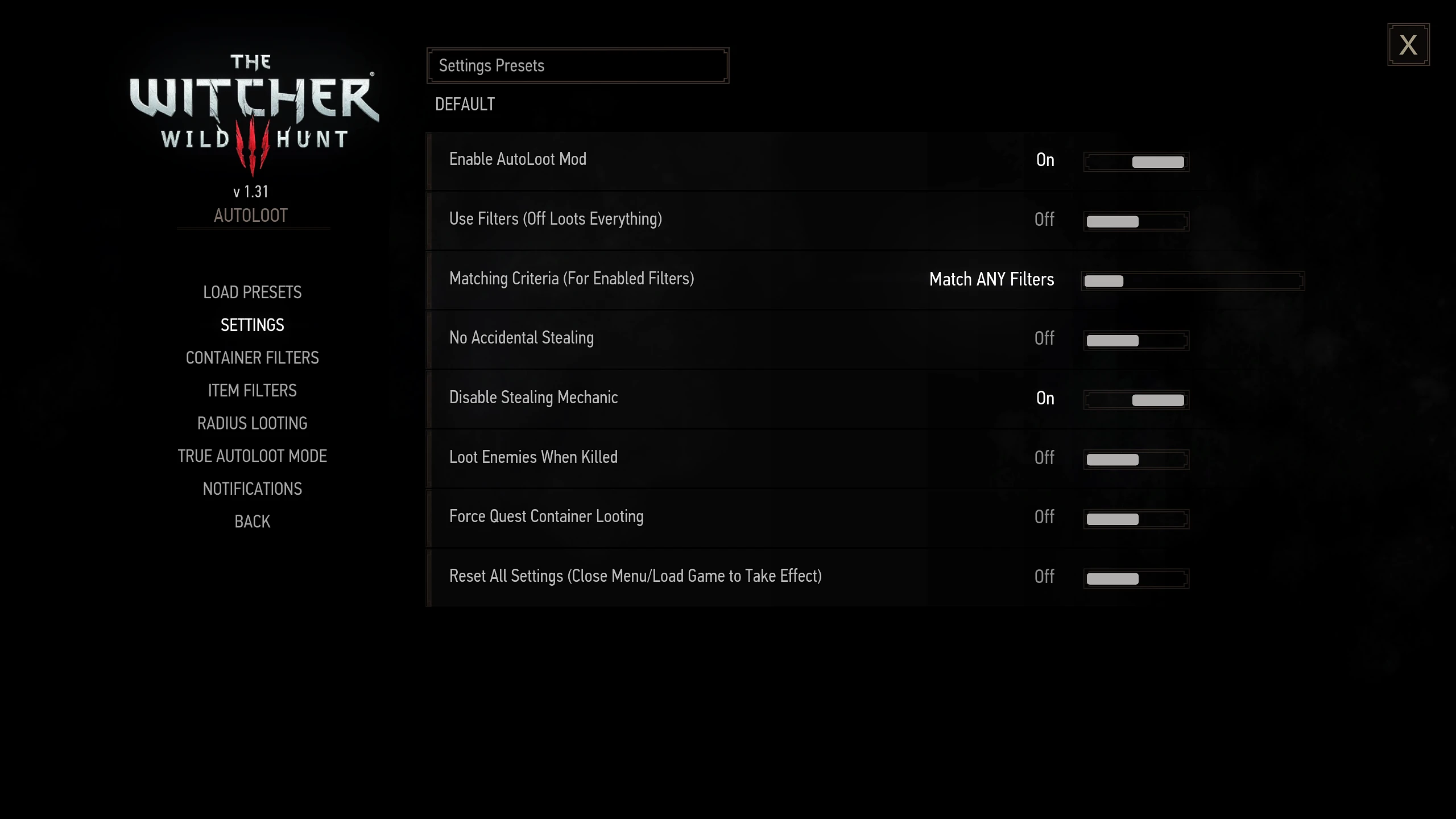
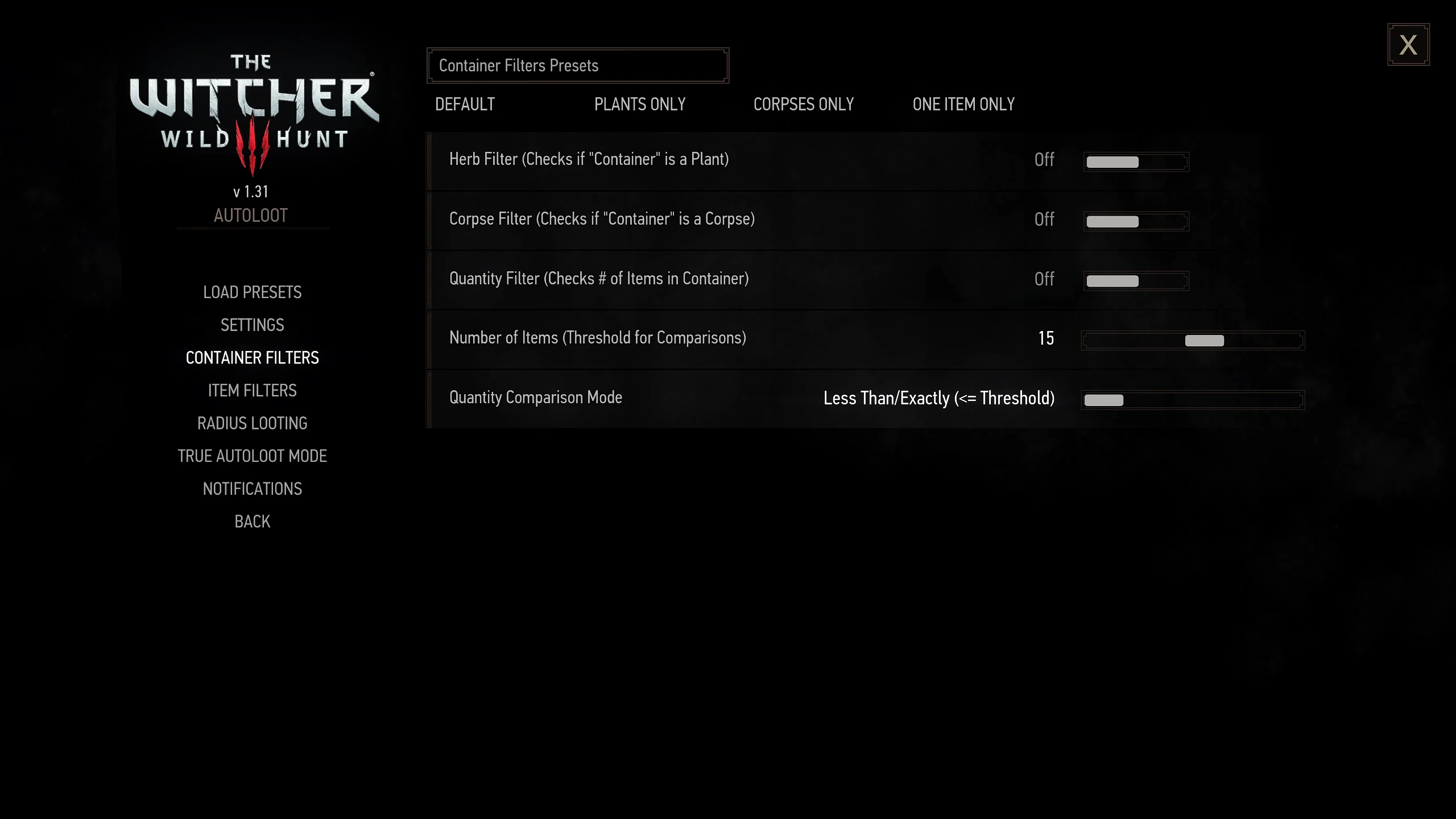
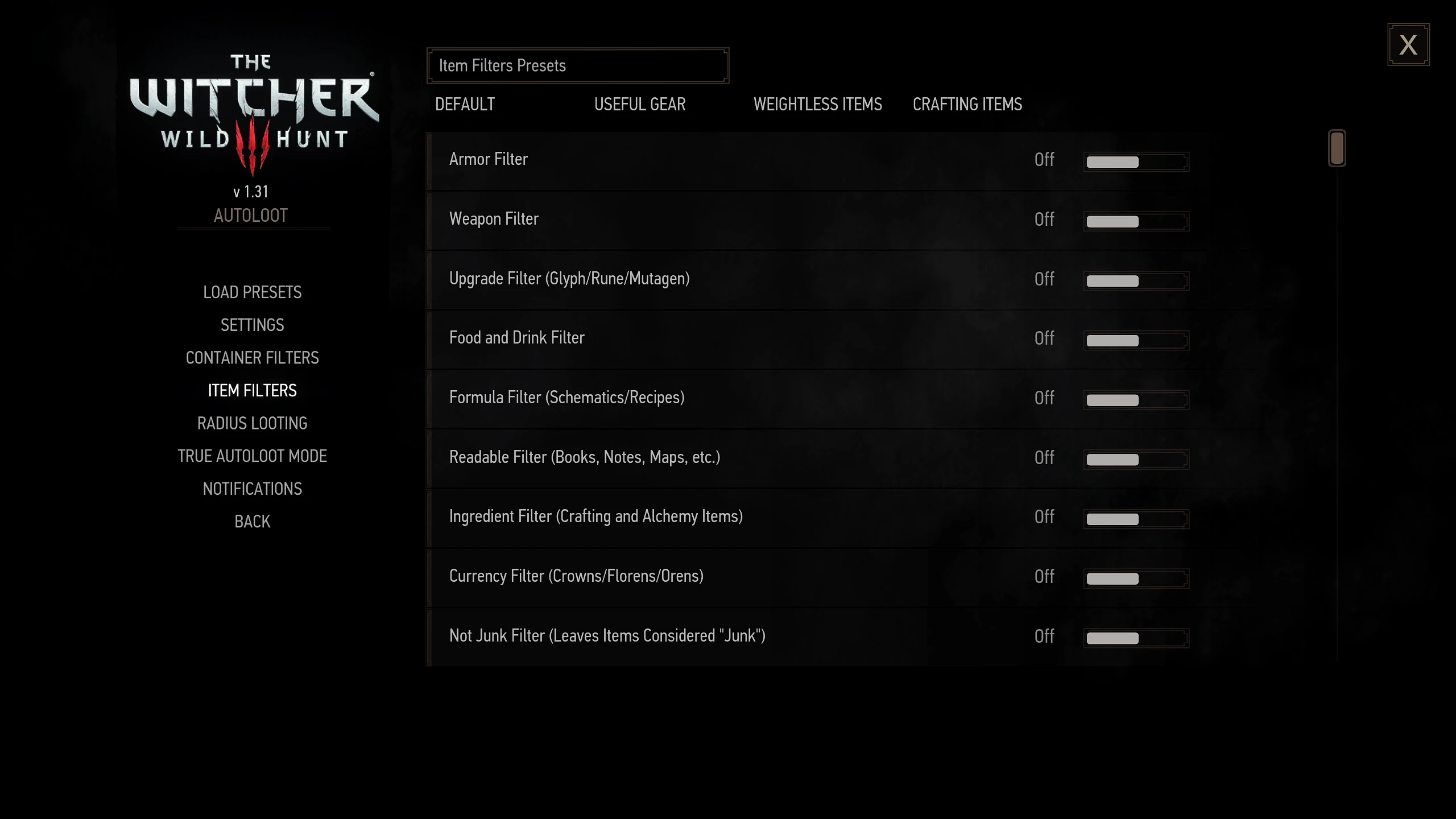
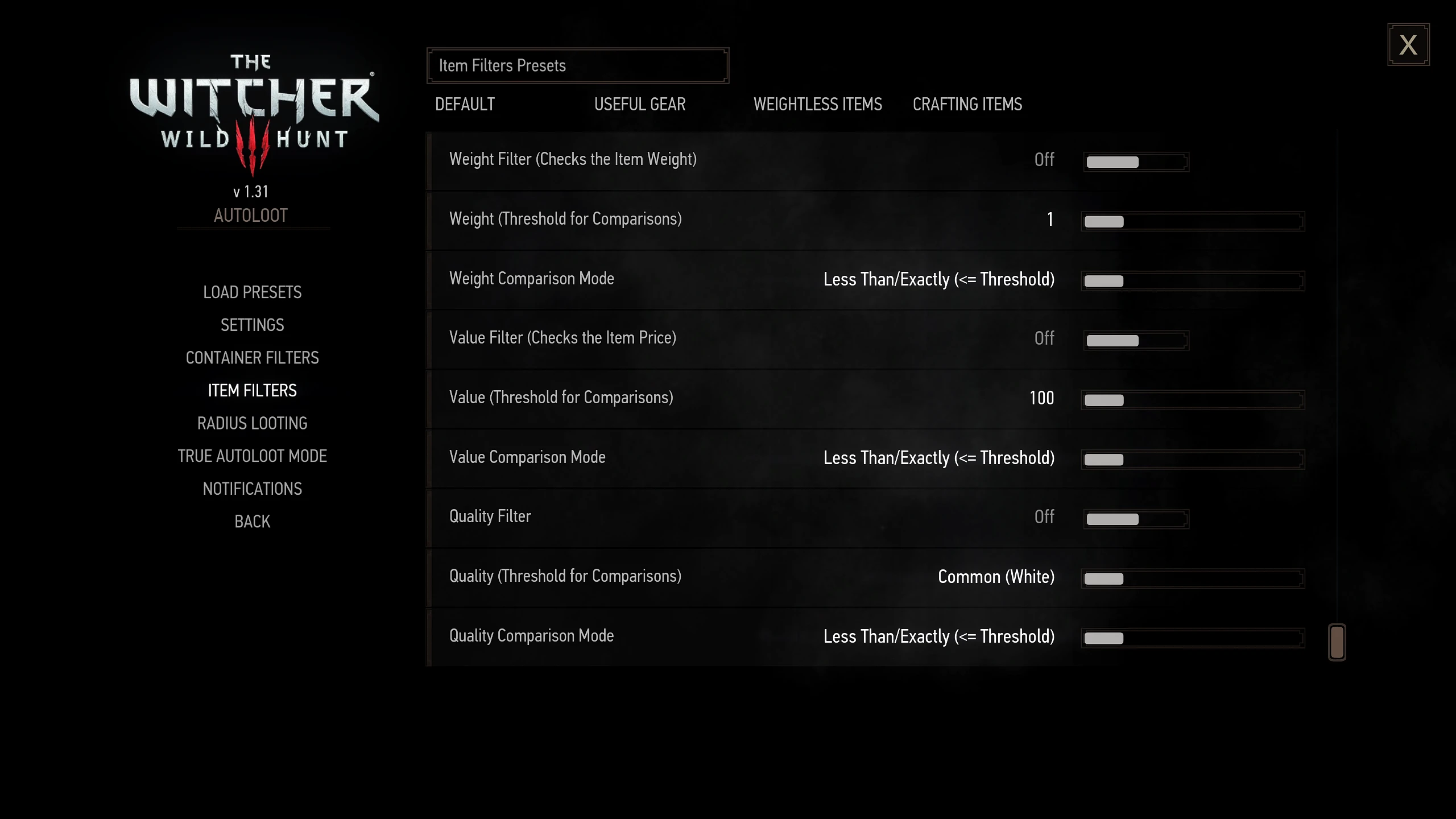
A complete optimization and rewrite (with permission from the original authors, JupiterTheGod and CarbonAlabel) of the AutoLoot Standard and Enhanced editions, with every aspect configurable through in-game menus. This mod also introduces the new "True AutoLoot" system.
Go to the YouTube video to jump between sections (it's a pretty long video)  For those new to AutoLoot (originally by JupiterTheGod), this mod simplifies looting in The Witcher 3. Items you always want to collect will now be automatically picked up from all containers. Building on the solid foundation of AutoLoot and AutoLoot Enhanced (by CarbonAlabel), this mod delivers a unified, optimized, and customizable AutoLoot experience.
This mod aims to eliminate the need for "special versions" of AutoLoot entirely, as well as the requirement to edit code in order to make your mod behave how you want. With permission from the original author, I’ve also taken some creative liberties and added new filters to cover items that weren't originally included in AutoLoot.
Finally, for those of you who don’t want to get bogged down looting caves, houses, and the countless places filled with containers, I’ve developed True AutoLoot ModeThis mode continuously searches for loot that matches your user configuration settings and picks it up without requiring any input or interaction from you. Special care has been taken to optimize this process, and I can confidently say it has finally reached a point where using this feature has no impact on performance.
I actively monitor for suggestions, bug reports, and feedback, so if you think something is missing, should be changed, or have found an issue with the mod, please post your thoughts!


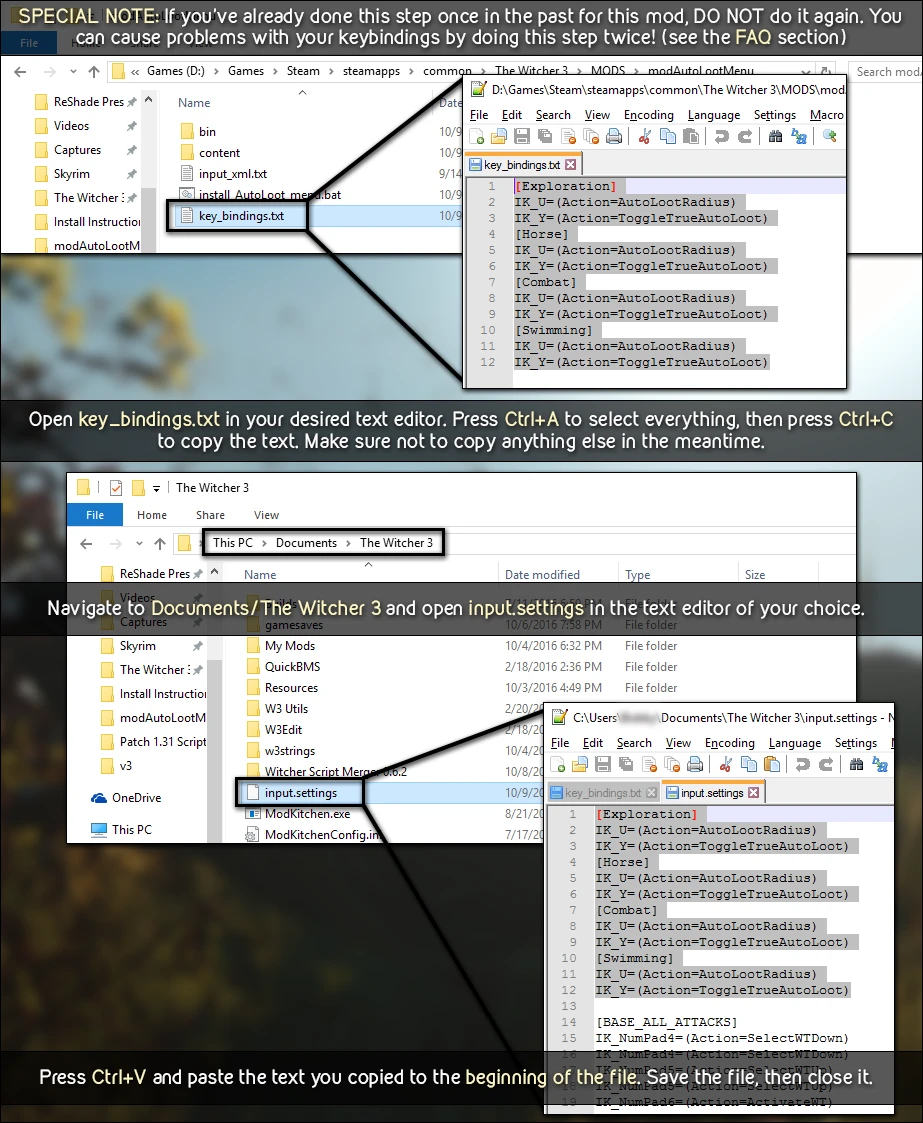
The only new input actions are under the [Combat] section. If you have already added the other actions to your input.settings file, do not add them again. Doing so may cause issues when you try to adjust your keybindings in the settings menu. The key will change in the menu, but will not work in-game..
 **BUGS:**
None known at this time.
Q: Will this mod work on version 1.X of the game?
A: This is intended for versions 1.30 and 1.31. Anything before that will not compile.
A: Items that are behind walls or below ground in caves? I want my loot, not the scenery!
A: This is because of how the mod searches for containers to loot. It uses a spherical area to detect containers, and there’s currently no known way to define what "accessible" means — to some players, it might mean being able to walk up to it, while to others, it might mean being inside the same building. Collision detection also doesn’t seem to work properly on containers. I’m still working on a way to fix this behavior.
A: Can I use this mod without installing the menu?
A No. All functions within this mod rely on the values set by your menu options. Additionally, there is no way to save settings to the configuration file if the menu is not installed (this is inherent game behavior, nothing this mod can do about that). I do not plan to make a non-menu version.
A: Do I have to follow the keybinding instructions (marked OPTIONAL)?
B: As indicated above, no, you don't. However, if you don't follow the input.settings section, you will not be able to use Radius Loot. Additionally, you will need to manually set "Use True AutoLoot Mode" to ON to enable that feature. If you don't follow the input.xml section, you will be unable to adjust your keybindings through the in-game Settings menu.
Q: After remapping my keybindings in the Settings menu, why are they not working?
A: You most likely have conflicting actions in input.settings. Open that file located in Documents/The Witcher 3, and search for either (Action=AutoLootRadius) or (Action=ToggleTrueAutoLoot) -- whichever keybinding isn't working. If you have duplicates under the same [Section], delete the additional entries (they will most likely be consecutive). Save input.settings and rebind your key in the Settings menu.
Q: I'm getting compile errors Like in this picture., help?!
A: First and foremost, these compile errors are not caused by this mod. You are using an outdated mod in your load order that is causing these compile errors. Recheck and update your mod list, and re-merge your scripts with script merger and try to compile again.

MENU OPTIONSI have moved this section to its own article to reduce the length of this page. Click here To view the ReadMe or check the Articles tab.
The new console commands come in two formats. One uses the "ahdal_" prefix, indicating they are specific to this mod and will not affect your game settings or other mods. The other format has no prefix. While these commands are not unsafe to use, applying parameters meant for other mods or settings from the vanilla config menu may alter values beyond this mod’s scope. It’s hard to mess up your settings, but still, exercise caution when experimenting.
Pink/purple parameters are REQUIRED, blue parameters are OPTIONAL (as indicated). I don't believe quotes or apostrophes are required to use these functions (I believe the console automatically casts the parameter to the required data type).
ahdal_reset
Resets all settings to their default values. This is the same as selecting the "Full Reset" option in the menu. Settings menu. You will see a banner appear in the middle of the screen indicating that the default values were loaded successfully.
ahdal_loadpreset( preset )
Loads the specified preset. A banner will appear in the center of the screen to confirm the preset was loaded successfully. Applicable values for Preset are (case-sensitive):
Example: ahdal_loadpreset( loadPresetHerbCorpse ) Loads the settings for "Herbs and Corpses Preset"
ahdal_clearnotifications
Clears all data stored in the AutoLoot notification manager. A message will appear at the bottom left for 7.5 seconds showing what was cleared. When out of combat, this should almost always return 0.000 for everything — the only exception is if you use it during combat or trigger it in the split second it takes for a loot to register. **Radius Loot / True AutoLoot** to loot containers.
getconfigval( group, Settings, optional time )
Gets the value stored in the config wrapper class (retrieved from your user.settings file) under the specified section [group] for the variable named Settings (this is meant for debugging to check certain values of XML menus without opening the menu, which could trigger other functions). Optionally, you can provide an integer time to indicate how long (in seconds) to display the notification with the parsed information. All parameters are case-sensitive.
Please provide the text you'd like me to translate. getconfigval("Gameplay", "AutomaticFinishersEnabled", 10) Displays (true/false) setting value for "Disable Automatic Finishers" option for 10 seconds
setconfigval( group, Setting, val, optional time, Optional Save )
Sets the value in the config wrapper in the section [group] for the variable named Settings with the value val. You may optionally provide an integer. time to indicate how long (in seconds) to display the notification with the parsed information. Additionally, you can optionally provide a bool value (true/false) for **Save** to indicate whether to save this value to user.settings (the difference between the two is that without a true value for Save(the value will not persist if you don't save your game).
Example: setconfigval( "AHDAutoLoot_true", "trueAutoLootTime", 2.0, , true ) Saves the True AutoLoot Mode refresh time to 2 seconds in user.settings; displays notification for default time (5 seconds by default)
getPlayerPos( optional mode, optional showTarget, optional time )
Displays a notification with X, Y, and Z coordinates of the player's position (default: global coordinates). You can input the string. local for the mode Parameter to indicate using local coordinates (not sure about the difference between global and local coordinates—might relate to different world states). You can pass a bool value. Show Target to indicate also displaying your target's coordinates (this is slightly misleading—the "target" refers to whatever entity you are currently focused on, such as a container, candle, or door; I don't think this works with enemies). Finally, you can optionally provide an integer. time To indicate how long (in seconds) to display the notification with the parsed information.
I notice you haven't provided any text to translate. Please share the game text you'd like me to translate from the source language into English. getplayerpos( , true ) --> Shows the world coordinates (X, Y, Z) of the player and target for the default duration (5 seconds)
 You will likely have to make one or two merges with Script Merger in playerWitcher.wsI have tested with many popular script-based mods, such as Friendly HUD, Immersive Cam, The Enhancement System, etc., and it does work. If you run into compile errors after merging, please watch the video below.

JupiterTheGod, original author of AutoLoot, for allowing me to make these modifications and use the original framework!
CarbonAlabel, author of AutoLoot Enhanced, for letting me incorporate its features into this mod
wghost81 and Murzinio for help designing the menu
gamerkiste for the German translation
Kutsu for the French translation
joselmocs For the notification icon/description ideas
iguruspain for the Spanish translation
WiperDarK for the Russian translation
tnovak for the Czech translation
futuroattore86 for the Italian translation
For the Portuguese translation
Go to the YouTube video to jump between sections (it's a pretty long video)
This mod aims to eliminate the need for "special versions" of AutoLoot entirely, as well as the requirement to edit code in order to make your mod behave how you want. With permission from the original author, I’ve also taken some creative liberties and added new filters to cover items that weren't originally included in AutoLoot.
Finally, for those of you who don’t want to get bogged down looting caves, houses, and the countless places filled with containers, I’ve developed True AutoLoot ModeThis mode continuously searches for loot that matches your user configuration settings and picks it up without requiring any input or interaction from you. Special care has been taken to optimize this process, and I can confidently say it has finally reached a point where using this feature has no impact on performance.
I actively monitor for suggestions, bug reports, and feedback, so if you think something is missing, should be changed, or have found an issue with the mod, please post your thoughts!
- By permission, includes all features of the original. AutoLoot by JupiterTheGod as well **AutoLoot Enhanced** by CarbonAlabel
- GUI menu for adjusting all aspects of AutoLoot in-game — every setting is actively tracked, no restarts or special instructions required.
- Over 20+ filters to truly customize exactly what loot you want this mod to pick up
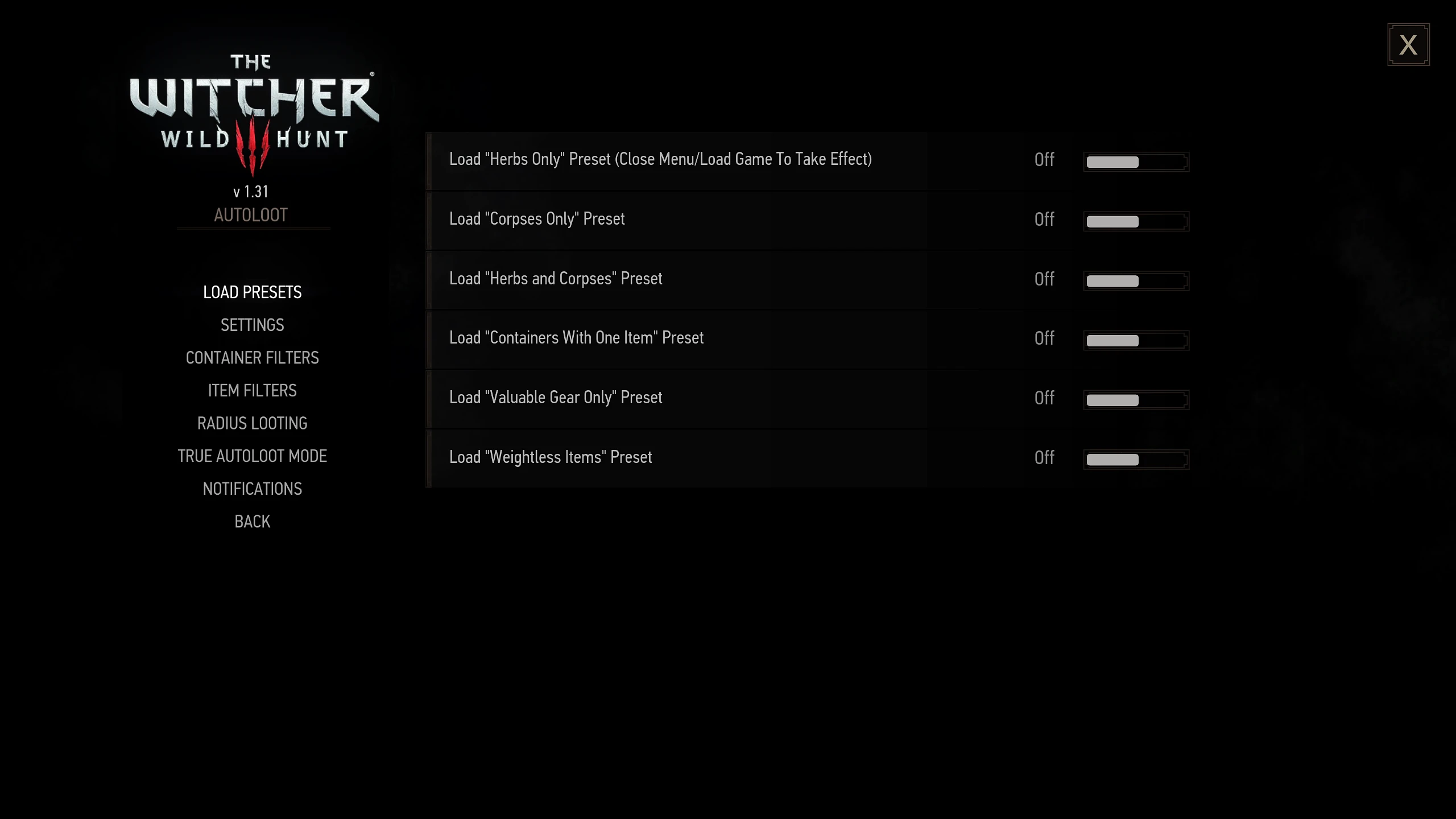
- Preset menu options to quickly configure every common version of AutoLoot (Loading starts when menu is closed)
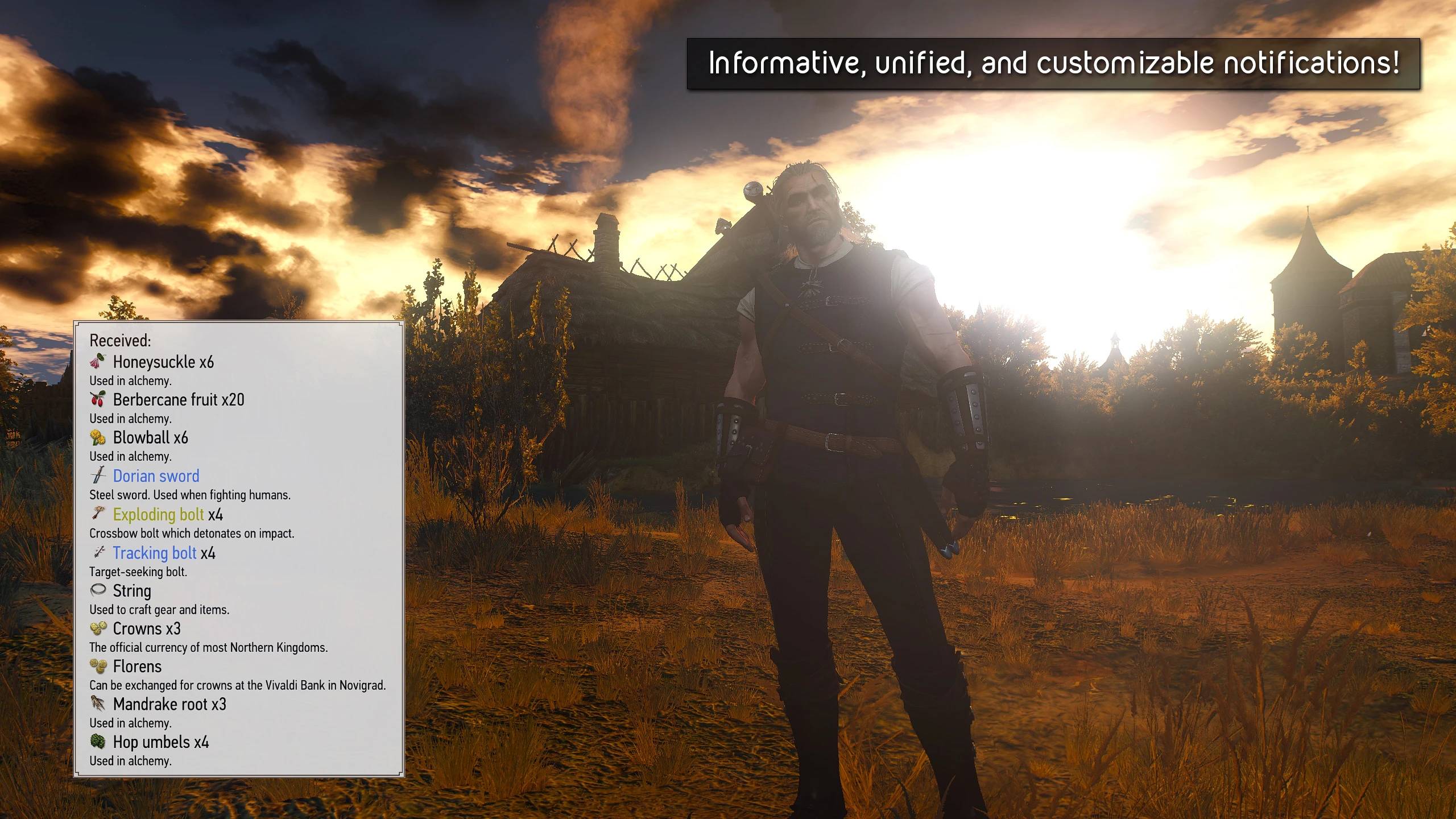
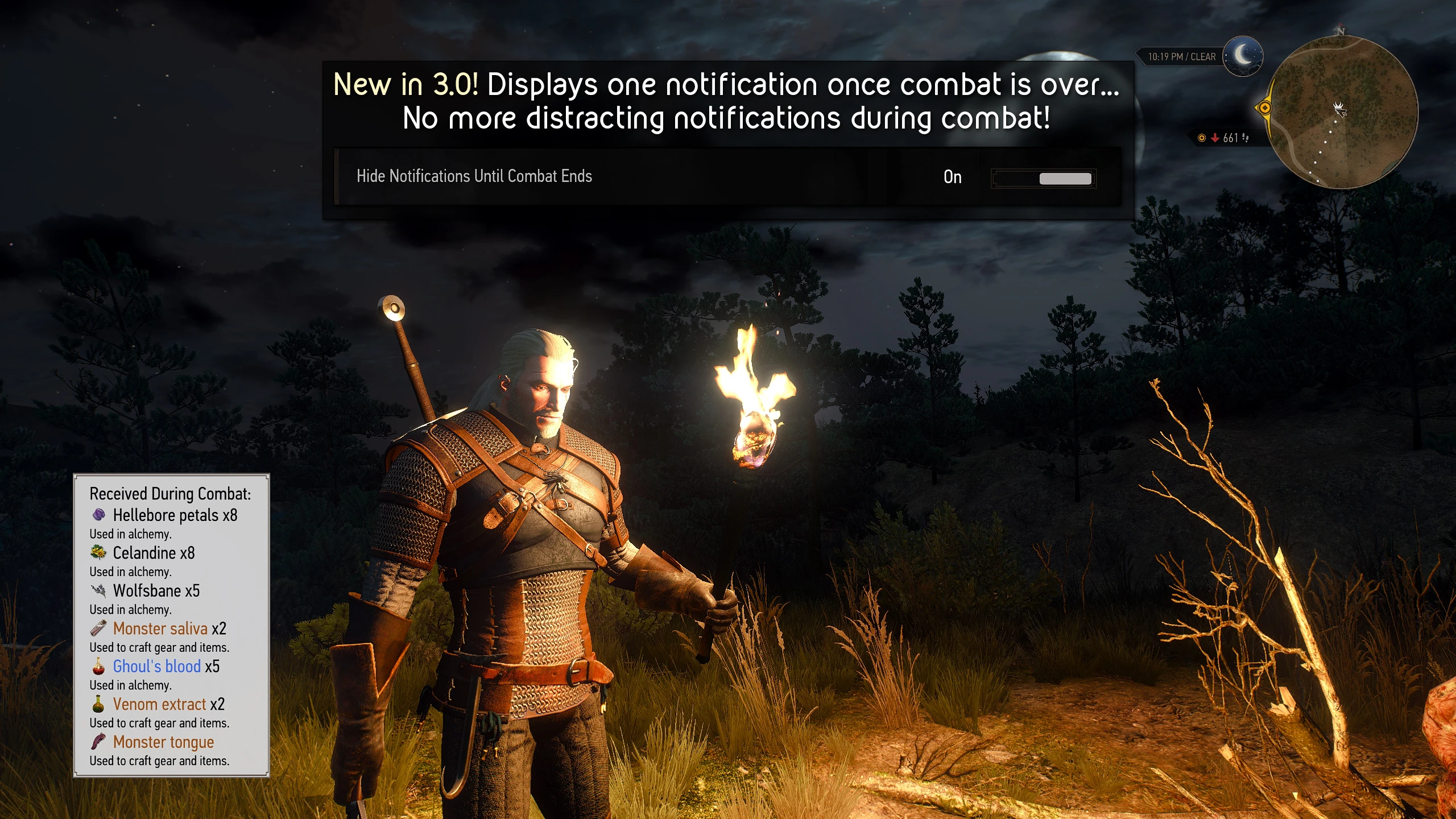
- Complete notifications control within the menu: font size Item descriptions and icons, display time, extra display time per item looted, and sound toggle — sounds now match the loot (no more generic "pop-up closed" sound)
- Safety checks implemented to ensure all quests and cut scenes remain unaffected by this mod (as well as an option to disable this feature if you don't care for it)
- Radius Looting: a feature by JupiterTheGod that loots all containers in a set area with one button press.
- True AutoLoot Mode: Activated by hotkey, this mod will automatically loot everything you specify indefinitely — no need to keep pressing buttons or interacting with containers. Pressing the same hotkey will disable this mode. This feature has no performance impact!
- Console commands added for use with this mod, along with generally helpful functions for use with any mod.
- Numerous bug fixes and optimizations to the original code.
- Localization for I see you've provided "English" as the text to translate. Since the target language is already English, here is the translation:
English, 请提供您要翻译的文本,以便我将其转换为英文。, French, I'm a professional game localization translator.
Auto-detect the source language and translate the following text into 【English】.
Requirements:
- The output must be and can only be in 【English】, with no mixing of other languages
- Fit the game context (UI, dialogue, quests, system text, etc.)
- Natural expression, in line with player habits, avoiding literal translation
- Do not add explanations or notes
Text:
Spanish, **Portuguese**, Italian, Russian, and Czech
FUTURE PLANS
I plan to add a "no cheating" option for Radius Looting and True AutoLoot Modes. This option would prevent the mod from looting items the player can't reach (such as items underground or inside buildings you haven't entered). It's proving tricky to implement, but I'll keep working on it (this is a feature I really want to use myself). IMPORTANT INFORMATION (PLEASE READ!)
- DELETE / UNINSTALL Any previous or other versions of AutoLoot, including this mod (DO NOT OVERWRITE)
- Once you finish following the instructions, run Script Merger (get it) here (if you don't have it)
- RETURNING USERS: If you are updating from version 2.x.x, YOU MUST STILL RUN SCRIPT MERGER (this will hopefully be the last update to require this)
- FIRST TIME USERS: Make sure to load a game at least once and wait for the "Default settings loaded" or "Update installed" message before changing your preferences, or your settings will be overwritten.
- ALL USERS: Make sure to install the config menu even if you're updating from 2.x.x (3.0 introduces new menu options)
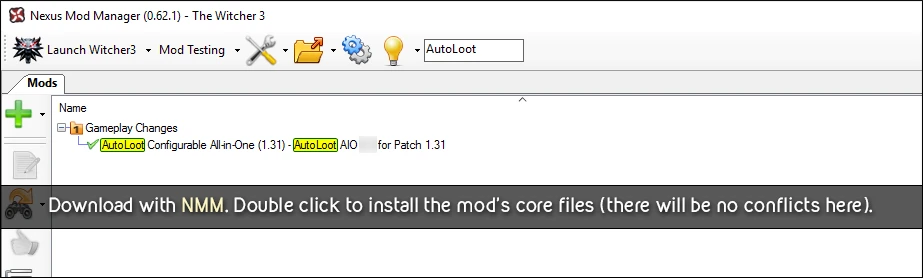
REQUIRED: CORE MOD INSTALLATION
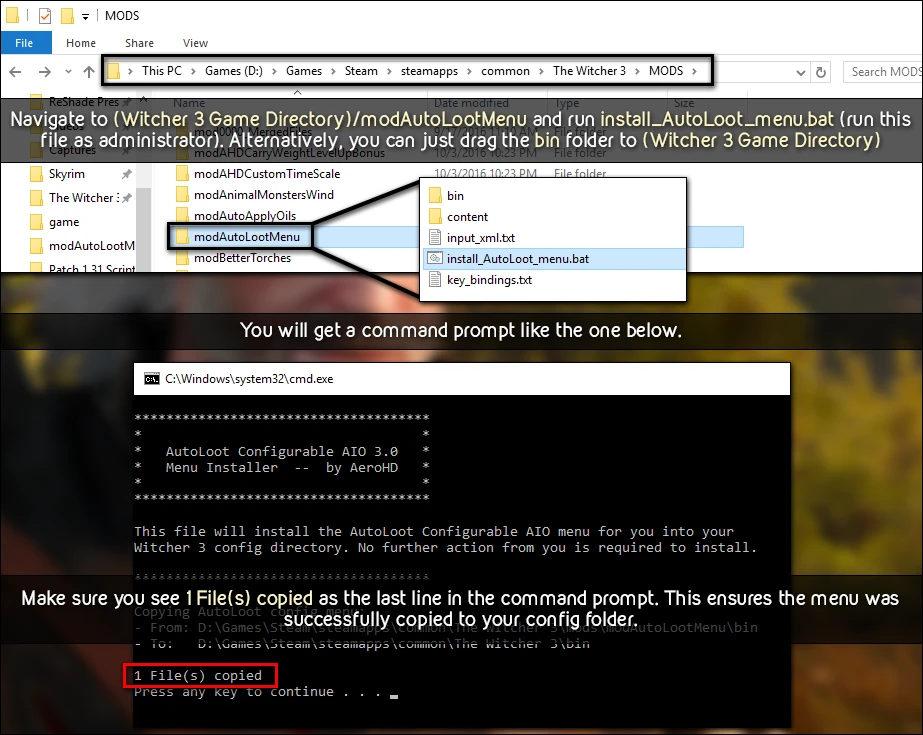
REQUIRED: GUI/CONFIG MENU
OPTIONAL: KEYBINDING ACTIONS (INPUT.SETTINGS)
This is optional, but you will not be able to use it. Radius Looting if you choose not to follow this section. True AutoLoot Mode will only be usable by opening the menu and manually setting it to ON.IMPORTANT FOR USERS UPDATING TO 3.0.x
The only new input actions are under the [Combat] section. If you have already added the other actions to your input.settings file, do not add them again. Doing so may cause issues when you try to adjust your keybindings in the settings menu. The key will change in the menu, but will not work in-game..
OPTIONAL: KEY BINDING MENU SETTINGS (INPUT.XML)
This is not required, but you will not be able to change your keybindings in the Settings If you choose not to proceed with this section, go to the menu.
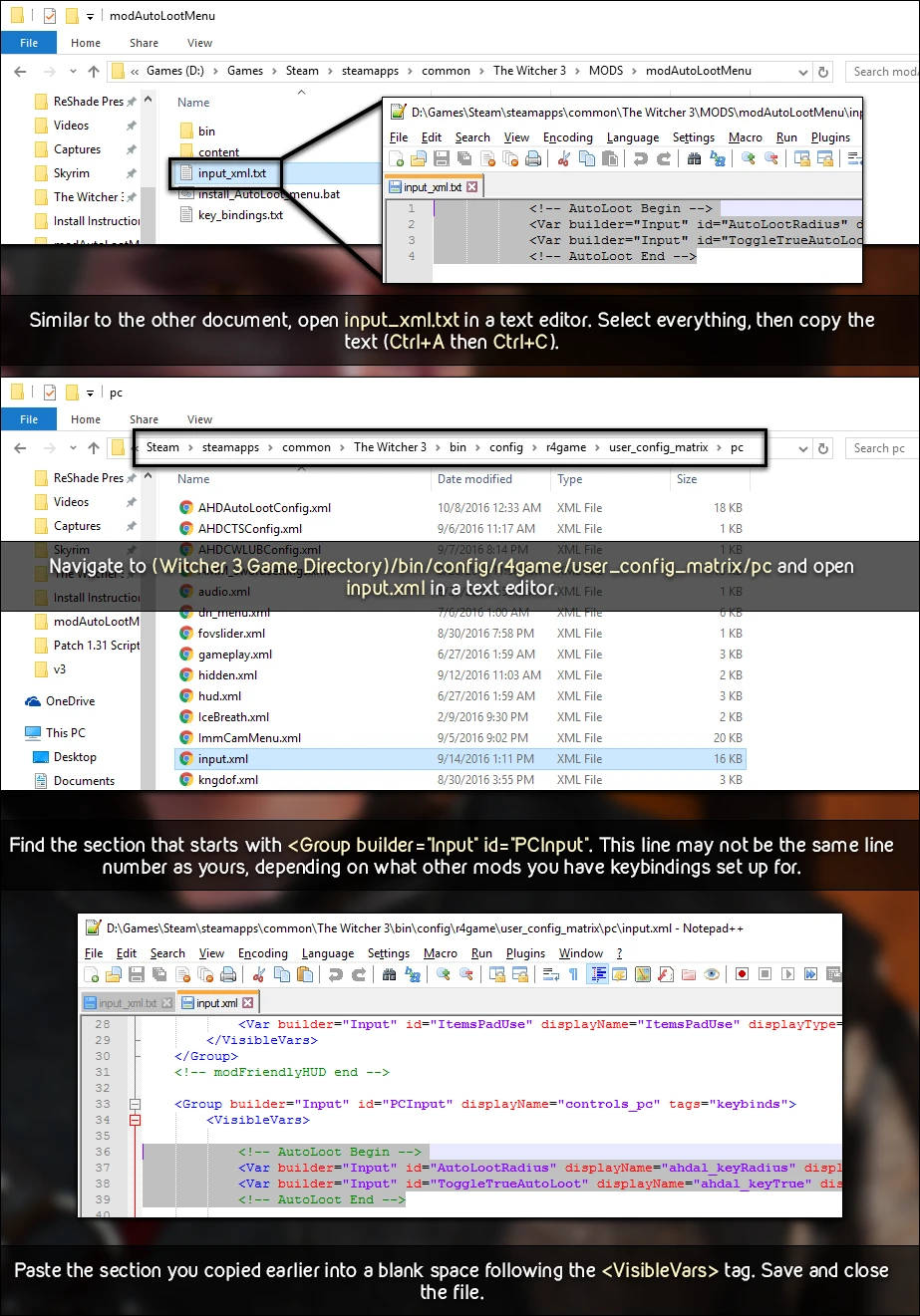
This is not required, but you will not be able to change your keybindings in the Settings If you choose not to proceed with this section, go to the menu.
None known at this time.
Q: Will this mod work on version 1.X of the game?
A: This is intended for versions 1.30 and 1.31. Anything before that will not compile.
A: Items that are behind walls or below ground in caves? I want my loot, not the scenery!
A: This is because of how the mod searches for containers to loot. It uses a spherical area to detect containers, and there’s currently no known way to define what "accessible" means — to some players, it might mean being able to walk up to it, while to others, it might mean being inside the same building. Collision detection also doesn’t seem to work properly on containers. I’m still working on a way to fix this behavior.
A: Can I use this mod without installing the menu?
A No. All functions within this mod rely on the values set by your menu options. Additionally, there is no way to save settings to the configuration file if the menu is not installed (this is inherent game behavior, nothing this mod can do about that). I do not plan to make a non-menu version.
A: Do I have to follow the keybinding instructions (marked OPTIONAL)?
B: As indicated above, no, you don't. However, if you don't follow the input.settings section, you will not be able to use Radius Loot. Additionally, you will need to manually set "Use True AutoLoot Mode" to ON to enable that feature. If you don't follow the input.xml section, you will be unable to adjust your keybindings through the in-game Settings menu.
Q: After remapping my keybindings in the Settings menu, why are they not working?
A: You most likely have conflicting actions in input.settings. Open that file located in Documents/The Witcher 3, and search for either (Action=AutoLootRadius) or (Action=ToggleTrueAutoLoot) -- whichever keybinding isn't working. If you have duplicates under the same [Section], delete the additional entries (they will most likely be consecutive). Save input.settings and rebind your key in the Settings menu.
Q: I'm getting compile errors Like in this picture., help?!

A: First and foremost, these compile errors are not caused by this mod. You are using an outdated mod in your load order that is causing these compile errors. Recheck and update your mod list, and re-merge your scripts with script merger and try to compile again.
MENU OPTIONS
CONSOLE COMMANDS
The new console commands come in two formats. One uses the "ahdal_" prefix, indicating they are specific to this mod and will not affect your game settings or other mods. The other format has no prefix. While these commands are not unsafe to use, applying parameters meant for other mods or settings from the vanilla config menu may alter values beyond this mod’s scope. It’s hard to mess up your settings, but still, exercise caution when experimenting.
Pink/purple parameters are REQUIRED, blue parameters are OPTIONAL (as indicated). I don't believe quotes or apostrophes are required to use these functions (I believe the console automatically casts the parameter to the required data type).
ahdal_reset
Resets all settings to their default values. This is the same as selecting the "Full Reset" option in the menu. Settings menu. You will see a banner appear in the middle of the screen indicating that the default values were loaded successfully.
ahdal_loadpreset( preset )
Loads the specified preset. A banner will appear in the center of the screen to confirm the preset was loaded successfully. Applicable values for Preset are (case-sensitive):
- loadPresetHerb
- loadPresetCorpse
- loadPresetHerbCorpse
- Load Preset
- Load Valuable Gear Preset
- loadPresetWeightless
Example: ahdal_loadpreset( loadPresetHerbCorpse ) Loads the settings for "Herbs and Corpses Preset"
ahdal_clearnotifications
Clears all data stored in the AutoLoot notification manager. A message will appear at the bottom left for 7.5 seconds showing what was cleared. When out of combat, this should almost always return 0.000 for everything — the only exception is if you use it during combat or trigger it in the split second it takes for a loot to register. **Radius Loot / True AutoLoot** to loot containers.
getconfigval( group, Settings, optional time )
Gets the value stored in the config wrapper class (retrieved from your user.settings file) under the specified section [group] for the variable named Settings (this is meant for debugging to check certain values of XML menus without opening the menu, which could trigger other functions). Optionally, you can provide an integer time to indicate how long (in seconds) to display the notification with the parsed information. All parameters are case-sensitive.
Please provide the text you'd like me to translate. getconfigval("Gameplay", "AutomaticFinishersEnabled", 10) Displays (true/false) setting value for "Disable Automatic Finishers" option for 10 seconds
setconfigval( group, Setting, val, optional time, Optional Save )
Sets the value in the config wrapper in the section [group] for the variable named Settings with the value val. You may optionally provide an integer. time to indicate how long (in seconds) to display the notification with the parsed information. Additionally, you can optionally provide a bool value (true/false) for **Save** to indicate whether to save this value to user.settings (the difference between the two is that without a true value for Save(the value will not persist if you don't save your game).
Example: setconfigval( "AHDAutoLoot_true", "trueAutoLootTime", 2.0, , true ) Saves the True AutoLoot Mode refresh time to 2 seconds in user.settings; displays notification for default time (5 seconds by default)
getPlayerPos( optional mode, optional showTarget, optional time )
Displays a notification with X, Y, and Z coordinates of the player's position (default: global coordinates). You can input the string. local for the mode Parameter to indicate using local coordinates (not sure about the difference between global and local coordinates—might relate to different world states). You can pass a bool value. Show Target to indicate also displaying your target's coordinates (this is slightly misleading—the "target" refers to whatever entity you are currently focused on, such as a container, candle, or door; I don't think this works with enemies). Finally, you can optionally provide an integer. time To indicate how long (in seconds) to display the notification with the parsed information.
I notice you haven't provided any text to translate. Please share the game text you'd like me to translate from the source language into English. getplayerpos( , true ) --> Shows the world coordinates (X, Y, Z) of the player and target for the default duration (5 seconds)
JupiterTheGod, original author of AutoLoot, for allowing me to make these modifications and use the original framework!
CarbonAlabel, author of AutoLoot Enhanced, for letting me incorporate its features into this mod
wghost81 and Murzinio for help designing the menu
gamerkiste for the German translation
Kutsu for the French translation
joselmocs For the notification icon/description ideas
iguruspain for the Spanish translation
WiperDarK for the Russian translation
tnovak for the Czech translation
futuroattore86 for the Italian translation
For the Portuguese translation
This tool is provided by the third party [bufftool]

Download Mods For Free
Install LagoFast, start The Witcher 3: Wild Hunt and play with the mods you love.
We use cookies to make interactions with our websites andservices easy and meaningful. For more information aboutthe cookies we use or to find out how you can disable cookies, click here.