Lip Movement and HiRes Shadows (and High Quality Heads) for NPCs in Gameplay
Autor:rmemrLast updated:30/05/2020 18:48:07279.5K162KB

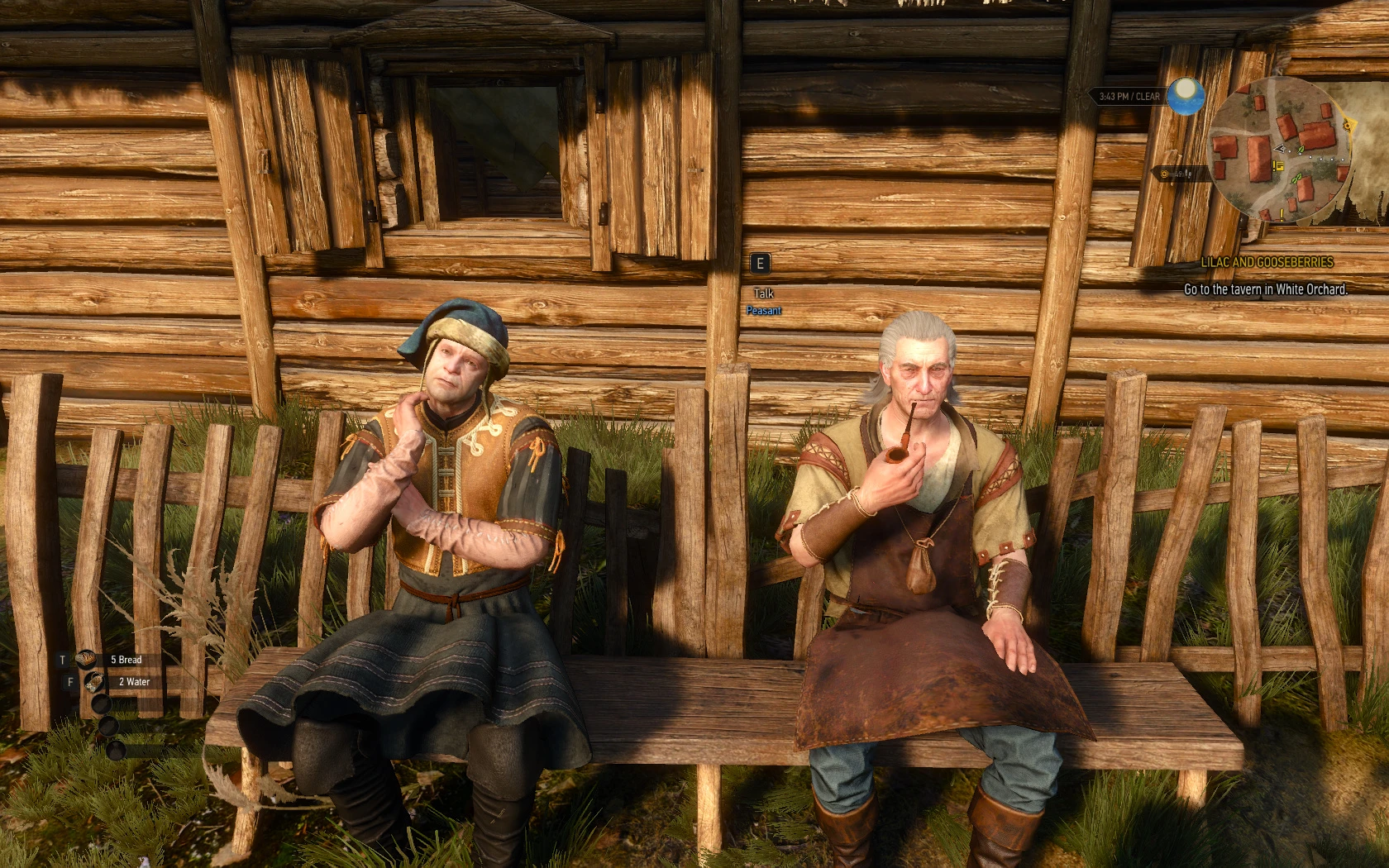
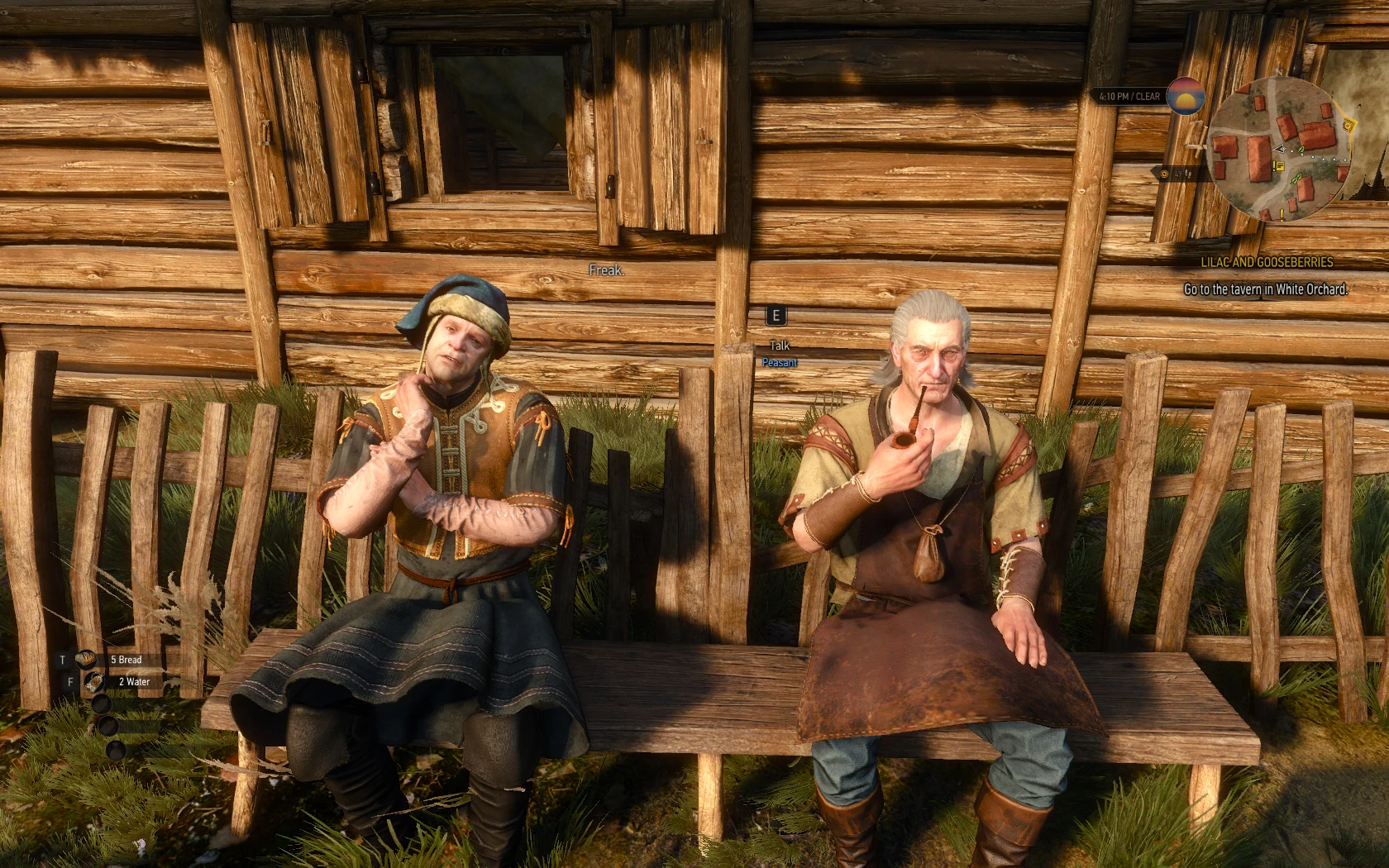
Mod Introduction
Enables high-quality heads (LOD0), lip movement, and higher shadow resolution used in dialogue scenes for human NPCs during normal gameplay.
Lip Movement and High-Res Shadows (and High Quality Heads) for NPCs in Gameplay
Enables high-quality heads (LOD0), lip movement, and higher shadow resolution for human NPCs during normal gameplay, as used in dialogue scenes.
**Newsflash:**
Don’t use head LOD mods like High Quality Facesand change your "MeshLODDistanceScale" back to "1".
EnableMimics mod forces NPCs to use their highest quality head mesh.
**Demonstration:**
Link
This means there is no reason to use "High Quality Faces" or any other head LOD mod.
Because those require this mod for working mimics, and with this mod installed, they literally do nothing.
This means you can set your "MeshLODDistanceScale" value back to 1.
Setting "MeshLODDistanceScale" to anything other than "1" usually causes more issues than it fixes.
What's New?
**v0.5.3b**
I literally don't know what went wrong. It looks like Nexus didn't update the file. I didn't even have the previous version on my hard drive when I uploaded the current version.
- The previous v0.5.3 was actually v0.5.2
v0.5.3
- Fixed an issue where mimic reload timing still caused online players to be disconnected immediately after cutscenes or dialogue.
v0.5.2
- Fixed a bug where reloading the mimics mod after cutscenes or dialogues could interrupt online sessions that trigger immediately afterward.
- Reverted beard growth and facial animation fix to the previous method to prevent potion effects from being canceled after loading a save.
v0.5.1
- Fixed the beard growth bug rework; had a breakthrough on how to trigger Geralt's facial animations.
(Optional) Added compatibility patch/bugfix for Complete Animation mod (now I’m fixing mods I don’t even use)
v0.5
- Fixed a bug where Ciri was not blinking while under player control.
- Fixed another bug: after some dialogues/cutscenes, the mimics mod did not reactivate LOD0 heads.
v0.4.1
- Fixed the beard growth bug; now compatible with DLC beards.
- Fixed a bug where some NPCs' faces would melt after being knocked out by guards (mimics mod unloaded)
v0.4
- Fixed a bug; dead NPCs no longer chew their tongues after death
- Added versions with scripted beard growth
v0.3.1
- Fixed a bug where refreshing Geralt's head during a cutscene would temporarily stop his facial expressions (only occurred if the cutscene started right after loading a save or switching subworlds).
- Added commands "mt" and "mimicstrigger" to manually refresh mimics. If NPCs do not emote after using the command, they never will or did.
v0.3
- Fixed a bug where blinking could desync other facial animations
- Added the mimic trigger also to the OnSpawned event of npc.ws
- Newsflash: EnableMimics mod forces NPCs to use their highest quality head mesh
v0.2.1
- Added Version without HiResShadows
- Adjusted blinking function; added blinking animation (NPCs will now occasionally blink twice in quick succession)
v0.2
**English:** NPCs will now randomly blink (NPCs did not blink in version 0.1).
- Fixed a bug; now "Lip Movement" will be reapplied after dialogues and cutscenes.
- Fixed a vanilla bug: Geralt's idle facial animations will now play (he will occasionally frown, slightly open his mouth, blink, etc.).
What it does
NPCs' lip movements often appear mismatched when delivering their one-liners during normal gameplay—sometimes it works, but most of the time it doesn't. This mod triggers a special mini-scene for every newly spawned NPC, which seems to improve consistency. There may be some limitations, so don't expect it to work all the time.
The mod also ensures NPCs always use their LOD0 heads (highest quality heads).
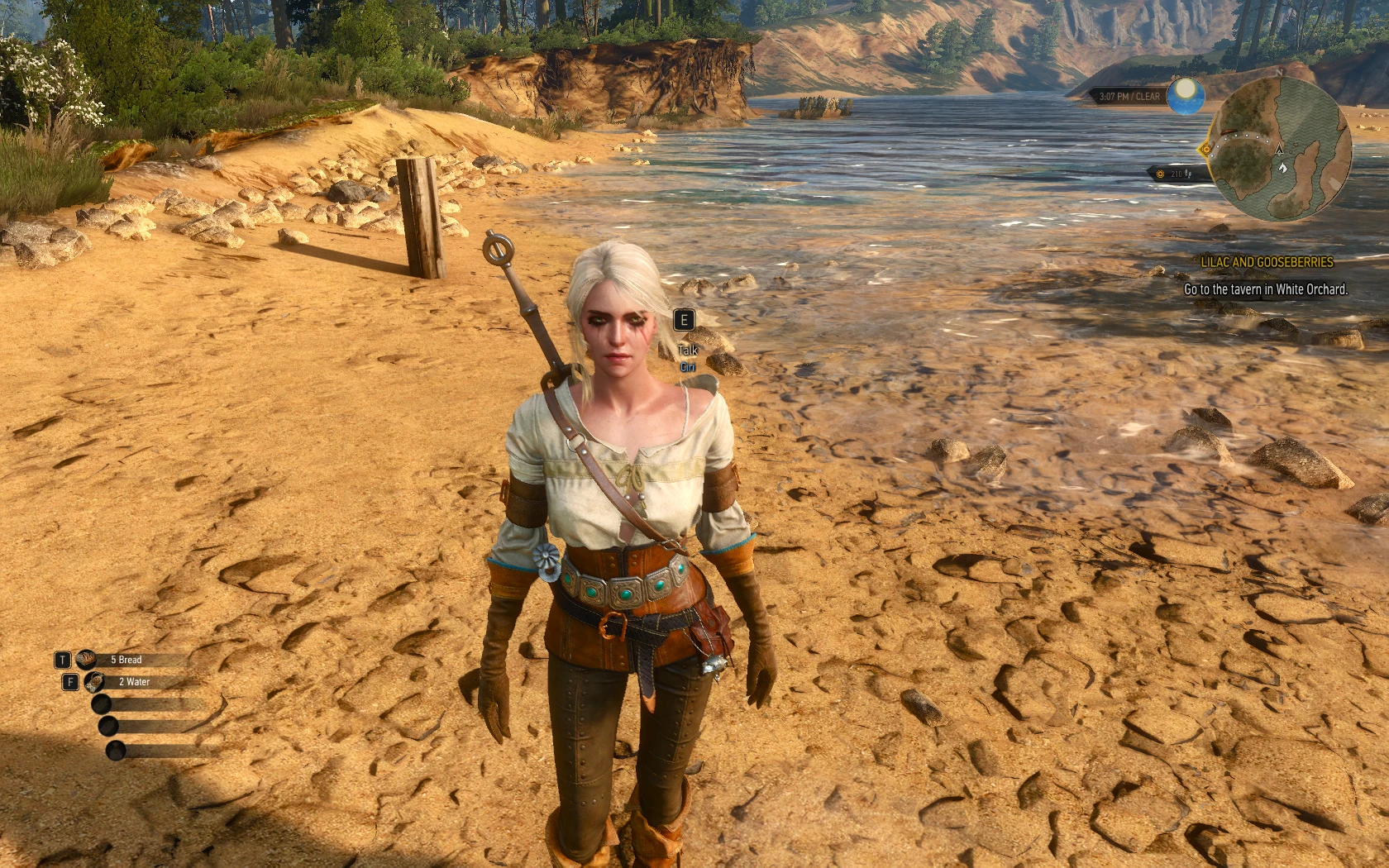
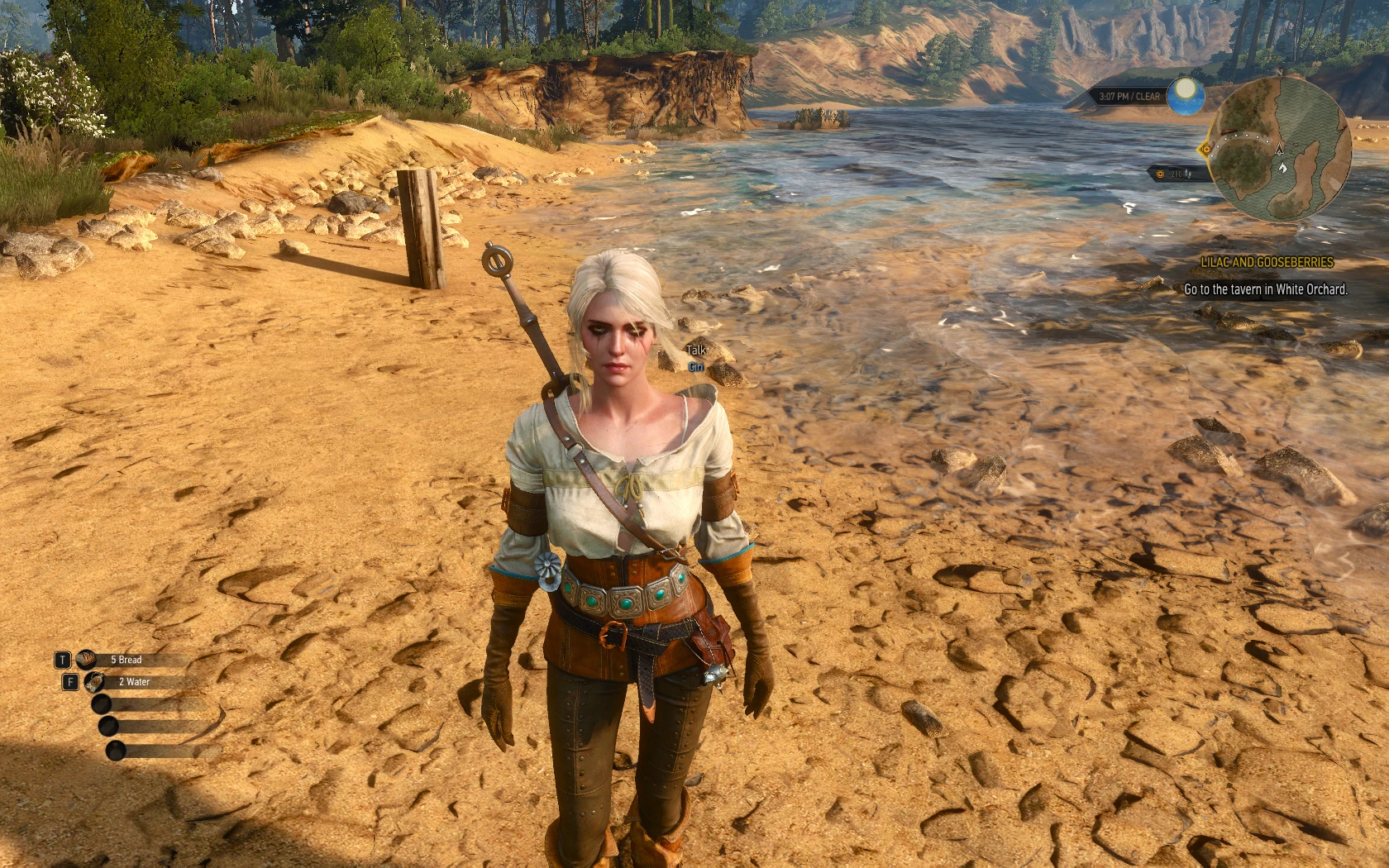
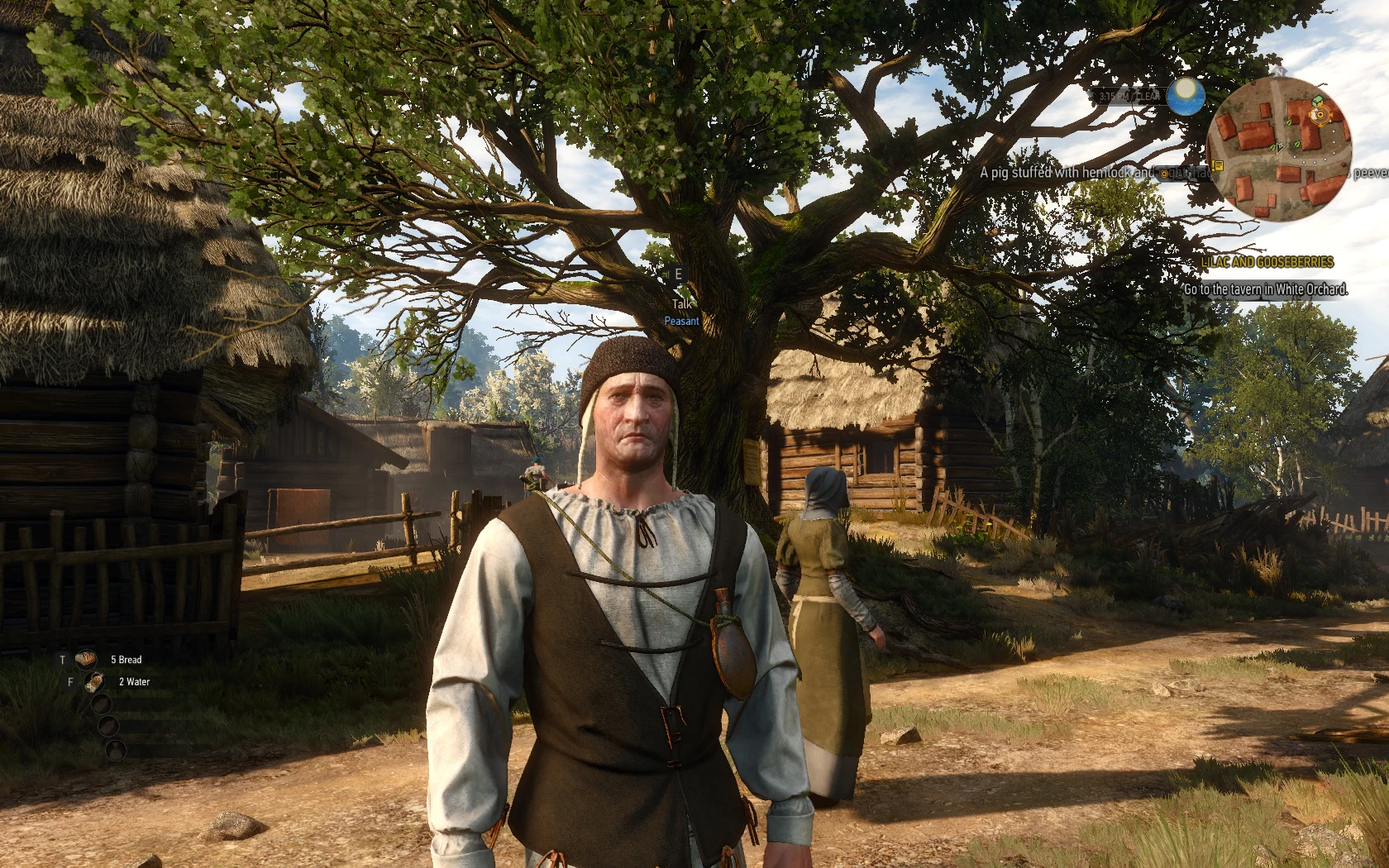
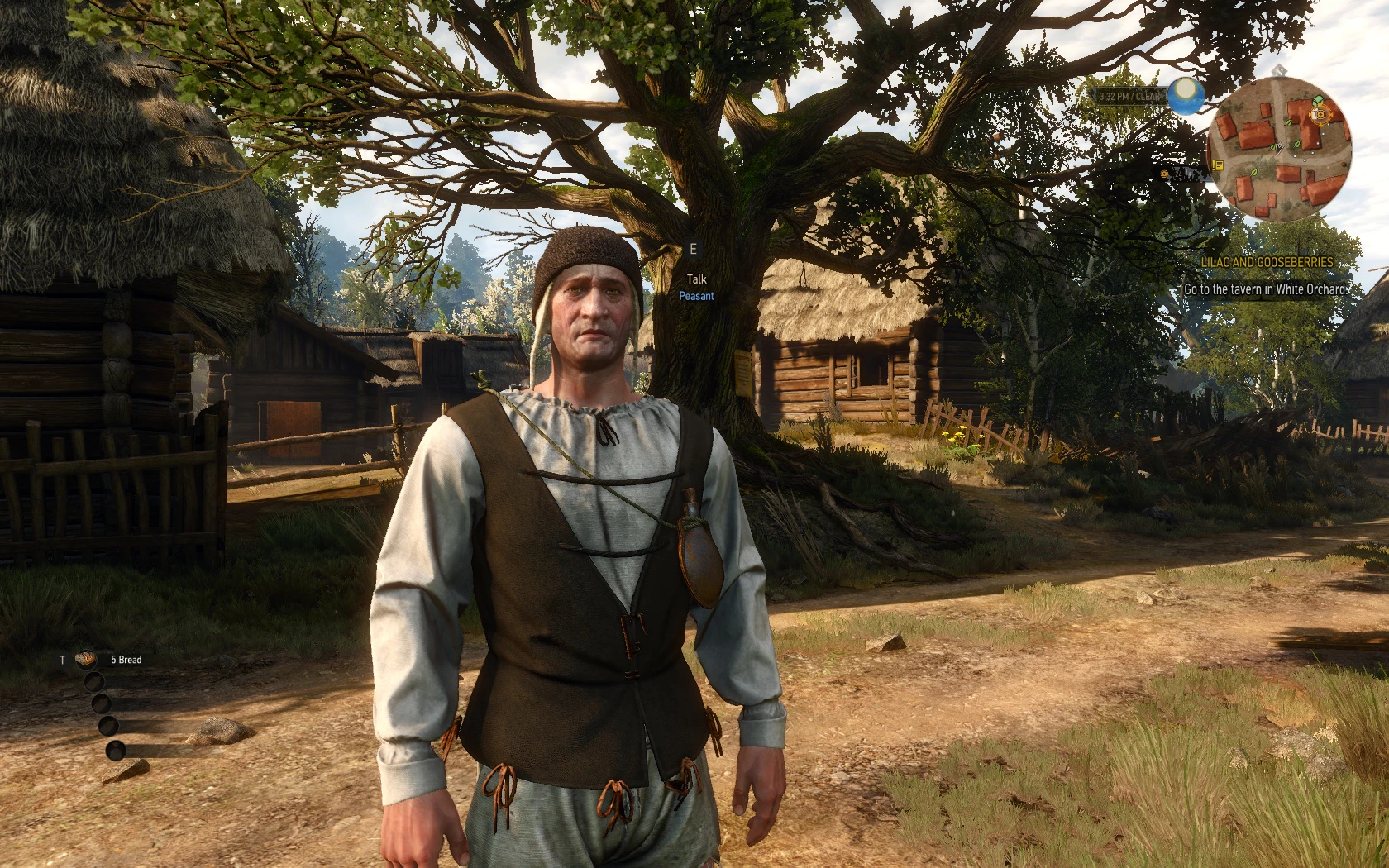
The mod also enables a flag for higher resolution shadows, similar to those used in dialogue scenes, for every new NPC. This mainly results in a subtle improvement to self-shadowing — see screenshots (all vanilla with freecam).
May or may not dip the FPS - I haven't noticed/tested. But since the changes are subtle anyway (you have to know where to look for them in normal gameplay) and you really, really seem to care so much about graphical fidelity - well, test and decide for yourself.
Tested with versions 1.11 and 1.22 on a vanilla install (no LOD mods, etc., but I see no reason why it wouldn't work with other mods).
How to install/use
modEnableMimics_blinking (use ONLY with v1.30+)
The scripts "game/actor.ws", "game/npc/npc.ws" and "game/player/player.ws" were modified
0b. Do not use any face or head LOD mods.
1. Unzip package into your witcher game directory (so dlc folder content from package goes into witcher 3/dlc folder and mod folder content from package goes into witcher3/mod folder)
2. If necessary, merge with your preferred tool (e.g., Script Merger). I don’t use any mergers myself, so I can’t help with script conflicts — sorry.
3. If you previously modified "MeshLODDistanceScale," reset it to "1."
("C:\Users\[your PC]\documents\The Witcher 3" inside of user.settings you can find "MeshLODDistanceScale")
**Older Versions:**
Full Packageactor.ws for v1.30 (Version 1.30 only)
1. Unzip the package into your Witcher game directory (so the DLC folder contents go into The Witcher 3/DLC, and the mod folder contents go into The Witcher 3/Mods).
2. If necessary, merge with your preferred tool (e.g., Script Merger). I don't use any mergers myself, so I can't help with script conflicts—sorry.
Manual Merge (works with all versions v1.11+ and likely older ones as well)
1. Unzip the package into your Witcher game directory (so the contents of the dlc folder from the package go into the Witcher 3/dlc folder, and the mod folder contents from the package go into the Witcher 3/mods folder).
Package goes into Witcher 3 mod folder.
Add the following line as the first line inside the CActor class (after the opening brace) in wichter 3/content/content0/scripts/game/actor.ws:
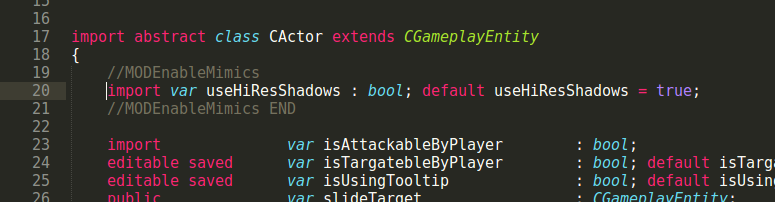
3. Add the following line as the last line of the `OnSpawned` function (just before the closing `}` of the function) in the class `CActor` located in `witcher 3/content/content0/scripts/game/actor.ws`:
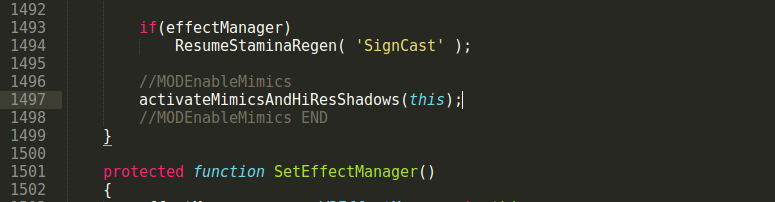
Afterwards it should look more or less like this (example for v1.22):
Start game.
How to Uninstall
1. Delete the modEnableMimics folders from The Witcher 3/dlc and from The Witcher 3/mods
2. Delete the script lines added in steps 2 and 3 above.
Have fun.
Thx @Murzinio and @skacikpl For testing and valuable info.
Thx @Gerignak for providing fixes from v0.2 to v0.5.3
Enables high-quality heads (LOD0), lip movement, and higher shadow resolution for human NPCs during normal gameplay, as used in dialogue scenes.
**Newsflash:**
Don’t use head LOD mods like High Quality Facesand change your "MeshLODDistanceScale" back to "1".
EnableMimics mod forces NPCs to use their highest quality head mesh.
**Demonstration:**
Link
This means there is no reason to use "High Quality Faces" or any other head LOD mod.
Because those require this mod for working mimics, and with this mod installed, they literally do nothing.
This means you can set your "MeshLODDistanceScale" value back to 1.
Setting "MeshLODDistanceScale" to anything other than "1" usually causes more issues than it fixes.
What's New?
**v0.5.3b**
I literally don't know what went wrong. It looks like Nexus didn't update the file. I didn't even have the previous version on my hard drive when I uploaded the current version.
- The previous v0.5.3 was actually v0.5.2
v0.5.3
- Fixed an issue where mimic reload timing still caused online players to be disconnected immediately after cutscenes or dialogue.
v0.5.2
- Fixed a bug where reloading the mimics mod after cutscenes or dialogues could interrupt online sessions that trigger immediately afterward.
- Reverted beard growth and facial animation fix to the previous method to prevent potion effects from being canceled after loading a save.
v0.5.1
- Fixed the beard growth bug rework; had a breakthrough on how to trigger Geralt's facial animations.
(Optional) Added compatibility patch/bugfix for Complete Animation mod (now I’m fixing mods I don’t even use)
v0.5
- Fixed a bug where Ciri was not blinking while under player control.
- Fixed another bug: after some dialogues/cutscenes, the mimics mod did not reactivate LOD0 heads.
v0.4.1
- Fixed the beard growth bug; now compatible with DLC beards.
- Fixed a bug where some NPCs' faces would melt after being knocked out by guards (mimics mod unloaded)
v0.4
- Fixed a bug; dead NPCs no longer chew their tongues after death
- Added versions with scripted beard growth
v0.3.1
- Fixed a bug where refreshing Geralt's head during a cutscene would temporarily stop his facial expressions (only occurred if the cutscene started right after loading a save or switching subworlds).
- Added commands "mt" and "mimicstrigger" to manually refresh mimics. If NPCs do not emote after using the command, they never will or did.
v0.3
- Fixed a bug where blinking could desync other facial animations
- Added the mimic trigger also to the OnSpawned event of npc.ws
- Newsflash: EnableMimics mod forces NPCs to use their highest quality head mesh
v0.2.1
- Added Version without HiResShadows
- Adjusted blinking function; added blinking animation (NPCs will now occasionally blink twice in quick succession)
v0.2
**English:** NPCs will now randomly blink (NPCs did not blink in version 0.1).
- Fixed a bug; now "Lip Movement" will be reapplied after dialogues and cutscenes.
- Fixed a vanilla bug: Geralt's idle facial animations will now play (he will occasionally frown, slightly open his mouth, blink, etc.).
What it does
NPCs' lip movements often appear mismatched when delivering their one-liners during normal gameplay—sometimes it works, but most of the time it doesn't. This mod triggers a special mini-scene for every newly spawned NPC, which seems to improve consistency. There may be some limitations, so don't expect it to work all the time.
The mod also ensures NPCs always use their LOD0 heads (highest quality heads).
The mod also enables a flag for higher resolution shadows, similar to those used in dialogue scenes, for every new NPC. This mainly results in a subtle improvement to self-shadowing — see screenshots (all vanilla with freecam).
May or may not dip the FPS - I haven't noticed/tested. But since the changes are subtle anyway (you have to know where to look for them in normal gameplay) and you really, really seem to care so much about graphical fidelity - well, test and decide for yourself.
Tested with versions 1.11 and 1.22 on a vanilla install (no LOD mods, etc., but I see no reason why it wouldn't work with other mods).
How to install/use
modEnableMimics_blinking (use ONLY with v1.30+)
The scripts "game/actor.ws", "game/npc/npc.ws" and "game/player/player.ws" were modified
0b. Do not use any face or head LOD mods.
1. Unzip package into your witcher game directory (so dlc folder content from package goes into witcher 3/dlc folder and mod folder content from package goes into witcher3/mod folder)
2. If necessary, merge with your preferred tool (e.g., Script Merger). I don’t use any mergers myself, so I can’t help with script conflicts — sorry.
3. If you previously modified "MeshLODDistanceScale," reset it to "1."
("C:\Users\[your PC]\documents\The Witcher 3" inside of user.settings you can find "MeshLODDistanceScale")
**Older Versions:**
Full Packageactor.ws for v1.30 (Version 1.30 only)
1. Unzip the package into your Witcher game directory (so the DLC folder contents go into The Witcher 3/DLC, and the mod folder contents go into The Witcher 3/Mods).
2. If necessary, merge with your preferred tool (e.g., Script Merger). I don't use any mergers myself, so I can't help with script conflicts—sorry.
Manual Merge (works with all versions v1.11+ and likely older ones as well)
1. Unzip the package into your Witcher game directory (so the contents of the dlc folder from the package go into the Witcher 3/dlc folder, and the mod folder contents from the package go into the Witcher 3/mods folder).
Package goes into Witcher 3 mod folder.
Add the following line as the first line inside the CActor class (after the opening brace) in wichter 3/content/content0/scripts/game/actor.ws:
import var useHiResShadows : bool; default useHiResShadows = true;
3. Add the following line as the last line of the `OnSpawned` function (just before the closing `}` of the function) in the class `CActor` located in `witcher 3/content/content0/scripts/game/actor.ws`:
activateMimicsAndHiResShadows(this);
Afterwards it should look more or less like this (example for v1.22):
Start game.
How to Uninstall
1. Delete the modEnableMimics folders from The Witcher 3/dlc and from The Witcher 3/mods
2. Delete the script lines added in steps 2 and 3 above.
Have fun.
Thx @Murzinio and @skacikpl For testing and valuable info.
Thx @Gerignak for providing fixes from v0.2 to v0.5.3
This tool is provided by the third party [bufftool]

Download Mods For Free
Install LagoFast, start The Witcher 3: Wild Hunt and play with the mods you love.
We use cookies to make interactions with our websites andservices easy and meaningful. For more information aboutthe cookies we use or to find out how you can disable cookies, click here.