Modded Hair in DLCs
Autor:DmitriasLast updated:03/03/2021 00:20:54816.9K25KB

Mod Introduction
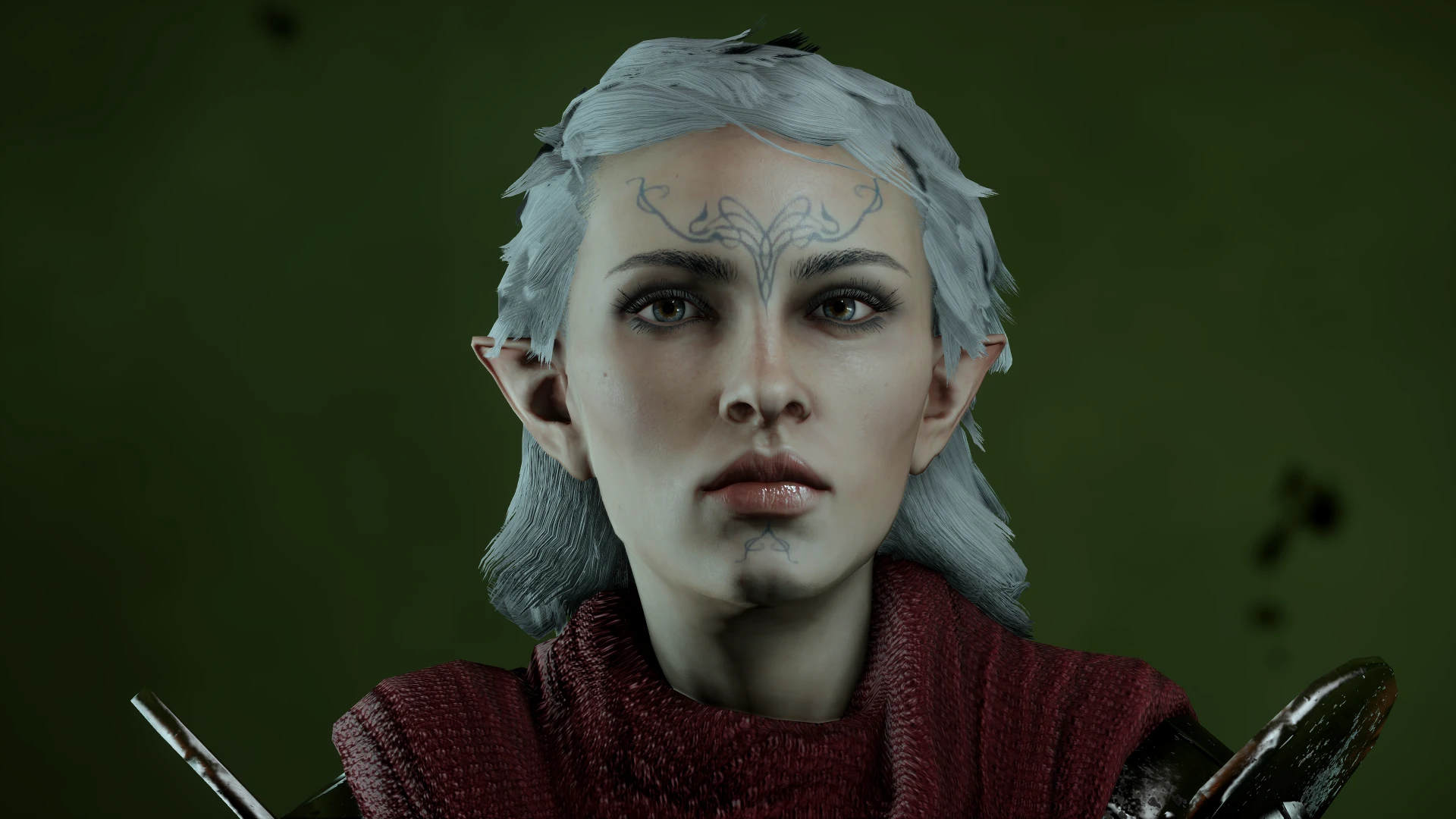
For frosty or da:i mod manager. Makes modded hairstyles show up in DLCs, also beards. Also has option to preview custom hair texture mods as expected in CC & BE now! See description, extra features listed there. A couple of advisor hairs
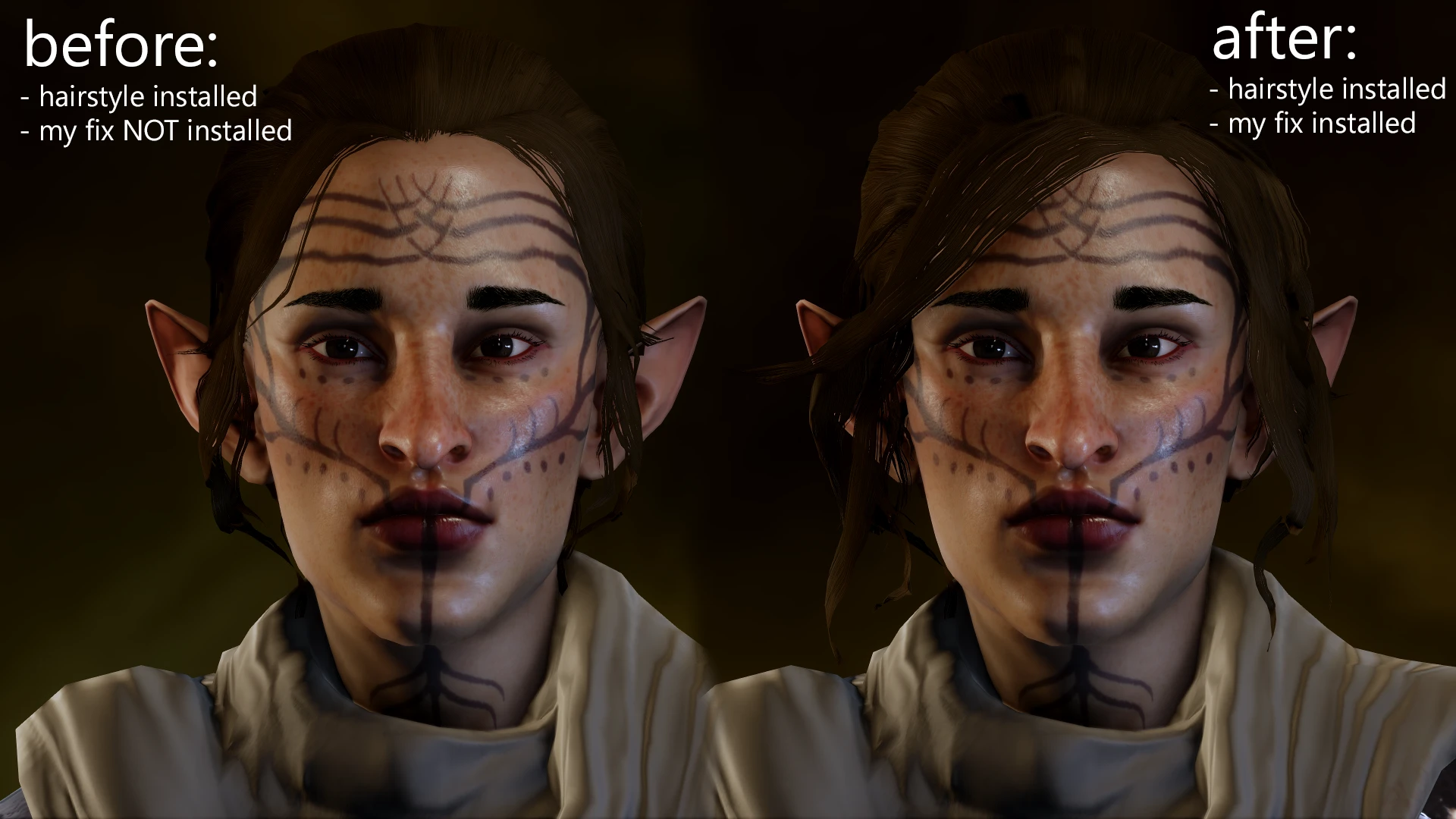
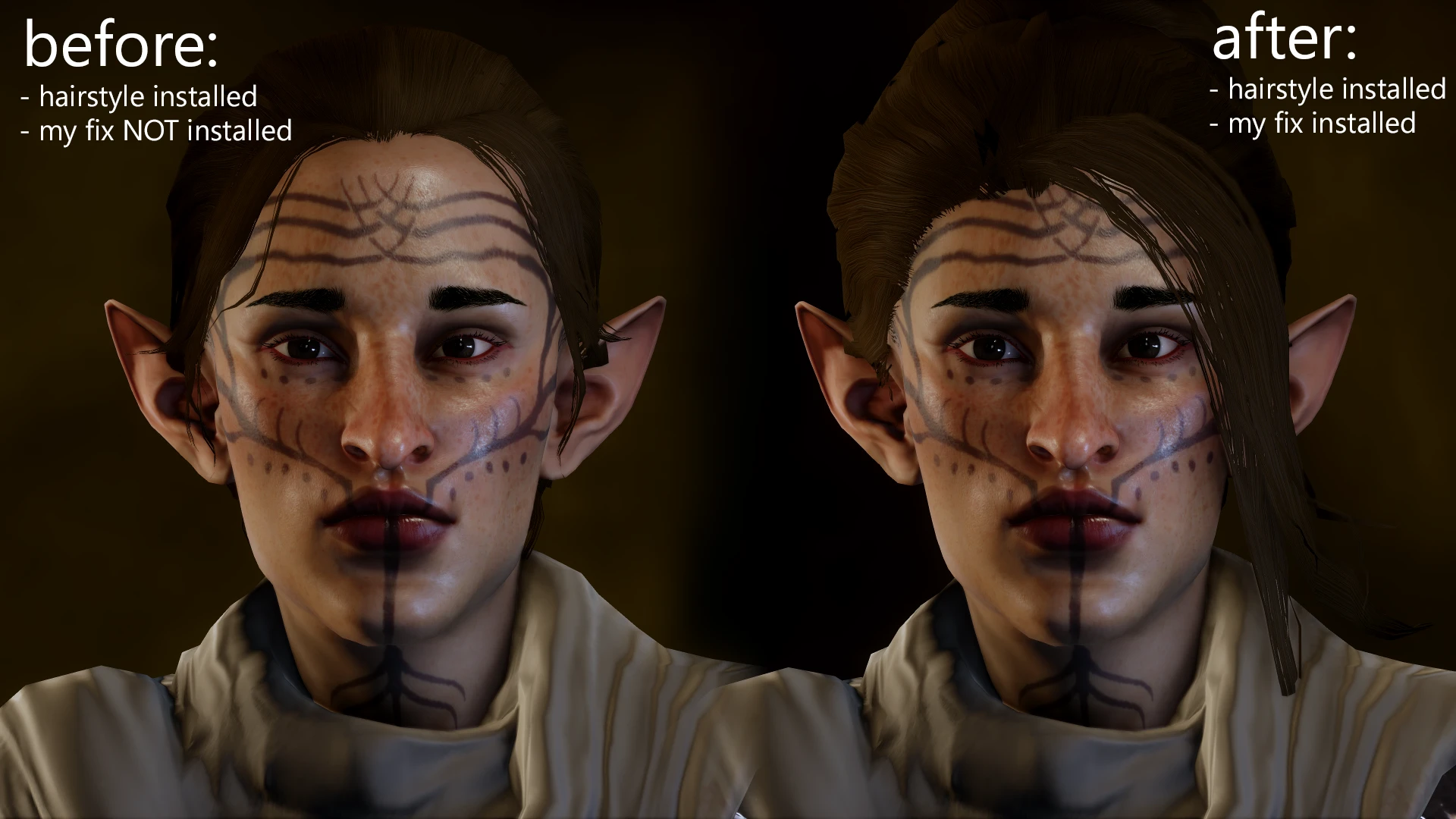
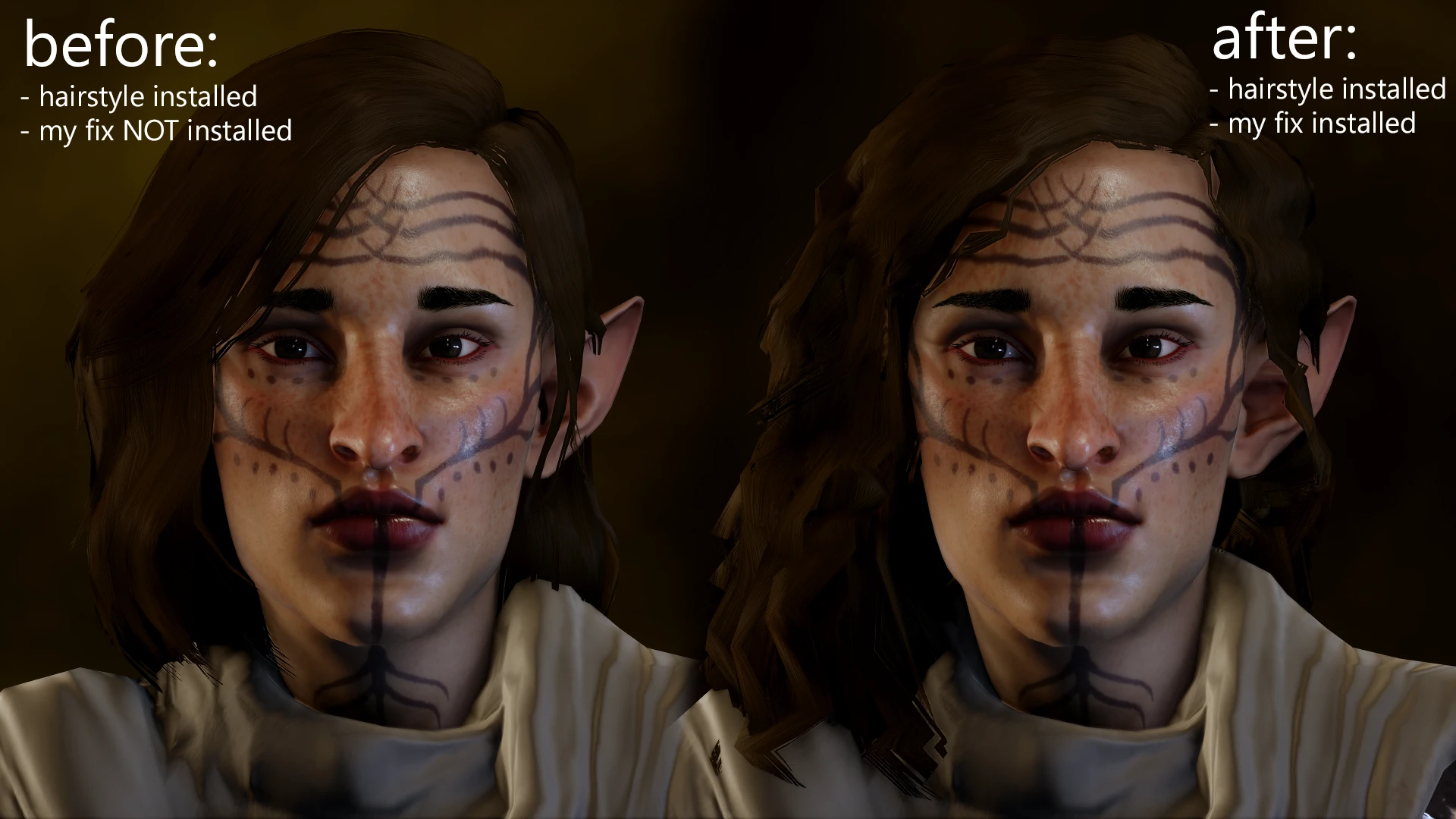
For Frosty or DAI Mod Manager. This mod ensures modded hairstyles appear in the Black Emporium, Trespasser, Jaws of Hakkon, or The Descent, rather than reverting to the unmodded style as many others do. It also works on beards.
**Spleah**also told me that my mod could prevent DAImod face textures from causing freezes in the DLCs when using DAIMM textures, even if you have complexions with edited shine. However, please note that I haven’t added any fixes for .daimod edits to Josephine’s outfits, complexion, or hair, since her files aren't compatible.
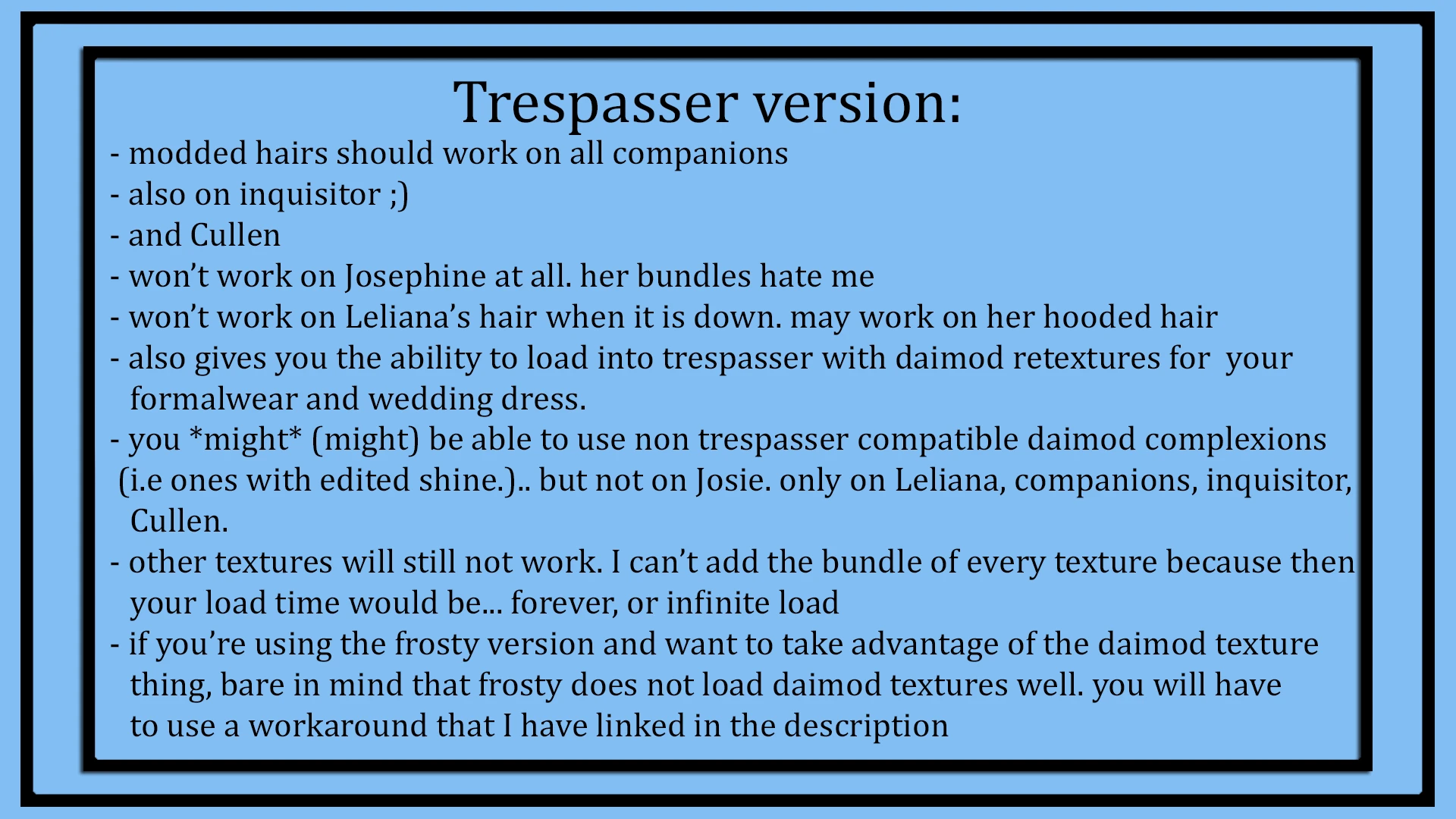
Daimod formalwear and dress textures should now also work in Trespasser. Leliana's unhooded hair and Josie's hair will not work in Trespasser due to their bundles, but Leliana's hooded hair should work (untested). If a file is not noted as fixed in the images, assume this mod does not address that issue. Please refer to the images for a more detailed explanation of what this mod may or may not fix.
This site It can help you understand what the base hairstyles named in the reference image actually look like.
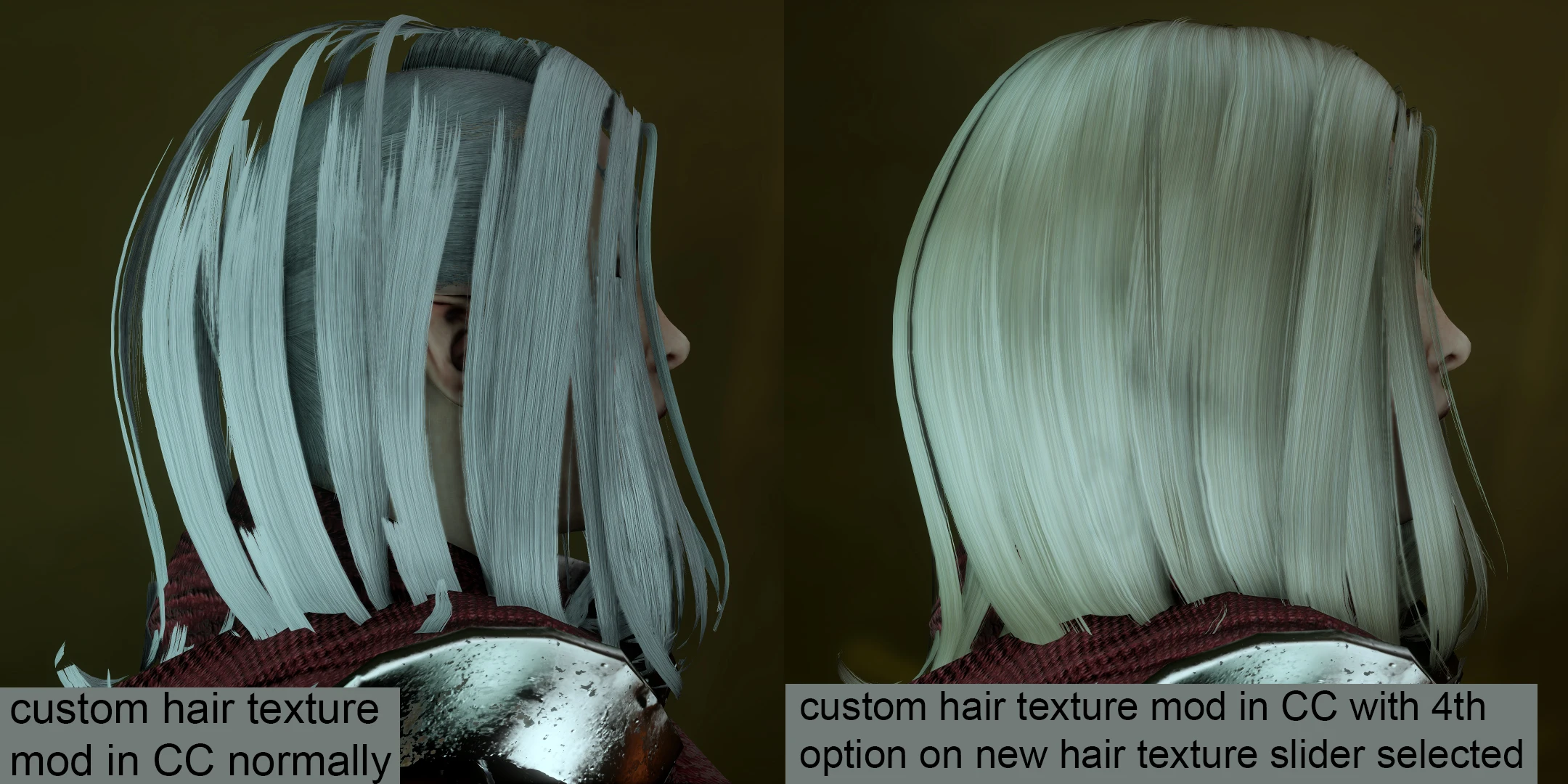
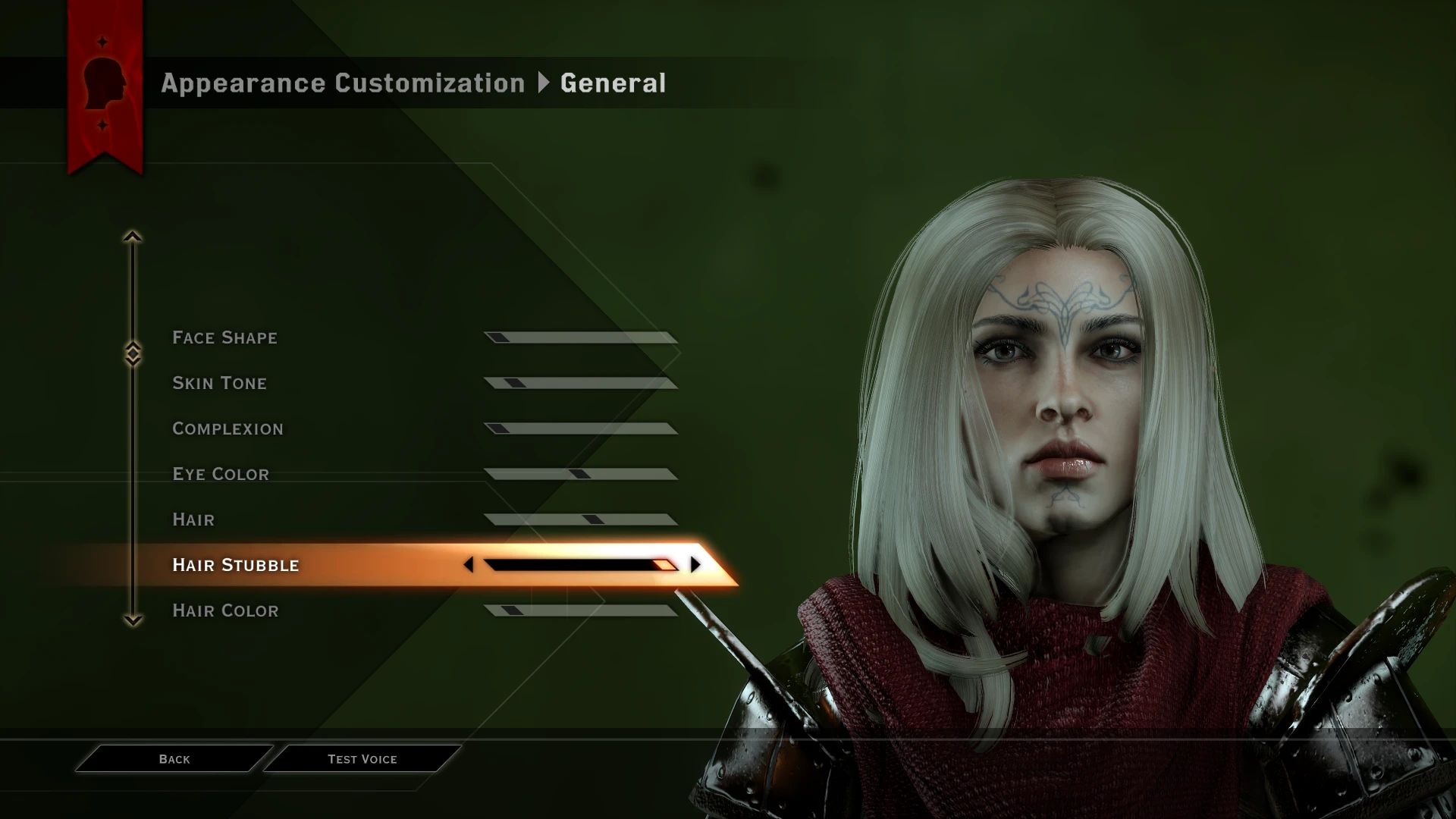
Additionally, the New Hair Texture Slider This file also adds a hair texture slider to character creation. The 4th and final option on this slider lets you preview hairs with custom textures—both in the character creator and the Black Emporium—showing how they will actually appear in-game. This is helpful because not all custom-textured hairs look as intended in the default CC, especially when using mods via Frosty. Misc Hairstyles for Frosty or the misc files from Anto hairstyles for DAI.
The DAI Mod Manager version of that slider file is mainly for adding variety — as far as I know, there aren't any DAI Mod Manager hairs designed in a way that would require the hair texture slider file to display textures correctly in Character Creator. For texture fixes using DAIMM, you'd likely want the DLC fix files instead.
That new file also adds the unused asset hair H to CC for elves, dwarves, and humans — a hairstyle unique to the Inquisitor and not used by any NPCs. The texture slider should work for all Inquisitor types. Additionally, if you load this mod below any Frosty custom hair texture mods, it will prevent them from causing unintended visual issues on other Inquisitor hairstyles that the texture wasn't designed for.
Conflicts
The main DLC fixes are bundle edits, so they may conflict with other mods that edit the same bundles for The Black Emporium, Trespasser, Jaws of Hakkon, or The Descent. This typically applies to mods that swap characters, hair, clothing, and similar assets.
The standard version of the texture slider mod will not conflict with bundle edits, but it will conflict with mods that edit the Inquisitor or Hawke's CharacterBlueprint files, as well as character creation. The main DLC fix files will Not conflict with those files, though.
However, the hair texture slider's ECC compatibility patch version 将会 Conflict with bundle edits to the Black Emporium, as it includes the Black Emporium fix.
The frosty version of the hair texture slider may conflict with certain custom hair texture mods. Don't worry, As long as you load the slider mod BELOW any custom hair texture mods you have, there should be no issues. I did this to prevent Frosty custom hair textures from affecting hairs they weren't designed for.
What this mod doesn't do:
The DLC fixes mod does not introduce any new hairstyles, beards, or textures. The hair H and hair texture slider file. does Add an extra hairstyle and additional hair textures to the CC. It doesn't alter the style of any existing hair or textures—it simply adds content already in the files as new options.
However, for major texture reworks and hairstyle overhauls, you will need to download those from other mods, as this page does not include any.
The DLC fixes, as the name suggests, apply only to the DLCs. If you're experiencing issues with mods in the main campaign, these files will not address those problems, nor will they be the cause of them.
However, the hair texture slider mod does Edit some files from the main campaign, so if you're using that and you experience issues with the main game, please double-check which mod is causing it. If it is this one, please give me details!
I’ve also added tips in the spoiler section of the description under troubleshooting, offering clues on possible reasons and solutions for why a mod might not work properly—whether in the main campaign or a DLC.
**Credits**
Sapphimfor their Super Bundle Finding Tutorial. And a huge thanks for figuring out how to edit character creation, and for letting me include and expand on some of the hair H and texture slider edits from their advanced character generation mod in the hair texture slider mod.
Dark Council EliteFor some of the hairstyles in the previews - Hair links 1 and 2, 3
Kittentailsand Antofor the hairstyle in some of the custom hair texture previews - Hair Mod Link, it's the "Amanda" style
Aileanifor permission to use the same bundle as used in their hair WIP
K**Ittentails**, again, and PadméFor help on which bundle to use
and Kittentails, once again, for letting me make the hair texture slider xD and for showing me some custom texture hair methods! ^^
Electric Fishand Hongmunmufor Bundle Tutorial, & Hongmunmu also for Cullen hair permission
kingslayerfor help with the texture slider
Please let me know if I missed a credit! <3
Possible issues
While adventuring with your companions, if you are using a DLC fix, deshined companion complexions may still not work. depending on the combination of people in your party.
This is something I realized while working on the last update. Given the sheer number of possible party combinations, there’s no way I can guarantee that all of them will work. Consider this a disclaimer. You might not run into these problems at all with the particular party you use, and I think many combinations will work, but be aware it is a possibility. I don't think this is an issue for hair mods however, just complexions with edited shine.
If you run into this issue, consider changing your party members. If you're set on keeping a specific group, try downloading DAImod complexions for them that are advertised as DLC-compatible (usually ones without edited shine/specular maps), or download FBmod versions of their complexions.
TROUBLESHOOTING MASTERLIST
[click the spoiler to reveal a list of solutions to common installation problems]
Modded Hair in DLCs
What this mod doesFor Frosty or DAI Mod Manager. This mod ensures modded hairstyles appear in the Black Emporium, Trespasser, Jaws of Hakkon, or The Descent, rather than reverting to the unmodded style as many others do. It also works on beards.
**Spleah**also told me that my mod could prevent DAImod face textures from causing freezes in the DLCs when using DAIMM textures, even if you have complexions with edited shine. However, please note that I haven’t added any fixes for .daimod edits to Josephine’s outfits, complexion, or hair, since her files aren't compatible.
Daimod formalwear and dress textures should now also work in Trespasser. Leliana's unhooded hair and Josie's hair will not work in Trespasser due to their bundles, but Leliana's hooded hair should work (untested). If a file is not noted as fixed in the images, assume this mod does not address that issue. Please refer to the images for a more detailed explanation of what this mod may or may not fix.
This site It can help you understand what the base hairstyles named in the reference image actually look like.
Additionally, the New Hair Texture Slider This file also adds a hair texture slider to character creation. The 4th and final option on this slider lets you preview hairs with custom textures—both in the character creator and the Black Emporium—showing how they will actually appear in-game. This is helpful because not all custom-textured hairs look as intended in the default CC, especially when using mods via Frosty. Misc Hairstyles for Frosty or the misc files from Anto hairstyles for DAI.
The DAI Mod Manager version of that slider file is mainly for adding variety — as far as I know, there aren't any DAI Mod Manager hairs designed in a way that would require the hair texture slider file to display textures correctly in Character Creator. For texture fixes using DAIMM, you'd likely want the DLC fix files instead.
That new file also adds the unused asset hair H to CC for elves, dwarves, and humans — a hairstyle unique to the Inquisitor and not used by any NPCs. The texture slider should work for all Inquisitor types. Additionally, if you load this mod below any Frosty custom hair texture mods, it will prevent them from causing unintended visual issues on other Inquisitor hairstyles that the texture wasn't designed for.
Conflicts
The main DLC fixes are bundle edits, so they may conflict with other mods that edit the same bundles for The Black Emporium, Trespasser, Jaws of Hakkon, or The Descent. This typically applies to mods that swap characters, hair, clothing, and similar assets.
The standard version of the texture slider mod will not conflict with bundle edits, but it will conflict with mods that edit the Inquisitor or Hawke's CharacterBlueprint files, as well as character creation. The main DLC fix files will Not conflict with those files, though.
However, the hair texture slider's ECC compatibility patch version 将会 Conflict with bundle edits to the Black Emporium, as it includes the Black Emporium fix.
The frosty version of the hair texture slider may conflict with certain custom hair texture mods. Don't worry, As long as you load the slider mod BELOW any custom hair texture mods you have, there should be no issues. I did this to prevent Frosty custom hair textures from affecting hairs they weren't designed for.
What this mod doesn't do:
The DLC fixes mod does not introduce any new hairstyles, beards, or textures. The hair H and hair texture slider file. does Add an extra hairstyle and additional hair textures to the CC. It doesn't alter the style of any existing hair or textures—it simply adds content already in the files as new options.
However, for major texture reworks and hairstyle overhauls, you will need to download those from other mods, as this page does not include any.
The DLC fixes, as the name suggests, apply only to the DLCs. If you're experiencing issues with mods in the main campaign, these files will not address those problems, nor will they be the cause of them.
However, the hair texture slider mod does Edit some files from the main campaign, so if you're using that and you experience issues with the main game, please double-check which mod is causing it. If it is this one, please give me details!
I’ve also added tips in the spoiler section of the description under troubleshooting, offering clues on possible reasons and solutions for why a mod might not work properly—whether in the main campaign or a DLC.
**Credits**
Sapphimfor their Super Bundle Finding Tutorial. And a huge thanks for figuring out how to edit character creation, and for letting me include and expand on some of the hair H and texture slider edits from their advanced character generation mod in the hair texture slider mod.
Dark Council EliteFor some of the hairstyles in the previews - Hair links 1 and 2, 3
Kittentailsand Antofor the hairstyle in some of the custom hair texture previews - Hair Mod Link, it's the "Amanda" style
Aileanifor permission to use the same bundle as used in their hair WIP
K**Ittentails**, again, and PadméFor help on which bundle to use
and Kittentails, once again, for letting me make the hair texture slider xD and for showing me some custom texture hair methods! ^^
Electric Fishand Hongmunmufor Bundle Tutorial, & Hongmunmu also for Cullen hair permission
kingslayerfor help with the texture slider
Please let me know if I missed a credit! <3
Possible issues
While adventuring with your companions, if you are using a DLC fix, deshined companion complexions may still not work. depending on the combination of people in your party.
This is something I realized while working on the last update. Given the sheer number of possible party combinations, there’s no way I can guarantee that all of them will work. Consider this a disclaimer. You might not run into these problems at all with the particular party you use, and I think many combinations will work, but be aware it is a possibility. I don't think this is an issue for hair mods however, just complexions with edited shine.
If you run into this issue, consider changing your party members. If you're set on keeping a specific group, try downloading DAImod complexions for them that are advertised as DLC-compatible (usually ones without edited shine/specular maps), or download FBmod versions of their complexions.
TROUBLESHOOTING MASTERLIST
[click the spoiler to reveal a list of solutions to common installation problems]
**Spoiler:**
If I haven't mentioned something as potentially fixed, you can assume it hasn't been addressed in this mod.
So if you're still having trouble loading into DLC content with this mod enabled, it's best to disable any mods not listed as fixed, as they may be causing the issue. (Keep in mind, if you're experiencing problems in a DLC, it's most likely due to a retexture—most other mods shouldn't cause infinite loading in DLCs unless they were made incorrectly.)
Show
- First and foremost, make sure your mesh settings are set to Ultra
- If you are using Frosty Mod Manager and your game is downloaded from the EA app, you need to use **Frosty Fix**Otherwise, no mods loaded via Frosty Mod Manager will show up in the game at all.
- Make sure your copy of the game is legitimate and that you have the latest update. Otherwise, your mods may not work as expected.
- If you can't unzip the .RAR archive file, try extracting it with PeaZip, which you can download. here. There are 4 download options, but you only need one. Pick the one that matches your operating system and its bit version. Right-click the RAR file you downloaded from my mod page, select PeaZip > "Extract here". This will open the file contents and produce either a .daimod or .fbmod file, depending on the version you downloaded. The mod is now ready to be imported or placed in your mods folder, depending on which mod manager you're using.
- If using Frosty Versions: Make sure there is no `Patch_ModManagerMerge` folder under your `DAI.exe` location's `Update` folder. For many, the directory is:
`C: > Program Files > Origin Games > Dragon Age Inquisition > Update > Patch_ModManagerMerge`.
This folder is generated when merging mods with the DAI Mod Manager. Delete it if you have one.
After this, you will also need to go to C: > Program Files > Origin Games > Dragon Age Inquisition > ModData and delete that folder — it's the one Frosty generates when merging mods. We must also delete the Frosty merged mods folder, as I believe it will still try to reference the Patch_ModManagerMerge folder we just removed, and we don't want that. After that, you can restore your corrected Frosty merged mods ModData folder by re-merging your Frosty mods using the "Launch" button in FMM. - The above probably works in reverse too, though I haven’t tested that theory, but if you’re using— Dear mod manager, Ensure you do not have a ModData folder generated from merging. frosty Mods: the directory is typically C: > Program Files > Origin Games > Dragon Age Inquisition > ModData. Delete it if present.
- If you can't open your saves because they were "created with a higher patch version" or similar, go to C: > Program Files > Origin Games > Dragon Age Inquisition > Update > Patch, find the package.mft file, open it with Notepad, and increase the number in the file until the save loads.
- if you are using Frosty Mod Manager You will have 2 Package.mft files, one in the location mentioned above, and another under C: > Program Files > Origin Games > Dragon Age Inquisition > ModData > Update > Patch. Make sure the patch versions of your original patch and your Frosty patch match.
- Make sure the Origin Games folder, Origin folder, DAI.exe folder, and really any folders associated with DAI are all added as exceptions in your antivirus.
- for Frosty Make sure you hit "Apply Mod" after importing the FBMod(s), and always use the "Launch" button in FMM every time you want to use Frosty Mods in DAI.
- Make sure you don’t have any mod conflicts — that is, mods that edit the same files, including bundle edits. In Frosty Mod Manager, there is a Conflicts tab. If you see nothing listed under "Resources," then you have no conflicts. If you do see something listed under Resources, then you have conflicts. In DAIMM, conflicts will reveal themselves when merging your mods. It will say: "WARNING: X file from this mod has been overridden by X file from this mod."
- For Frosty, make sure you are using FMM v1.0.5.9, the Latest VersionThe version number should be displayed in the top left corner of the mod manager.
- If you're using Frosty, please **DO NOT** load retextures with the .daimod file extension through it. Frosty has issues loading .daimod retextures. Instead, please refer to the tutorial on the second **Post of** this threadby Katarsi, which shows you the proper way to use both mod managers together, so you can still load your .daimod retextures, just through DAI Mod Manager instead.
you don't need to worry about this if the retexture mods you use have the .fbmod file extension instead, though.
If you use the linked workaround, make sure your DAI Mod Manager mods and Frosty Mod Manager mods don’t edit the same files, or you may run into issues. If that happens, simply disable the conflicting mods. - See the "Possible Issues" section of the description for other solutions.
- Make sure You only have one custom hair texture mod installed. At once!
- DLC fixes, as the name suggests, are intended solely to resolve issues within the DLCs. If you are experiencing problems with DLC fix mods outside of the DLCs—for example, in the main campaign—the DLC fix options from this mod will not address those issues, nor will they be the cause of them.
- Continuing from the last point, though not related to or caused by my mod (it's a separate issue), Frosty hair mods have been known to behave oddly, even in the base game if certain DLCs are not installed. However, This should not be an issue for you if you own at least one of the DLCs I've provided fixes for on this page. (which you clearly do, since you're here.)
You only need one of those DLCs installed to fix that issue. While this isn't a problem with my mod, I thought I’d clarify it anyway, since some people thought loading my mod could resolve that specific issue. That’s not the case, but it’s an issue easily fixed by downloading at least one of the free DLCs—for example, The Black Emporium or one of the multiplayer DLCs.
If I haven't mentioned something as potentially fixed, you can assume it hasn't been addressed in this mod.
So if you're still having trouble loading into DLC content with this mod enabled, it's best to disable any mods not listed as fixed, as they may be causing the issue. (Keep in mind, if you're experiencing problems in a DLC, it's most likely due to a retexture—most other mods shouldn't cause infinite loading in DLCs unless they were made incorrectly.)
This tool is provided by the third party [bufftool]

Download Mods For Free
Install LagoFast, start Dragon Age Inquisition and play with the mods you love.
We use cookies to make interactions with our websites andservices easy and meaningful. For more information aboutthe cookies we use or to find out how you can disable cookies, click here.